







Question: Use Visual Basic. Name all controls and follow guidelines .. Hotel Occupancy The Hotel has 8 Floors and 30 rooms on each floor. Create an
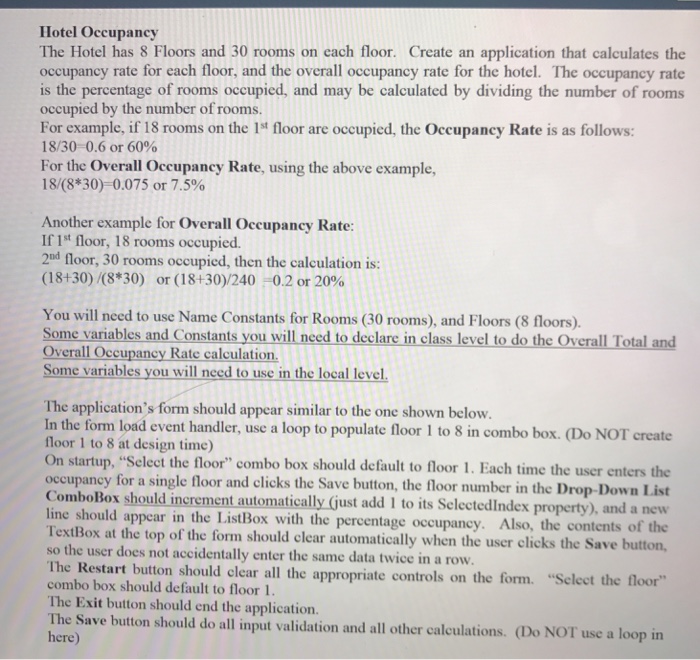
Hotel Occupancy The Hotel has 8 Floors and 30 rooms on each floor. Create an application that calculates the occupancy rate for each floor, and the overall occupancy rate for the hotel. The occupancy rate is the percentage of rooms occupied, and may be calculated by dividing the number of rooms occupied by the number of rooms. For example, if 18 rooms on the 1st floor are occupied, the Occupancy Rate is as follows: 18/30-0.6 or 60% For the Overall Occupancy Rate, using the above example, 18(8*30)- 0.075 or 7.5% Another example for Overall Occupancy Rate: If 1t floor, 18 rooms occupicsd. 2nd floor, 30 rooms occupied, then the calculation i (18430)/(8*30) or ( 18 +30)/240-02 or 20% You will need to use Name Constants for Rooms (30 rooms), and Floors (8 floors) Some variables and Constants you will need to declare in class level to do the Overall Total and Overall Occupancy Rate calculation. Some variables you will need to use in the local level The application's form should appear similar to the one shown below. In the form load event handler, use a loop to populate floor 1 to 8 in combo box. (Do NOT create floor 1 to 8 at design time) On startup, "Select the floor" combo box should default to floor 1. Each time the user enters the occupancy for a single floor and clicks the Save button, the floor number in the Drop-Down List ComboBox should increment automatically (just add I to its SelectedIndex property), and a new line should appear in the ListBox with the percentage occupancy. TextBox at the top of the form should clear automatically when the user clicks the Save button, so the user does not accidentally enter the same data twice in a row Also, the contents of the The Restart button should clear all the appropriate controls on the form. "Sclect the floor" combo box should default to floor l The Exit button should end the application. The Save button should do all input validation and all other calculations. (Do NOT use a loop in here) Hotel Occupancy The Hotel has 8 Floors and 30 rooms on each floor. Create an application that calculates the occupancy rate for each floor, and the overall occupancy rate for the hotel. The occupancy rate is the percentage of rooms occupied, and may be calculated by dividing the number of rooms occupied by the number of rooms. For example, if 18 rooms on the 1st floor are occupied, the Occupancy Rate is as follows: 18/30-0.6 or 60% For the Overall Occupancy Rate, using the above example, 18(8*30)- 0.075 or 7.5% Another example for Overall Occupancy Rate: If 1t floor, 18 rooms occupicsd. 2nd floor, 30 rooms occupied, then the calculation i (18430)/(8*30) or ( 18 +30)/240-02 or 20% You will need to use Name Constants for Rooms (30 rooms), and Floors (8 floors) Some variables and Constants you will need to declare in class level to do the Overall Total and Overall Occupancy Rate calculation. Some variables you will need to use in the local level The application's form should appear similar to the one shown below. In the form load event handler, use a loop to populate floor 1 to 8 in combo box. (Do NOT create floor 1 to 8 at design time) On startup, "Select the floor" combo box should default to floor 1. Each time the user enters the occupancy for a single floor and clicks the Save button, the floor number in the Drop-Down List ComboBox should increment automatically (just add I to its SelectedIndex property), and a new line should appear in the ListBox with the percentage occupancy. TextBox at the top of the form should clear automatically when the user clicks the Save button, so the user does not accidentally enter the same data twice in a row Also, the contents of the The Restart button should clear all the appropriate controls on the form. "Sclect the floor" combo box should default to floor l The Exit button should end the application. The Save button should do all input validation and all other calculations. (Do NOT use a loop in here)
Step by Step Solution
There are 3 Steps involved in it

Get step-by-step solutions from verified subject matter experts
 Study Help