







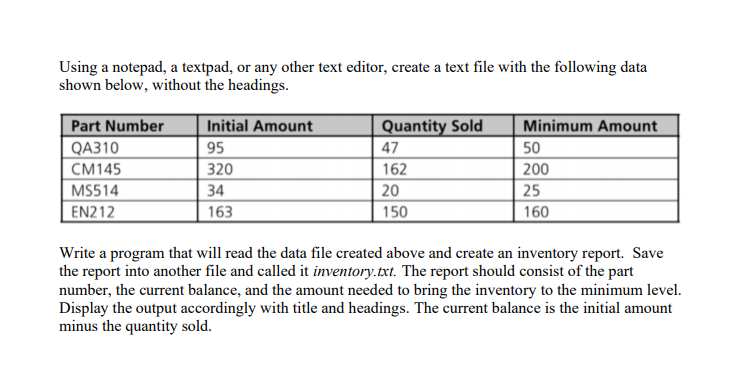
Question: Using a notepad, a textpad, or any other text editor, create a text file with the following data shown below, without the headings. table
Using a notepad, a textpad, or any other text editor, create a text file with the following data shown below, without the headings.
tablePart Number,Initial Amount,Quantity Sold,Minimum AmountQACMMSEN
Write a program that will read the data file created above and create an inventory report. Save the report into another file and called it inventory.txt The report should consist of the part number, the current balance, and the amount needed to bring the inventory to the minimum level. Display the output accordingly with title and headings. The current balance is the initial amount minus the quantity sold.
Step by Step Solution
There are 3 Steps involved in it
1 Expert Approved Answer
Step: 1 Unlock

Question Has Been Solved by an Expert!
Get step-by-step solutions from verified subject matter experts
Step: 2 Unlock
Step: 3 Unlock
 Study Help