







Question: using a wed drowser, go to quo.intuit.com Enter User ID ( the email address you used to set up your QBO Account ) > Sign
using a wed drowser, go to
quo.intuit.com
Enter User ID the email address you used to set up your QBO Account Sign In
Enter Password the password you used to set up your QBO Account
Select Continue
If Let's 'verify your number appears, select Skip for now
When Select Company appears, select LastNameFirstInitial Mookie The Beagle Concierge
Reference to Section
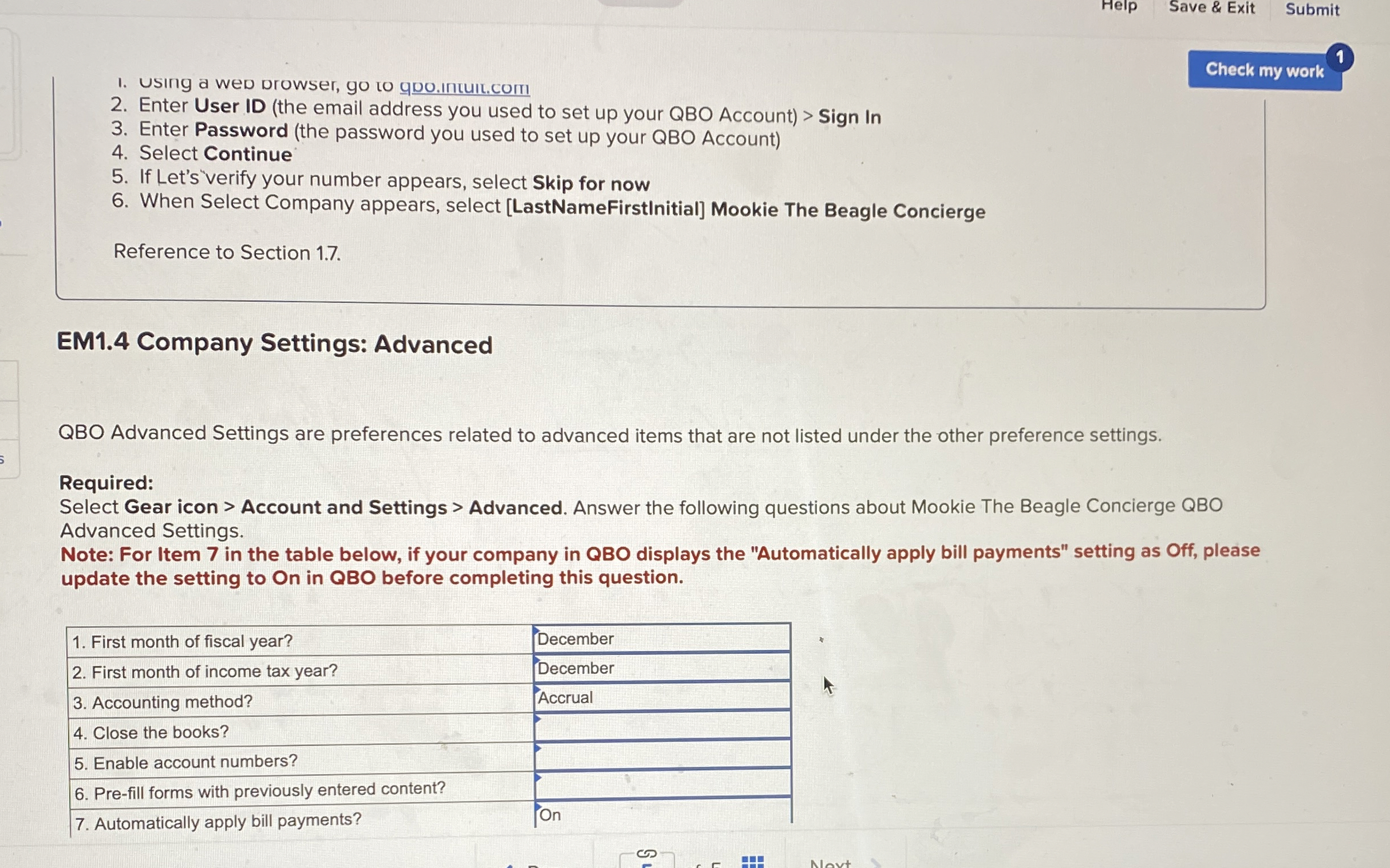
EM Company Settings: Advanced
QBO Advanced Settings are preferences related to advanced items that are not listed under the other preference settings.
Required:
Select Gear icon Account and Settings Advanced. Answer the following questions about Mookie The Beagle Concierge QBO
Advanced Settings.
Note: For Item in the table below, if your company in QBO displays the "Automatically apply bill payments" setting as Off, please
update the setting to On in QBO before completing this question.
Step by Step Solution
There are 3 Steps involved in it
1 Expert Approved Answer
Step: 1 Unlock

Question Has Been Solved by an Expert!
Get step-by-step solutions from verified subject matter experts
Step: 2 Unlock
Step: 3 Unlock
 Study Help