







Question: using android studio 2. Part B, A1B (20 marks) * This part is based on the Practicing Labs 1, 2, 3. Refer to the lab
using android studio
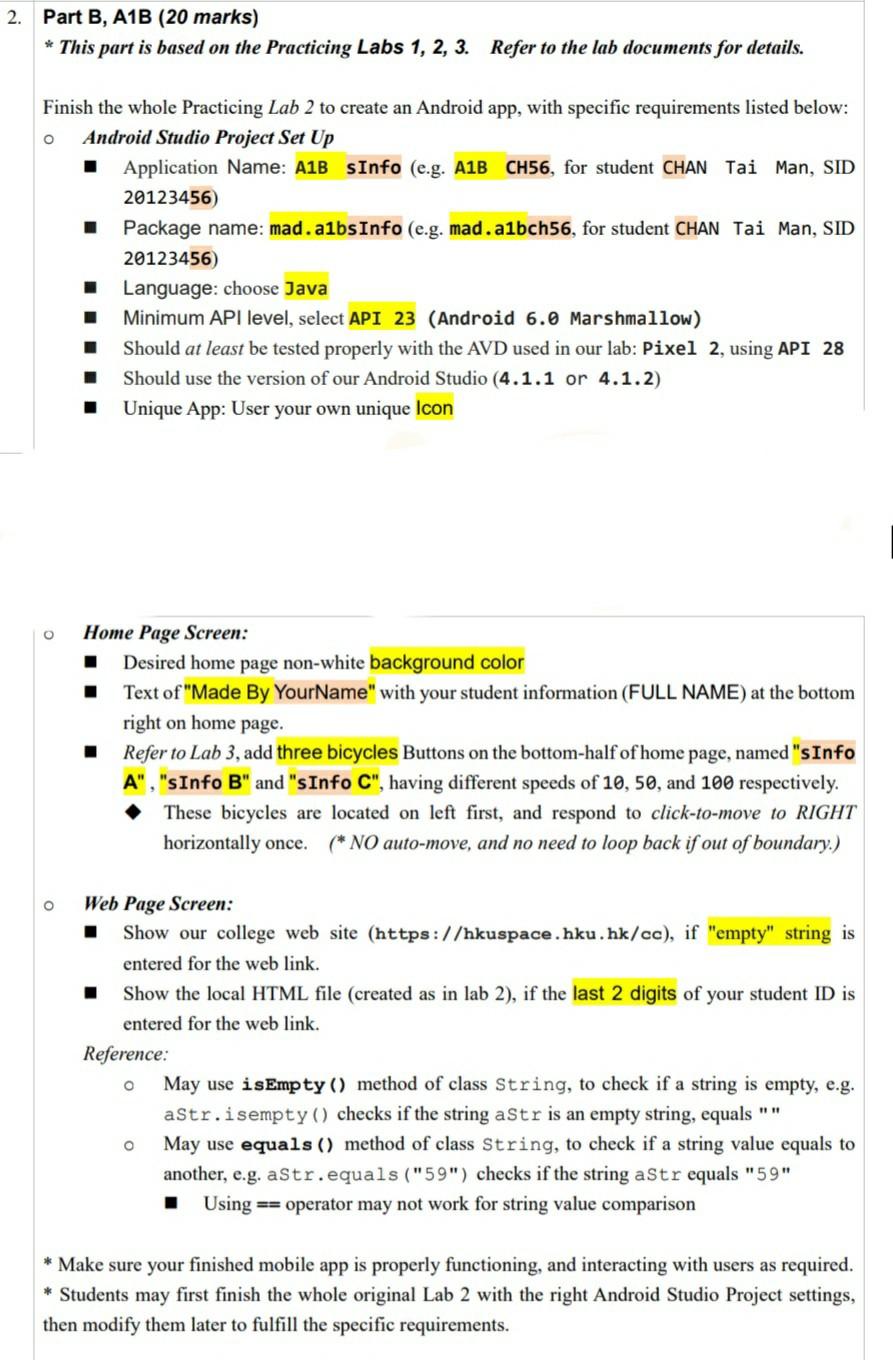
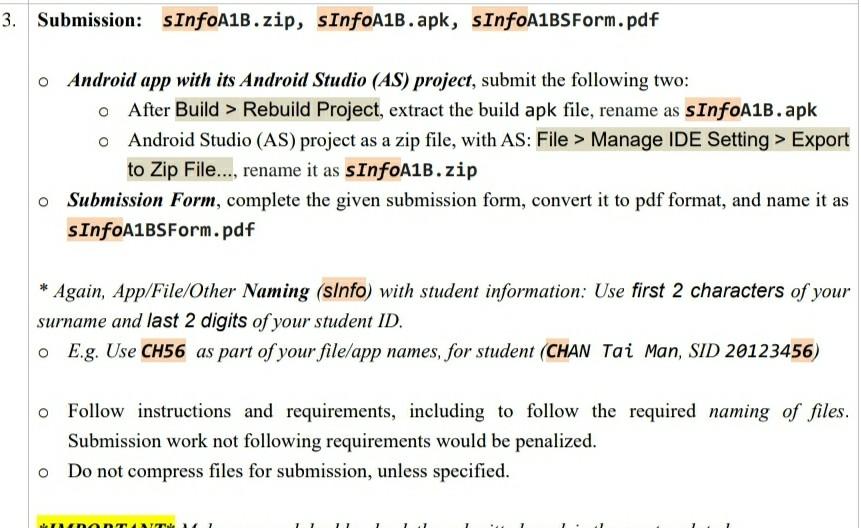
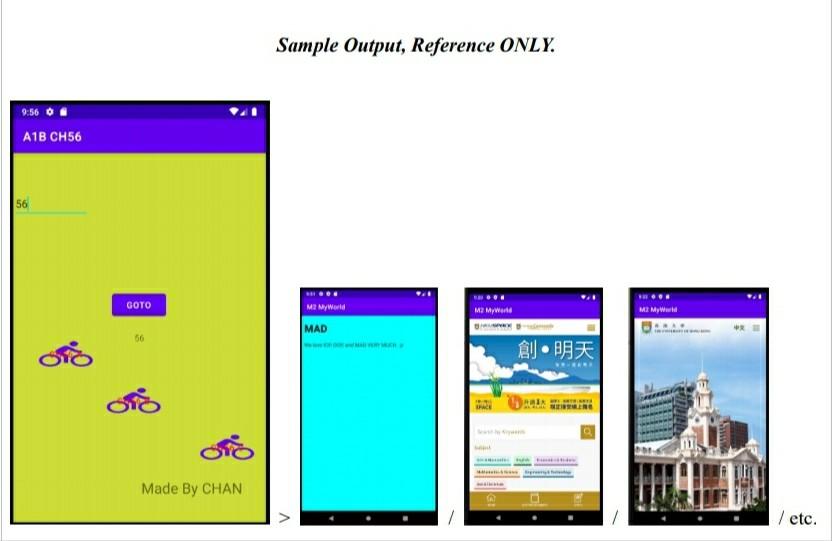
2. Part B, A1B (20 marks) * This part is based on the Practicing Labs 1, 2, 3. Refer to the lab documents for details. Finish the whole Practicing Lab 2 to create an Android app, with specific requirements listed below: Android Studio Project Set Up Application Name: A1B SInfo (e.g. A1B CH56, for student CHAN Tai Man, SID 20123456 Package name: mad.albs Info (e.g. mad.albch56, for student CHAN Tai Man, SID 20123456) Language: choose Java Minimum API level, select API 23 (Android 6.0 Marshmallow) Should at least be tested properly with the AVD used in our lab: Pixel 2, using API 28 Should use the version of our Android Studio (4.1.1 or 4.1.2) Unique App: User your own unique Icon 1 . Home Page Screen: Desired home page non-white background color Text of "Made By YourName" with your student information (FULL NAME) at the bottom right on home page. Refer to Lab 3, add three bicycles Buttons on the bottom-half of home page, named "sInfo A", "sInfo B" and "sInfo C", having different speeds of 10, 50, and 100 respectively. These bicycles are located on left first, and respond to click-to-move to RIGHT horizontally once. (* NO auto-move, and no need to loop back if out of boundary.) O Web Page Screen: 1 Show our college web site (https://hkuspace.hku.hk/cc), if "empty" string is entered for the web link. Show the local HTML file (created as in lab 2), if the last 2 digits of your student ID is entered for the web link. Reference: May use isEmpty() method of class String, to check if a string is empty, e.g. aStr.isempty() checks if the string aStr is an empty string, equals "" o May use equals() method of class String, to check if a string value equals to another, e.g. aStr.equals("59") checks if the string aStr equals "59" Using == operator may not work for string value comparison * Make sure your finished mobile app is properly functioning, and interacting with users as required. * Students may first finish the whole original Lab 2 with the right Android Studio Project settings, then modify them later to fulfill the specific requirements. 3. Submission: SInfoA1B.zip, sInfoA1B.apk, sInfoA1BSForm.pdf o Android app with its Android Studio (AS) project, submit the following two: o After Build > Rebuild Project, extract the build apk file, rename as sInfoA1B.apk Android Studio (AS) project as a zip file, with AS: File > Manage IDE Setting > Export to Zip File..., rename it as sInfoA1B.zip Submission Form, complete the given submission form, convert it to pdf format, and name it as sInfoA1BSForm.pdf Again, App/File/Other Naming (sInfo) with student information: Use first 2 characters of your surname and last 2 digits of your student ID. o E.g. Use CH56 as part of your file/app names, for student (CHAN Tai Man, SID 20123456) Follow instructions and requirements, including to follow the required naming of files. Submission work not following requirements would be penalized. Do not compress files for submission, unless specified. Sample Output, Reference ONLY. 8:56 A1B CH56 GOTO ME MYWd MAD 66 TERE Made By CHAN > / etc. 2. Part B, A1B (20 marks) * This part is based on the Practicing Labs 1, 2, 3. Refer to the lab documents for details. Finish the whole Practicing Lab 2 to create an Android app, with specific requirements listed below: Android Studio Project Set Up Application Name: A1B SInfo (e.g. A1B CH56, for student CHAN Tai Man, SID 20123456 Package name: mad.albs Info (e.g. mad.albch56, for student CHAN Tai Man, SID 20123456) Language: choose Java Minimum API level, select API 23 (Android 6.0 Marshmallow) Should at least be tested properly with the AVD used in our lab: Pixel 2, using API 28 Should use the version of our Android Studio (4.1.1 or 4.1.2) Unique App: User your own unique Icon 1 . Home Page Screen: Desired home page non-white background color Text of "Made By YourName" with your student information (FULL NAME) at the bottom right on home page. Refer to Lab 3, add three bicycles Buttons on the bottom-half of home page, named "sInfo A", "sInfo B" and "sInfo C", having different speeds of 10, 50, and 100 respectively. These bicycles are located on left first, and respond to click-to-move to RIGHT horizontally once. (* NO auto-move, and no need to loop back if out of boundary.) O Web Page Screen: 1 Show our college web site (https://hkuspace.hku.hk/cc), if "empty" string is entered for the web link. Show the local HTML file (created as in lab 2), if the last 2 digits of your student ID is entered for the web link. Reference: May use isEmpty() method of class String, to check if a string is empty, e.g. aStr.isempty() checks if the string aStr is an empty string, equals "" o May use equals() method of class String, to check if a string value equals to another, e.g. aStr.equals("59") checks if the string aStr equals "59" Using == operator may not work for string value comparison * Make sure your finished mobile app is properly functioning, and interacting with users as required. * Students may first finish the whole original Lab 2 with the right Android Studio Project settings, then modify them later to fulfill the specific requirements. 3. Submission: SInfoA1B.zip, sInfoA1B.apk, sInfoA1BSForm.pdf o Android app with its Android Studio (AS) project, submit the following two: o After Build > Rebuild Project, extract the build apk file, rename as sInfoA1B.apk Android Studio (AS) project as a zip file, with AS: File > Manage IDE Setting > Export to Zip File..., rename it as sInfoA1B.zip Submission Form, complete the given submission form, convert it to pdf format, and name it as sInfoA1BSForm.pdf Again, App/File/Other Naming (sInfo) with student information: Use first 2 characters of your surname and last 2 digits of your student ID. o E.g. Use CH56 as part of your file/app names, for student (CHAN Tai Man, SID 20123456) Follow instructions and requirements, including to follow the required naming of files. Submission work not following requirements would be penalized. Do not compress files for submission, unless specified. Sample Output, Reference ONLY. 8:56 A1B CH56 GOTO ME MYWd MAD 66 TERE Made By CHAN > / etc
Step by Step Solution
There are 3 Steps involved in it

Get step-by-step solutions from verified subject matter experts
 Study Help