







Question: Using Android Studio: 5. Create a project called MealRater. The activity layout should contain two Edit Texts, one button, and four TextViews (Figure 4.14). Resturant
Using Android Studio: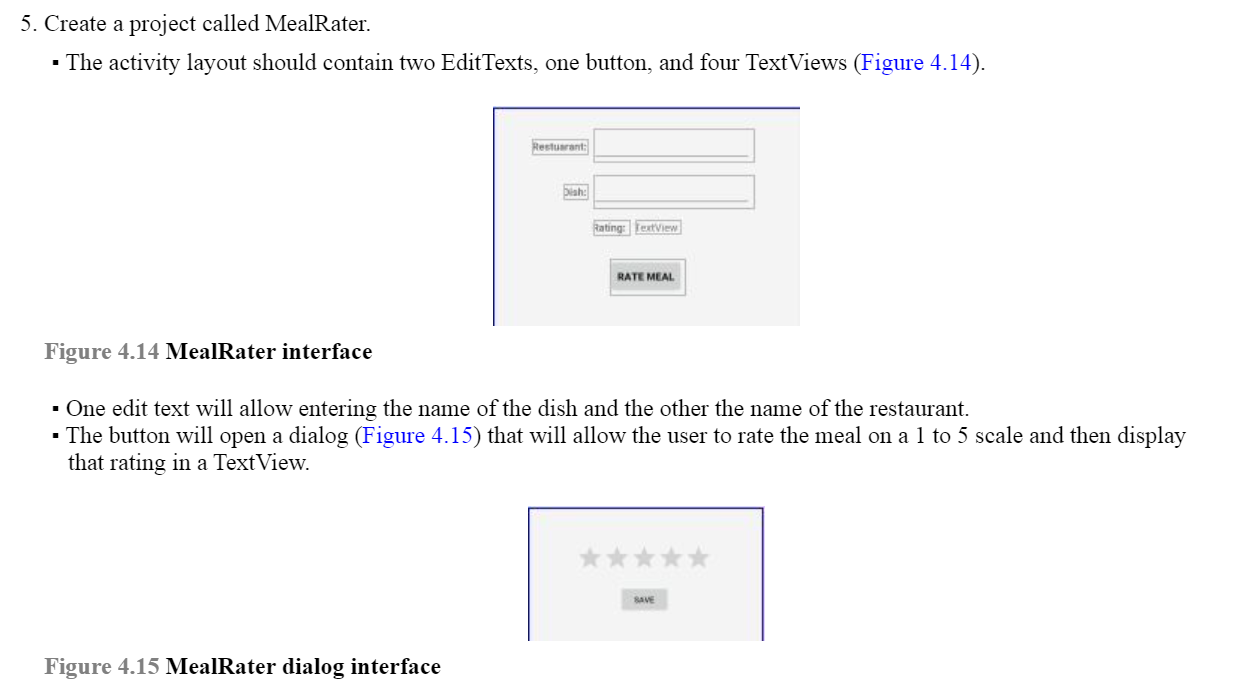
5. Create a project called MealRater. The activity layout should contain two Edit Texts, one button, and four TextViews (Figure 4.14). Resturant bah: Rating: TextView RATE MEAL Figure 4.14 MealRater interface One edit text will allow entering the name of the dish and the other the name of the restaurant. The button will open a dialog (Figure 4.15) that will allow the user to rate the meal on a 1 to 5 scale and then display that rating in a TextView. SAVE Figure 4.15 MealRater dialog interface
Step by Step Solution
There are 3 Steps involved in it
1 Expert Approved Answer
Step: 1 Unlock

Question Has Been Solved by an Expert!
Get step-by-step solutions from verified subject matter experts
Step: 2 Unlock
Step: 3 Unlock
 Study Help