







Question: - Using Android Studio and Kotlin, you are to write a color finder program for Android. The screen should look something like this. - Use
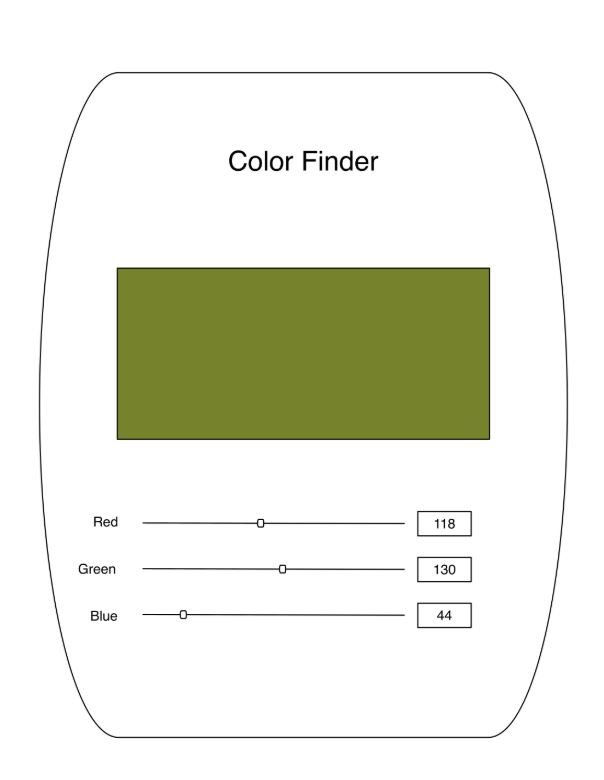
- Using Android Studio and Kotlin, you are to write a color finder program for Android. The screen should look something like this. - Use a SeekBar/TextView combination for each color component (red, green, and blue) where the component's value is shown in the corresponding TextView and changes as the matching SeekBar is moved. In addition, the App should have an area (For example, a Surface View or a Canvas) that shows the resulting color which is displayed dynamically as the SeekBars change. Color Finder Red 118 Green 130 Blue - Using Android Studio and Kotlin, you are to write a color finder program for Android. The screen should look something like this. - Use a SeekBar/TextView combination for each color component (red, green, and blue) where the component's value is shown in the corresponding TextView and changes as the matching SeekBar is moved. In addition, the App should have an area (For example, a Surface View or a Canvas) that shows the resulting color which is displayed dynamically as the SeekBars change. Color Finder Red 118 Green 130 Blue
Step by Step Solution
There are 3 Steps involved in it

Get step-by-step solutions from verified subject matter experts
 Study Help