







Question: Write in Kotlin. Building a Temperature Converter Android Application using Android Studio Your assignment is to create a Temperature Conversion app as described below. App
Write in Kotlin.
Building a Temperature Converter Android Application using Android Studio
Your assignment is to create a Temperature Conversion app as described below.
App Requirements
The app should allow the user to select either Fahrenheit-to-Celsius or Celsius-to-Fahrenheit conversions. No other conversion selections should be allowed, and one conversion must be selected at any given time (no situation where no conversion is selected).
Your Activity must use a Constraint Layout
Use the following formulae for conversion:
o T(C) = (T(F) 32.0) 5.0/9.0
o T(F) = (T(C) 9.0/5.0) + 32.0
The initial temperature value should be entered by the user.
Pressing a Convert button should calculate the converted temperature value and display it on the screen. Converted values should be displayed out to 1 decimal place only.
The conversion operation, value, and calculated results are added to the history:
o Example:
F to C: 55.0 12.8
C to F: 3.5 38.3
The app must look and act consistently in either portrait or landscape orientation.
Concepts and practices discussed in class must be followed.
The below is an example of how the app might look. Note, you do NOT need to make yours look like this. You are free to use your own creativity in designing the UI for this app. The only requirement is that all the content mentioned above should be present in the app. 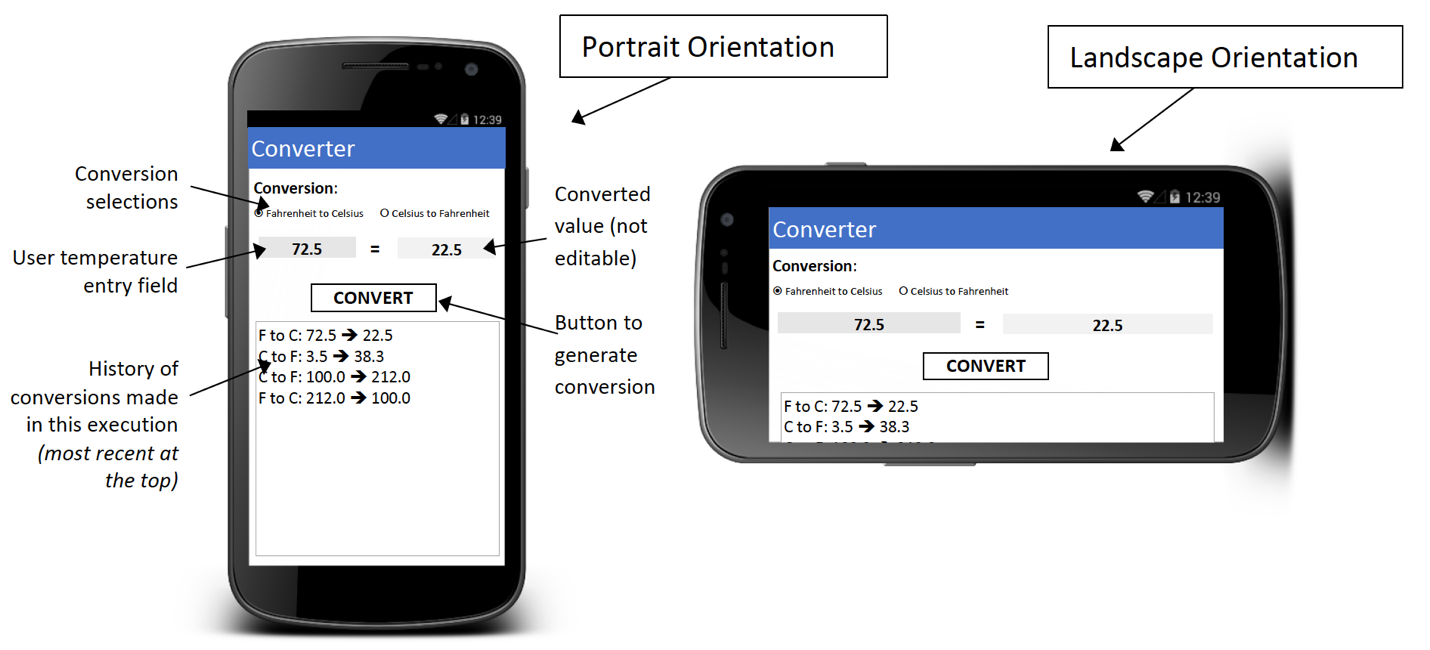
Submissions & Grading
Submissions must consist of your zipped project folder (please execute Build =>Clean Project before generating the zip file). Submissions not following these requirements will be penalized.
Create a Demonstration of your project and make a video of that demo and submit the video or the link to the video with the project zipped folder.
Submissions should reflect the concepts and practices we cover in class.
Late submissions will be penalized by 10% per week late. (i.e., from one second late to 1 week late: 10% penalty, from one week plus one second late to 2 weeks late: 20% penalty, etc.).
The following are the key points that will be examined in Project when graded:
o 30% UI Design and Appearance
Looks & works properly in both Portrait and Landscape orientation)
Proper use of constraint layout
Conversion selection work properly (one is always selected)
Overall appearance is clean and professional
o 20% Input operation
User data entry works properly
o 20% Conversion & Results Display
Converted value is correct
Converted value is displayed properly (1 decimal digit)
o 30% Conversion History
Conversions appear in the history
Most recent conversions are at the top of the history
When many conversions are present, history is scrollable
Step by Step Solution
There are 3 Steps involved in it

Get step-by-step solutions from verified subject matter experts
 Study Help