







Question: Using Android Studio, you need to create Intents and activate them with activities. You will use both explicit and implicit Intents. The Main activity will
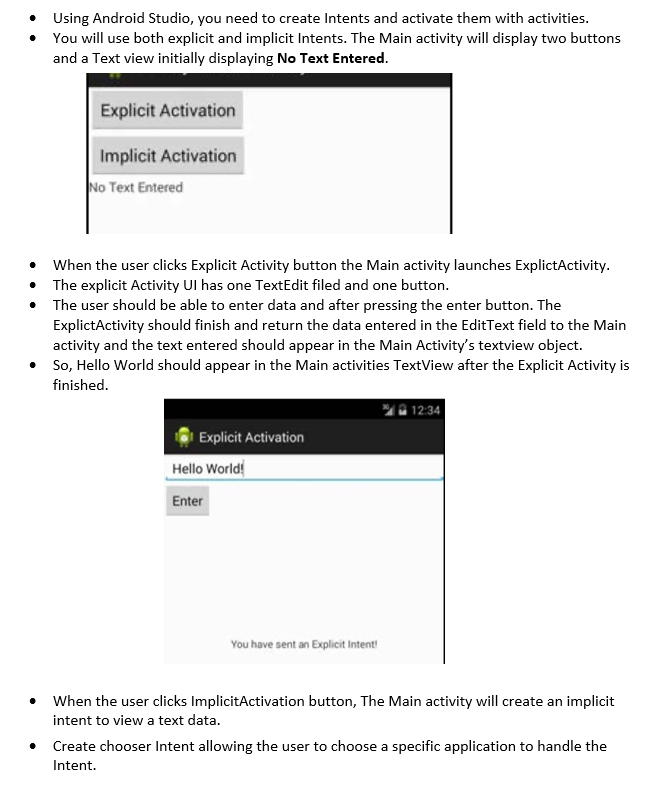
Using Android Studio, you need to create Intents and activate them with activities. You will use both explicit and implicit Intents. The Main activity will display two buttons and a Text view initially displaying No Text Entered. Explicit Activation Implicit Activation No Text Entered . When the user clicks Explicit Activity button the Main activity launches ExplictActivity. The explicit Activity Ul has one TextEdit filed and one button. The user should be able to enter data and after pressing the enter button. The ExplictActivity should finish and return the data entered in the Edit Text field to the Main activity and the text entered should appear in the Main Activity's textview object. So, Hello World should appear in the Main activities TextView after the Explicit Activity is finished. 12:34 Explicit Activation Hello World! Enter You have sent an Explicit Intent! When the user clicks ImplicitActivation button, The Main activity will create an implicit intent to view a text data. Create chooser Intent allowing the user to choose a specific application to handle the Intent
Step by Step Solution
There are 3 Steps involved in it

Get step-by-step solutions from verified subject matter experts
 Study Help