







Question: Using Android Studio)Suppose you are designing a login activity for your android app. The android app has two activity (LoginActiviy, NewActivity). Write only the Java
Using Android Studio)Suppose you are designing a login activity for your android app. The android app has two activity (LoginActiviy, NewActivity). Write only the Java Code here for LoginActivity. The login activity is show in the following figure
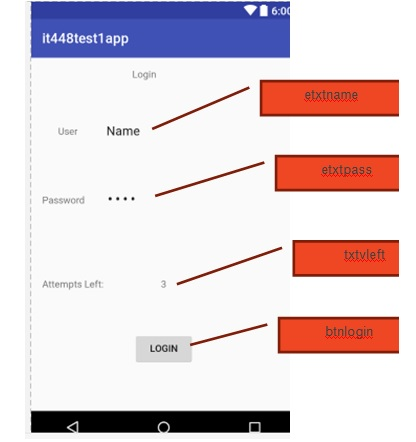
The user name will be admin and password admin. The user has only 3 attempts to try to login, for each wrong trail the number of attempts left will be decremented by one. Once the attempts left is zero the login button should be disabled.
If the user enters the user name and password correctly and press login, A new activity NewActivity should be opened using intent.
it448testlapp Login User Name Password Attempts Left LOGIN 6:00 etxtname etxt pass
Step by Step Solution
There are 3 Steps involved in it

Get step-by-step solutions from verified subject matter experts
 Study Help