







Question: Using BlueJ Generate the graphic output shown at right, on a 600x600 DrawingPanel. Use a black background. Alter the line color to suit your taste.
Using BlueJ
Generate the graphic output shown at right, on a 600x600 DrawingPanel. Use a black background. Alter the line color to suit your taste. Set the increment between lines to something pleasing to the eye; it does not need to match the sample.
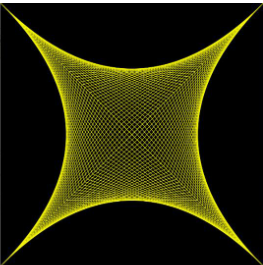
Create and use constants for the drawing panel size and line count per curved portion. Create additional constants if they help make the code more readable. Only one single loop should be used to draw the figure.
What You May Use: Constants and variables; use the requested naming convention and declare them at the appropriate scope (i.e., use no global variables unless unavoidable, but global constants where they make sense). Definite loops. Drawing panel and graphics objects. Math methods like Math.round, plus trigonometry methods like Math.cos if you would like.
What You May Not Use: Selection control structures. That means no if statements, switch statements, or ternary operators.
Step by Step Solution
There are 3 Steps involved in it

Get step-by-step solutions from verified subject matter experts
 Study Help