







Question: Using C programming and UNIX/Linux terminal. PLEASE DON'T FORGET TO EXPLAIN THE LAST PART! /* String constants Illustrates: string constants, pointers to strings, and array
Using C programming and UNIX/Linux terminal.
PLEASE DON'T FORGET TO EXPLAIN THE LAST PART!
/* String constants Illustrates: string constants, pointers to strings, and array of chars */
#include
int main() { char *a = "I am a constant"; // a pointer initialized to point to // a string constant; value of a can // be changed; content of string cannot // be changed char b[] = "Hello"; // an array of characters (i.e. a string) // initialized to "Hello"; value of // b cannot be changed; content of // string can be changed // since dimension is not given, string // is made just big enough to contain // all the specified characters char c[] = {'H', 'e', 'l', 'l', 'o', '\0'}; // equivalent to definition of b printf("%s %s %s ",a, b, c); return 0; }
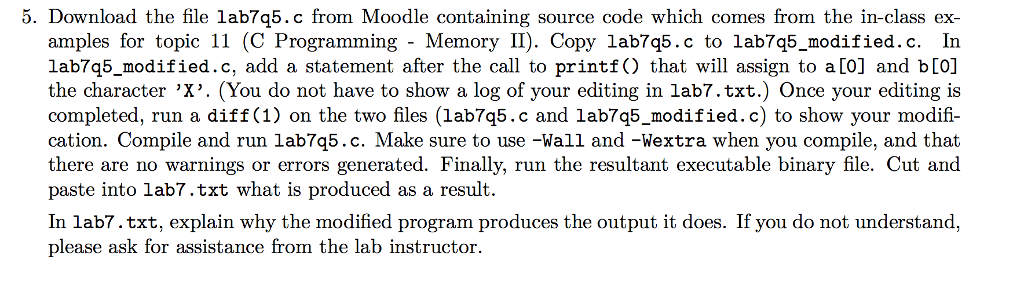
5. Download the file lab7q5.c from Moodle containing source code which comes from the in-class ex- amples for topic 11 (C Programming - Memory II). Copy lab7q5.c to lab7q5 modified.c. In lab7q5_modified.c, add a statement after the call to printf) that will assign to a[0] and b[O] the character 'X'. (You do not have to show a log of your editing in lab7.txt.) Once your editing is completed, run a diff (1) on the two files (lab7q5.c and lab7q5_modified.c) to show your modifi- cation. Compile and run lab7q5.c. Make sure to use -Wall and -Wextra when you compile, and that there are no warnings or errors generated. Finally, run the resultant executable binary file. Cut and paste into lab7.txt what is produced as a result. In lab7.txt, explain why the modified program produces the output it does. If you do not understand, please ask for assistance from the lab instructor
Step by Step Solution
There are 3 Steps involved in it

Get step-by-step solutions from verified subject matter experts
 Study Help