







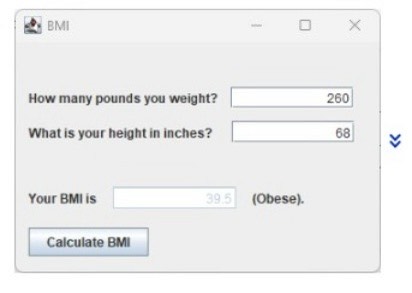
Question: USING ECLIPSE IDE JAVA!!!! NEED OUPUT TO LOOK HOW IT LOOKS ON THIS PICTURE BUT OUTPUT IS NOT SHOWING THE BMI CALCULATION NOR THE BUTTON
USING ECLIPSE IDE JAVA!!!! NEED OUPUT TO LOOK HOW IT LOOKS ON THIS PICTURE BUT OUTPUT
IS NOT SHOWING THE BMI CALCULATION NOR THE BUTTON THAT SAYS "CALCULATE BMI"
CAN SOMEONE PLS HELP FIX CODE
package edu.pupr.BMIClaculator;
import javax.swing.;
import java.awt.event.ActionEvent;
import java.awt.event.ActionListener;
public class BMIClaculator
public static void mainString args
JFrame frame new JFrameBMI Calculator";
frame.setSize;
frame.setDefaultCloseOperationJFrameEXITONCLOSE;
JPanel panel new JPanel;
frame.addpanel;
placeComponentspanel;
frame.setVisibletrue;
private static void placeComponentsJPanel panel
panel.setLayoutnull;
JLabel userLabel new JLabelBMI;
userLabel.setBounds;
panel.adduserLabel;
JLabel weightLabel new JLabelHow many pounds you weigh?";
weightLabel.setBounds;
panel.addweightLabel;
JTextField weightText new JTextField;
weightText.setBounds;
panel.addweightText;
JLabel heightLabel new JLabelWhat is your height in inches?";
heightLabel.setBounds;
panel.addheightLabel;
JTextField heightText new JTextField;
heightText.setBounds;
panel.addheightText;
JLabel bmiLabel new JLabelYour BMI is;
bmiLabel.setBounds;
panel.addbmiLabel;
JLabel categoryLabel new JLabelObese;
categoryLabel.setBounds;
panel.addcategoryLabel;
JButton calculateButton new JButtonCalculate BMI";
calculateButton.setBounds;
panel.addcalculateButton;
calculateButton.addActionListenernew ActionListener
@Override
public void actionPerformedActionEvent e
try
double weight Double.parseDoubleweightTextgetText;
double height Double.parseDoubleheightTextgetText;
double bmi calculateBMIweight height;
bmiLabel.setTextYour BMI is: bmi;
categoryLabel.setTextgetBMICategorybmi;
catch NumberFormatException ex
JOptionPane.showMessageDialogpanel "Please enter valid numerical values for weight and height.", "Input Error", JOptionPane.ERRORMESSAGE;
;
private static double calculateBMIdouble weight, double height
return weight height height;
private static String getBMICategorydouble bmi
if bmi
return "Underweight";
else if bmi && bmi
return "Normal Weight";
else if bmi && bmi
return "Overweight";
else
return "Obese";
Step by Step Solution
There are 3 Steps involved in it
1 Expert Approved Answer
Step: 1 Unlock

Question Has Been Solved by an Expert!
Get step-by-step solutions from verified subject matter experts
Step: 2 Unlock
Step: 3 Unlock
 Study Help