







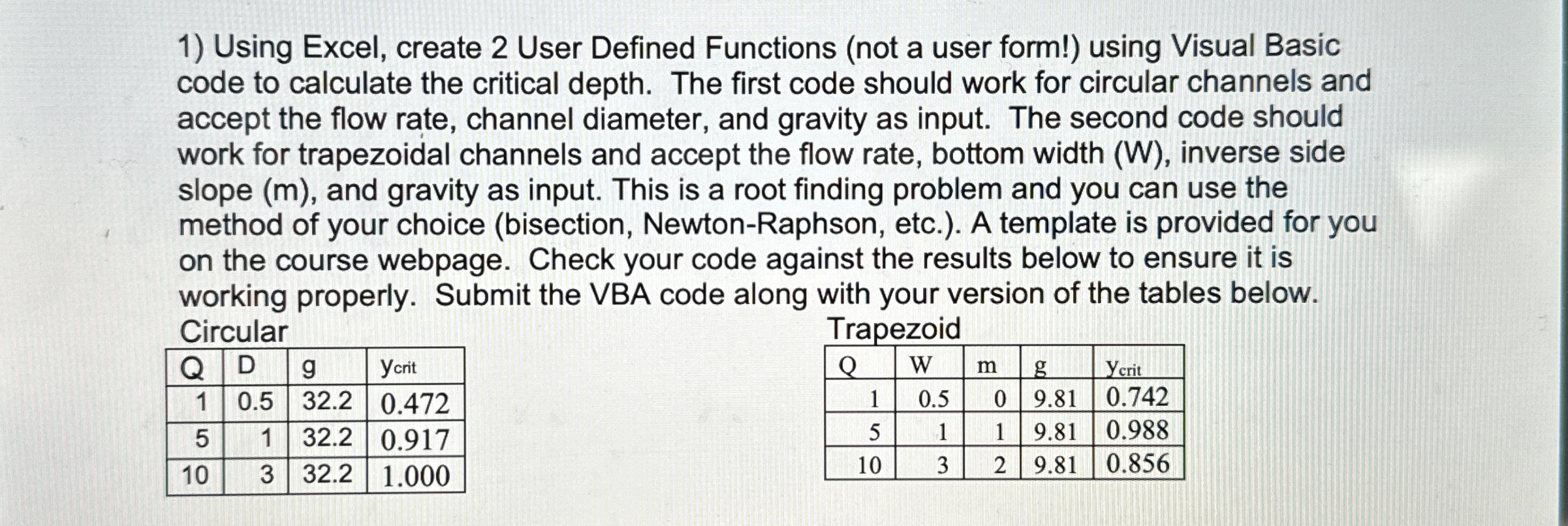
Question: Using Excel, create 2 User Defined Functions ( not a user form! ) using Visual Basic code to calculate the critical depth. The first code
Using Excel, create User Defined Functions not a user form! using Visual Basic code to calculate the critical depth. The first code should work for circular channels and accept the flow rate, channel diameter, and gravity as input. The second code should work for trapezoidal channels and accept the flow rate, bottom width W inverse side slope and gravity as input. This is a root finding problem and you can use the method of your choice bisection NewtonRaphson, etc. A template is provided for you on the course webpage. Check your code against the results below to ensure it is working properly. Submit the VBA code along with your version of the tables below.
Need help with both codes
Step by Step Solution
There are 3 Steps involved in it
1 Expert Approved Answer
Step: 1 Unlock

Question Has Been Solved by an Expert!
Get step-by-step solutions from verified subject matter experts
Step: 2 Unlock
Step: 3 Unlock
 Study Help