







Question: using excel VBA, i have the code so that no matter the number of batches or number of samples, the program will calculate and place
using excel VBA, i have the code so that no matter the number of batches or number of samples, the program will calculate and place "x" next to the samples that are above the inputted value("upper Limit"). Now I am in need of assitance on the last step. For all samples with an "x" next to it, i need to calulate both the # samples above the limit and and % samples abpve the limit and output them into the appropriate box that is shown on the worksheet. Any help would be appreciated. Thank you
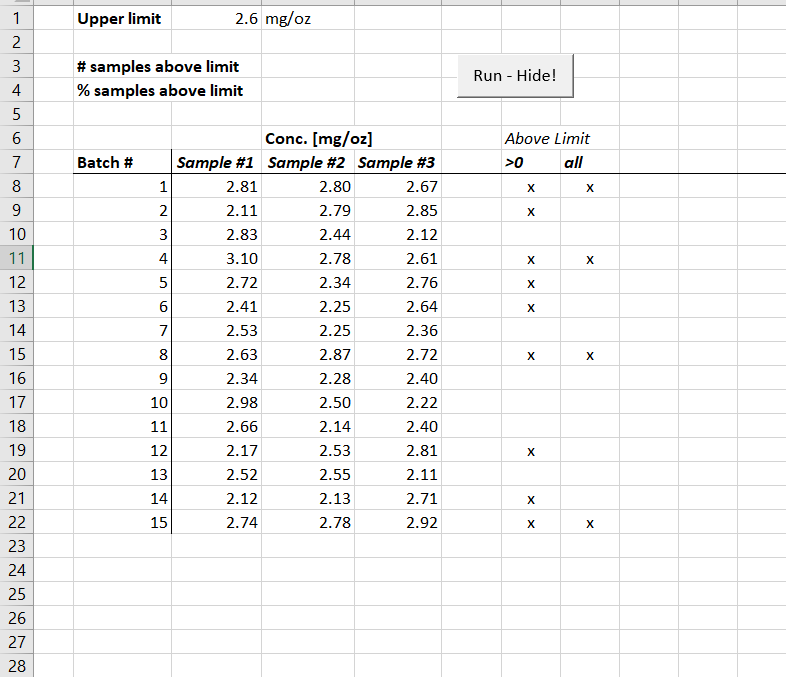
Upper limit 2.6 mg/o:z # samples above limit % samples above limit Run - Hide! Conc. [mg/oz] Above Limit all Sample #1 2.81 2.11 2.83 3.10 2.72 2.41 2.53 2.63 2.34 2.98 2.66 2.17 2.52 2.12 2.74 Sample #2 2.80 2.79 2.44 2.78 2.34 2.25 2.25 2.87 2.28 2.50 2.14 2.53 2.55 2.13 2.78 Sample #3 2.67 2.85 2.12 2.61 2.76 2.64 2.36 2.72 2.40 2.22 2.40 2.81 2.11 2.71 2.92 Batch # >0 10 4 12 13 14 15 16 17 18 19 20 21 6 7 10 12 13 14 15 23 24 25 26 27 28
Step by Step Solution
There are 3 Steps involved in it

Get step-by-step solutions from verified subject matter experts
 Study Help