







Question: Using Java JCreator: Correct the code presented below to get the desired output seen in the image. import javax.swing import java.awt import java.awt.event public class
Using Java JCreator: Correct the code presented below to get the desired output seen in the image.
import javax.swing
import java.awt
import java.awt.event
public class Concentric extends JFrame
{
public Concentric()
{
super( "Concentric" );
setSize( 300, 300 );
show();
}
public void paint( Graphics g )
{
for ( int x = 0; x
{
int y = 240 - ( x * 2 );
g.drawOval( x + 30, x + 30, y, y );
}
}
public static void main( String args[] )
{
Concentric app = new Concentric();
app.addWindowListener(
new WindowAdapter()
{
public void windowClosing( WindowEvent e )
{
System.exit( 0 );
}
}
);
}
}
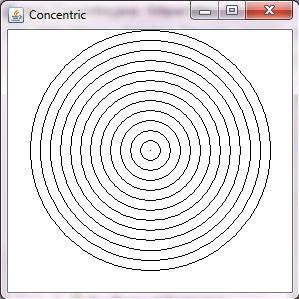
Concentric
Step by Step Solution
There are 3 Steps involved in it
1 Expert Approved Answer
Step: 1 Unlock

Question Has Been Solved by an Expert!
Get step-by-step solutions from verified subject matter experts
Step: 2 Unlock
Step: 3 Unlock
 Study Help