







Question: **** Using Java ***** package sa.edu.yuc; public class MyArrayImpl implements MyArray { private int capacity; private int[] arr; private int size; public MyArrayImpl(int capacity) {
**** Using Java *****
![private int capacity; private int[] arr; private int size; public MyArrayImpl(int capacity)](https://dsd5zvtm8ll6.cloudfront.net/si.experts.images/questions/2024/09/66ef6e6b32b79_40266ef6e6aa3ed0.jpg)
package sa.edu.yuc;
public class MyArrayImpl implements MyArray { private int capacity; private int[] arr; private int size; public MyArrayImpl(int capacity) { // TODO Auto-generated constructor stub } @Override public boolean isEmpty() { // TODO Auto-generated method stub return false; } @Override public boolean isFull() { // TODO Auto-generated method stub return false; } @Override public boolean add(int value) throws ArrayFullException, DuplicateException { // TODO Auto-generated method stub return false; }
@Override public boolean delete(int value) throws ArrayEmptyException { // TODO Auto-generated method stub return false; } @Override public int find(int value) { // TODO Auto-generated method stub return 0; }
@Override public int get(int index) { // TODO Auto-generated method stub return 0; } @Override public String toString() { // TODO Auto-generated method stub return null; } } -------------------------------------------------------------------
package sa.edu.yuc;
public class SIS { public boolean addStudent(Student st) throws ArrayFullException, DuplicateException { // TODO Auto-generated method stub return false; } public Student findStudent(int id) { // TODO Auto-generated method stub return null; } public boolean deleteStudent(int id)throws ArrayEmptyException { // TODO Auto-generated method stub return false; } public void showAll() { // TODO Auto-generated method stub } }
---------------------------------------------------------
package sa.edu.yuc; import java.util.Scanner; public class SisTest { public static void main(String[] args) { SIS s = new SIS(); Scanner input = new Scanner(System.in); int option; do{ menu(); System.out.print("Enter Option(1..5) > "); option = input.nextInt(); switch (option) { case 1: // TODO Auto-generated method stub break; case 2: // TODO Auto-generated method stub break; case 3: // TODO Auto-generated method stub break; case 4: // TODO Auto-generated method stub break; case 5: System.out.println("Thank you for using SIS application !!!"); break; default: System.out.println("Invalid option Plz enter(1..5)!!!"); } }while(option != 5); } private static void menu() { System.out.println("Welcome to MySIS"); System.out.println("Press 1 to add a student"); System.out.println("Press 2 to find a student"); System.out.println("Press 3 to delete a student"); System.out.println("Press 4 to list all students"); System.out.println("Press 5 to exit"); } } -----------------------------------------
package sa.edu.yuc;
import java.util.Scanner; public class Student implements Comparable
--------------------------------------
package sa.edu.yuc; public class ArrayEmptyException extends Exception { public ArrayEmptyException(String message){ super(message); } }
---------------------------------------------------------
package sa.edu.yuc; public class ArrayFullException extends Exception{ public ArrayFullException(String message) { super(message); } }
-------------------------------------------------
package sa.edu.yuc; public class DuplicateException extends Exception { public DuplicateException(String message) { super(message); } }
------------------------------------------------
package sa.edu.yuc; public interface MyArray { public boolean isEmpty(); public boolean isFull(); public boolean add(int value) throws ArrayFullException, DuplicateException; public boolean delete(int value) throws ArrayEmptyException; public int find(int value); public int get(int index); }
----------------------------------------
package sa.edu.yuc;
public class MyArrayImpl implements MyArray { private int capacity; private int[] arr; private int size; public MyArrayImpl(int capacity) { // TODO Auto-generated constructor stub } @Override public boolean isEmpty() { // TODO Auto-generated method stub return false; } @Override public boolean isFull() { // TODO Auto-generated method stub return false; } @Override public boolean add(int value) throws ArrayFullException, DuplicateException { // TODO Auto-generated method stub return false; }
@Override public boolean delete(int value) throws ArrayEmptyException { // TODO Auto-generated method stub return false; } @Override public int find(int value) { // TODO Auto-generated method stub return 0; }
@Override public int get(int index) { // TODO Auto-generated method stub return 0; } @Override public String toString() { // TODO Auto-generated method stub return null; } } ------------------------------------
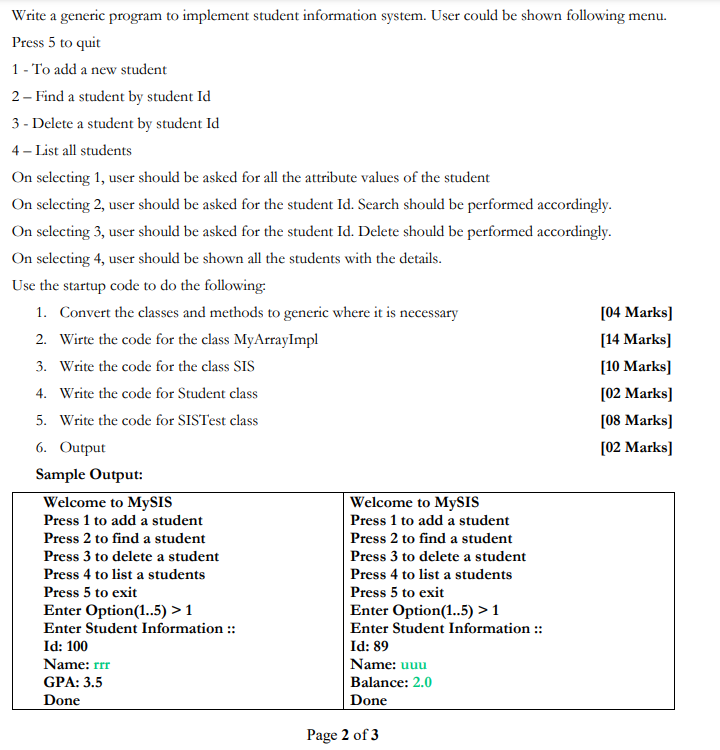
Write a generic program to implement student information system. User could be shown following menu. Press 5 to quit 1 - To add a new student 2 - Find a student by student Id 3 - Delete a student by student Id 4 - List all students On selecting 1, user should be asked for all the attribute values of the student On selecting 2, user should be asked for the student Id. Search should be performed accordingly. On selecting 3, user should be asked for the student Id. Delete should be performed accordingly. On selecting 4, user should be shown all the students with the details. Use the startup code to do the following 1. Convert the classes and methods to generic where it is necessary [04 Marks] 2. Wirte the code for the class MyArrayImpl [14 Marks) 3. Write the code for the class SIS [10 Marks) 4. Write the code for Student class [02 Marks] 5. Write the code for SISTest class [08 Marks] 6. Output [02 Marks) Sample Output: Welcome to MySIS Welcome to MySIS Press 1 to add a student Press 1 to add a student Press 2 to find a student Press 2 to find a student Press 3 to delete a student Press 3 to delete a student Press 4 to list a students Press 4 to list a students Press 5 to exit Press 5 to exit Enter Option(1..5) >1 Enter Option(1..5) > 1 Enter Student Information :: Enter Student Information :: Id: 100 Id: 89 Name: rrr Name: uuu GPA: 3.5 Balance: 2.0 Done Done Page 2 of 3 Data Structures CS204 Welcome to MySIS Press 1 to add a student Press 2 to find a student Press 3 to delete a student Press 4 to list a students Press 5 to exit Enter Option(1..5) > 1 Enter Student Information :: Id: 150 Name: ddd GPA: 3.1 Done Welcome to MySIS Press 1 to add a student Press 2 to find a student Press 3 to delete a student Press 4 to list a students Press 5 to exit Enter Option(1..5) > 1 Enter Student Information :: Id: 95 Name: ggg GPA: 1.5 Done Welcome to MySIS Press 1 to add a student Press 2 to find a student Press 3 to delete a student Press 4 to list a students Press 5 to exit Enter Option(1..5) > 4 Student [id=89, name=uuu, GPA =2.0) Student [id=95, name=ggg, GPA =1.5] Student [id=100, name=rrr, GPA =3.5] Student [id=150, name=ddd, GPA =3.1] Welcome to MySIS Press 1 to add a student Press 2 to find a student Press 3 to delete a student Press 4 to list a students Press 5 to exit Enter Option(1..5) > 2 Enter id to search = 95 Student [id=95, name=ggg, GPA =1.5] Wednesday, 03 March, 2021 Welcome to Mysis Press 1 to add a student Press 2 to find a student Press 3 to delete a student Press 4 to list a students Press 5 to exit Enter Option(1.5) > 2 Enter id to search = 900 Invalid Student ID Welcome to MySIS Press 1 to add a student Press 2 to find a student Press 3 to delete a student Press 4 to list a students Press 5 to exit Enter Option(1..5) > 3 Enter id to search = 100 Student is deleted Welcome to MySIS Press 1 to add a student Press 2 to find a student Press 3 to delete a student Press 4 to list a students Press 5 to exit Enter Option(1..5) > 4 Student [id=89, name=uuu, GPA =2.0] Student [id=95, name=ggg, GPA =1.5) Student [id=150, name=ddd, GPA =3.1] Welcome to MySIS Press 1 to add a student Press 2 to find a student Press 3 to delete a student Press 4 to list a students Press 5 to exit Enter Option(1..5) > 5 Thank you for using SIS application !!! Write a generic program to implement student information system. User could be shown following menu. Press 5 to quit 1 - To add a new student 2 - Find a student by student Id 3 - Delete a student by student Id 4 - List all students On selecting 1, user should be asked for all the attribute values of the student On selecting 2, user should be asked for the student Id. Search should be performed accordingly. On selecting 3, user should be asked for the student Id. Delete should be performed accordingly. On selecting 4, user should be shown all the students with the details. Use the startup code to do the following 1. Convert the classes and methods to generic where it is necessary [04 Marks] 2. Wirte the code for the class MyArrayImpl [14 Marks) 3. Write the code for the class SIS [10 Marks) 4. Write the code for Student class [02 Marks] 5. Write the code for SISTest class [08 Marks] 6. Output [02 Marks) Sample Output: Welcome to MySIS Welcome to MySIS Press 1 to add a student Press 1 to add a student Press 2 to find a student Press 2 to find a student Press 3 to delete a student Press 3 to delete a student Press 4 to list a students Press 4 to list a students Press 5 to exit Press 5 to exit Enter Option(1..5) >1 Enter Option(1..5) > 1 Enter Student Information :: Enter Student Information :: Id: 100 Id: 89 Name: rrr Name: uuu GPA: 3.5 Balance: 2.0 Done Done Page 2 of 3 Data Structures CS204 Welcome to MySIS Press 1 to add a student Press 2 to find a student Press 3 to delete a student Press 4 to list a students Press 5 to exit Enter Option(1..5) > 1 Enter Student Information :: Id: 150 Name: ddd GPA: 3.1 Done Welcome to MySIS Press 1 to add a student Press 2 to find a student Press 3 to delete a student Press 4 to list a students Press 5 to exit Enter Option(1..5) > 1 Enter Student Information :: Id: 95 Name: ggg GPA: 1.5 Done Welcome to MySIS Press 1 to add a student Press 2 to find a student Press 3 to delete a student Press 4 to list a students Press 5 to exit Enter Option(1..5) > 4 Student [id=89, name=uuu, GPA =2.0) Student [id=95, name=ggg, GPA =1.5] Student [id=100, name=rrr, GPA =3.5] Student [id=150, name=ddd, GPA =3.1] Welcome to MySIS Press 1 to add a student Press 2 to find a student Press 3 to delete a student Press 4 to list a students Press 5 to exit Enter Option(1..5) > 2 Enter id to search = 95 Student [id=95, name=ggg, GPA =1.5] Wednesday, 03 March, 2021 Welcome to Mysis Press 1 to add a student Press 2 to find a student Press 3 to delete a student Press 4 to list a students Press 5 to exit Enter Option(1.5) > 2 Enter id to search = 900 Invalid Student ID Welcome to MySIS Press 1 to add a student Press 2 to find a student Press 3 to delete a student Press 4 to list a students Press 5 to exit Enter Option(1..5) > 3 Enter id to search = 100 Student is deleted Welcome to MySIS Press 1 to add a student Press 2 to find a student Press 3 to delete a student Press 4 to list a students Press 5 to exit Enter Option(1..5) > 4 Student [id=89, name=uuu, GPA =2.0] Student [id=95, name=ggg, GPA =1.5) Student [id=150, name=ddd, GPA =3.1] Welcome to MySIS Press 1 to add a student Press 2 to find a student Press 3 to delete a student Press 4 to list a students Press 5 to exit Enter Option(1..5) > 5 Thank you for using SIS application
Step by Step Solution
There are 3 Steps involved in it

Get step-by-step solutions from verified subject matter experts
 Study Help