







Question: Using Java program ========== Employee class ========== import java.text.NumberFormat; public class Employee { private String name; private double salary; public Employee() { } public Employee(String
Using Java program 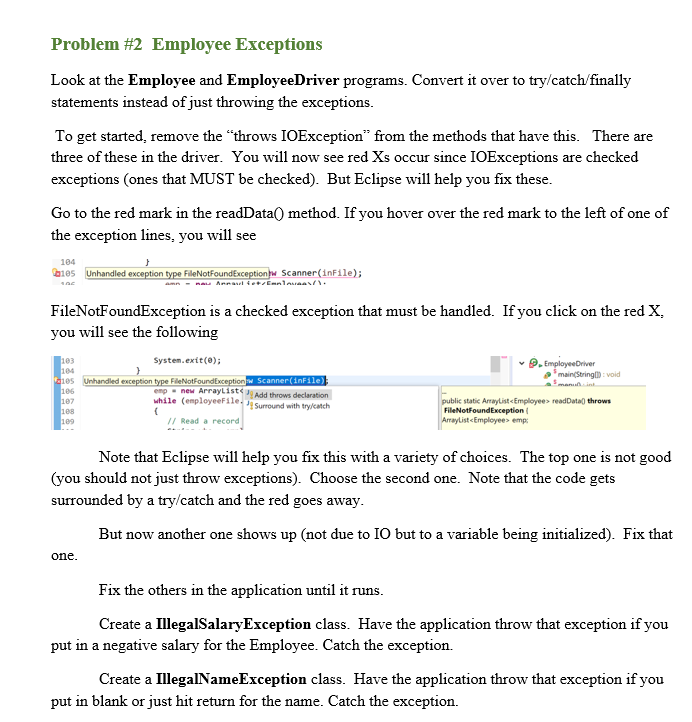 ========== Employee class ==========
import java.text.NumberFormat;
public class Employee { private String name; private double salary;
public Employee() { }
public Employee(String name, double salary) { this.name = name; this.salary = salary; } public String toStringF() { return name + "|" + salary; }
public String toString() { NumberFormat nf = NumberFormat.getCurrencyInstance(); return name + " has a salary of " + nf.format(salary); }
public String getName() { return name; }
public void setName(String name) { this.name = name; }
public double getSalary() { return salary; }
public void setSalary(double salary) { this.salary = salary; } } ========== EmployeeDriver class ==========
import java.awt.FileDialog; import java.awt.Frame; import java.io.BufferedReader; import java.io.File; import java.io.FileNotFoundException; import java.io.FileReader; import java.io.IOException; import java.io.PrintWriter; import java.util.ArrayList; import java.util.Scanner; import java.util.StringTokenizer;
public class EmployeeDriver {
public static void main(String[] args) throws Exception {
int choice = 0; ArrayList
while (choice >= 0) { choice = menu(); if (choice == 1) { inputData(emp); } else if (choice == 2) { emp = readData(); } else if (choice == 3) { printData(emp); } else if (choice == 4) { saveData(emp); }else if (choice ==5) emp.clear(); else if (choice == 6) { System.out.println("Bye!!!!!"); System.exit(0); } } // end while }
public static int menu() { Scanner keyboard = new Scanner(System.in); System.out.println(" Choice:"); System.out.println(" 1. Input employees from keyboard"); System.out.println(" 2. Read employees from file"); System.out.println(" 3. Print employees"); System.out.println(" 4. Save employee data"); System.out.println(" 5. Clear the data"); System.out.println(" 6. Quit!! "); System.out.println(" CHOICE:"); int value = keyboard.nextInt(); return value;
}
public static ArrayList
System.out.println("More (true/false)"); more = keyboard.nextBoolean(); keyboard.nextLine(); } return emp; }
public static void printData(ArrayList public static ArrayList String line = bf.readLine(); while (line !=null) { StringTokenizer st = new StringTokenizer(line, "|"); // Read a record from the file. String who = st.nextToken(); double amt = Double.parseDouble(st.nextToken().toString()); Employee e = new Employee(who, amt); emp.add(e); line = bf.readLine(); } return emp; } public static BufferedReader openRead() throws IOException { Frame f = new Frame(); // decide from where to read the file FileDialog foBox = new FileDialog(f, "Pick location for reading your file", FileDialog.LOAD); System.out.println( "The dialog box will appear behind Eclipse. " + " Choose where you would like to read from."); foBox.setVisible(true); // get the absolute path to the file String foName = foBox.getFile(); String dirPath = foBox.getDirectory(); // create a file instance for the absolute path File inFile = new File(dirPath + foName); BufferedReader in = new BufferedReader(new FileReader(inFile)); return in; } public static PrintWriter openWrite() throws Exception { Frame f = new Frame(); // decide from where to read the file FileDialog foBox = new FileDialog(f, "Pick location for writing your file", FileDialog.SAVE); System.out.println("The dialog box will appear behind Eclipse. " + " Choose where you would like to write your data."); foBox.setVisible(true); // get the absolute path to the file String foName = foBox.getFile(); String dirPath = foBox.getDirectory(); // create a file instance for the absolute path File outFile = new File(dirPath + foName); PrintWriter out = new PrintWriter(outFile); return out; } public static void saveData(ArrayList // Get each employee's data and write it to the file. for (int counter = 0; counter System.out.println("The data was saved to a file"); } } ******************************************************************* SAMPLE OUTPUT EMPLOYEEDRIVER Choice: 1. Input employees from keyboard 2. Read employees from file 3. Print employees 4. Save employee data 5. Clear the data 6. Quit!! CHOICE: 1 Employee name: ---note - I just hit return here ---- Error: You did not enter a name Employee name: ----note - I typed a number of spaces here ---- Error: You did not enter a name Employee name: Mike Salary: -200 Error: Negative salary: -200.0 Employee name: Joe Salary: 200 More (true/false) true Employee name: Sam Salary: -200 Error: Negative salary: -200.0 Employee name: Sam Salary: 400 More (true/false) true Employee name: Doug Salary: 100 More (true/false) false Choice: 1. Input employees from keyboard 2. Read employees from file 3. Print employees 4. Save employee data 5. Clear the data 6. Quit!! CHOICE: 3 Employees: Joe has a salary of $200.00 Sam has a salary of $400.00 Doug has a salary of $100.00 Choice: 1. Input employees from keyboard 2. Read employees from file 3. Print employees 4. Save employee data 5. Clear the data 6. Quit!! -----Note when I choose 4 to save, it gives me a FileDialog asking the location which I fill in and complete. I then end the program. I then start the program again, choose 2, and point to that location It returns the data from above. When I open the file, it looks like: Joe|200.0 Sam|400.0 Doug|100.0 **********************************************************************
Step by Step Solution
There are 3 Steps involved in it

Get step-by-step solutions from verified subject matter experts
 Study Help