







Question: Using Java/Eclipse could you provide a code as per the instructions below: Part of the client and server classes are already provided below. import java.io.*;
Using Java/Eclipse could you provide a code as per the instructions below: Part of the client and server classes are already provided below.
import java.io.*;
import java.net.*;
import javax.swing.*;
import java.awt.Color; import java.awt.event.*;
public class Client { static Socket clientSocket; static JTextArea receivedTextArea; static JLabel sendLabel; public static void main(String[] args) throws Exception { //Create the GUI frame and components JFrame frame = new JFrame ("Chatting Client"); frame.setLayout(null); frame.setBounds(100, 100, 500, 550); frame.setDefaultCloseOperation(JFrame.EXIT_ON_CLOSE); JLabel clientLabel = new JLabel("Client Name"); clientLabel.setBounds(20, 40, 150, 30); frame.getContentPane().add(clientLabel); JTextField nameTextField = new JTextField(); nameTextField.setBounds(130, 40, 150, 30); frame.getContentPane().add(nameTextField); JButton connectButton = new JButton("Connect"); connectButton.setBounds(290, 40, 100, 30); frame.getContentPane().add(connectButton); receivedTextArea = new JTextArea(); receivedTextArea.setBounds(20,80, 460, 300); receivedTextArea.setEditable(false); frame.getContentPane().add(receivedTextArea); JScrollPane receivedTextAreaScroll = new JScrollPane(receivedTextArea, JScrollPane.VERTICAL_SCROLLBAR_AS_NEEDED, JScrollPane.HORIZONTAL_SCROLLBAR_AS_NEEDED); receivedTextAreaScroll.setBounds(20, 80, 460, 300); frame.getContentPane().add(receivedTextAreaScroll); sendLabel = new JLabel("Send to"); sendLabel.setBounds(20, 400, 100, 30); frame.getContentPane().add(sendLabel); sendLabel.setVisible(false); JTextField sendTextField = new JTextField(); sendTextField.setBounds(130, 400, 150, 30); frame.getContentPane().add(sendTextField); sendTextField.setVisible(false); JTextField messageTextField = new JTextField(); messageTextField.setBounds(20, 450, 350, 60); frame.getContentPane().add(messageTextField); messageTextField.setVisible(false); JButton sendButton = new JButton("Send"); sendButton.setBounds(400, 450, 80, 30); frame.getContentPane().add(sendButton); sendButton.setVisible(false); //Action listener when connect button is pressed connectButton.addActionListener( new ActionListener() { public void actionPerformed(ActionEvent e) { try { if (connectButton.getText().equals("Connect")) { //if pressed to connect //create a new socket to connect with the server application clientSocket = new Socket ("localhost", 6789); //call function StartThread StartThread(); //make the GUI components visible, so the client can send and receive messages sendButton.setVisible(true); sendLabel.setVisible(true); sendTextField.setVisible(true); messageTextField.setVisible(true); receivedTextArea.setText("You are Connected "); //change the Connect button text to disconnect connectButton.setText("Disconnect"); } else { //if pressed to disconnect //create an output stream and send a Remove message to disconnect from the server DataOutputStream outToServer = new DataOutputStream (clientSocket.getOutputStream()); outToServer.writeBytes("-Remove "); //close the client's socket clientSocket.close(); //make the GUI components invisible sendButton.setVisible(false); sendLabel.setVisible(false); sendTextField.setVisible(false); messageTextField.setVisible(false); receivedTextArea.setText(null); //change the Connect button text to connect connectButton.setText("Connect");
} } catch (Exception ex) { System.out.println(ex.toString()); } }});
}
}
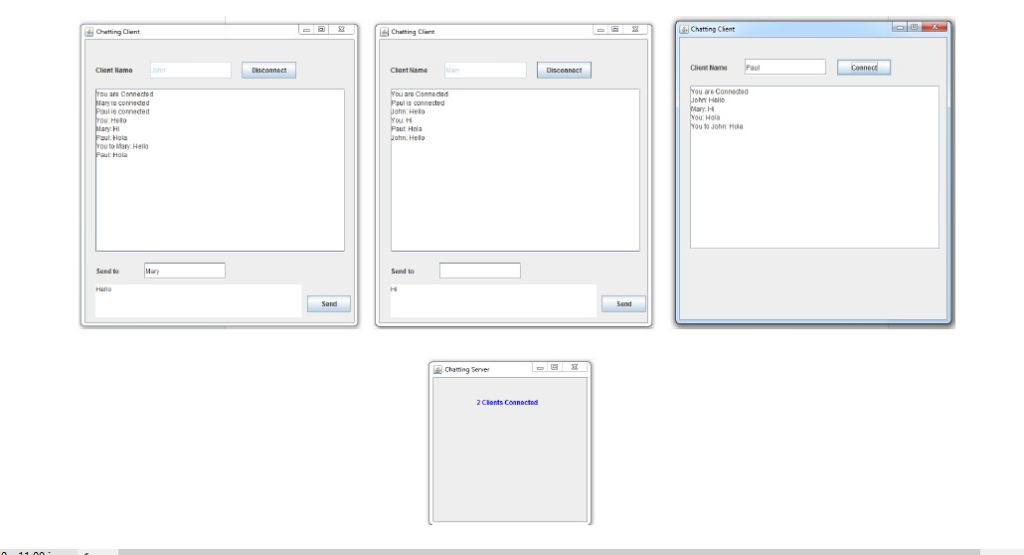
2. Lab Experiment: In this lab, we are going to learn the programming of Multi-Client Server Application using Socket Programming. The Multi-Client / Server Application is the application where multiple clients are connected to one server. The server will use a thread for every client connected to it to serve that client. Multithreading is needed when the Server has to do different tasks at the same time. Extra effort should be considered to synchronize all the running threads to do the write tasks of the server. Clients' Sockets at the Server can be kept in an array in order to access them by the running threads of every client serving thread. 3. Assignment: Implement a Chat Room application with one server and multiple clients. The server shown in the figure below will have a thread for every client connecting to it. Another thread for accepting connections, and another one to update the label with the current number of clients connecting Chating Cl Chatting Cient Cliem Nn Chent Nama ars Conneched re Connee Paut Haa to Mary Hall and to Sond to Charong Serer 2 Clents Connected 2. Lab Experiment: In this lab, we are going to learn the programming of Multi-Client Server Application using Socket Programming. The Multi-Client / Server Application is the application where multiple clients are connected to one server. The server will use a thread for every client connected to it to serve that client. Multithreading is needed when the Server has to do different tasks at the same time. Extra effort should be considered to synchronize all the running threads to do the write tasks of the server. Clients' Sockets at the Server can be kept in an array in order to access them by the running threads of every client serving thread. 3. Assignment: Implement a Chat Room application with one server and multiple clients. The server shown in the figure below will have a thread for every client connecting to it. Another thread for accepting connections, and another one to update the label with the current number of clients connecting Chating Cl Chatting Cient Cliem Nn Chent Nama ars Conneched re Connee Paut Haa to Mary Hall and to Sond to Charong Serer 2 Clents Connected
Step by Step Solution
There are 3 Steps involved in it

Get step-by-step solutions from verified subject matter experts
 Study Help