







Question: Using join command in Linux Language It is similar to this command but I am still a bit confused, Pls help What I have so
Using join command in Linux Language
It is similar to this command but I am still a bit confused, Pls help
 What I have so far is:
join -a2 -e "No Vendor" -1
Currently stuck pls help
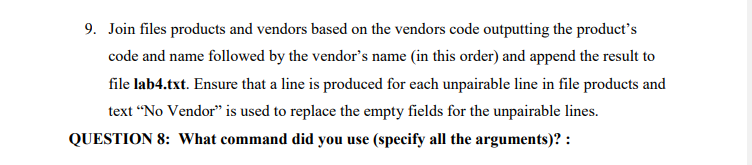
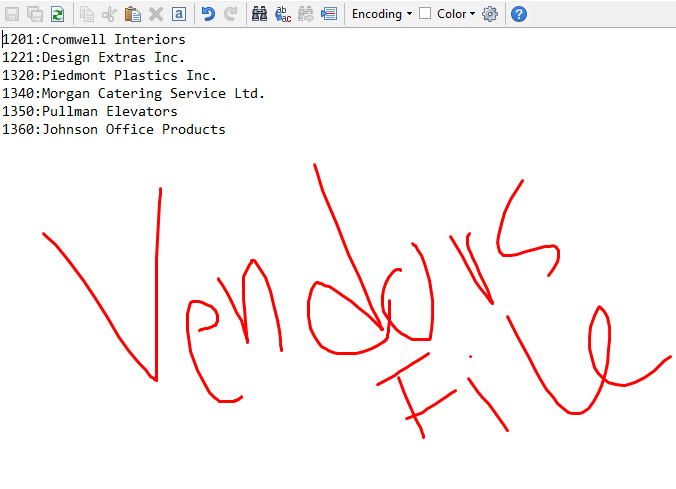
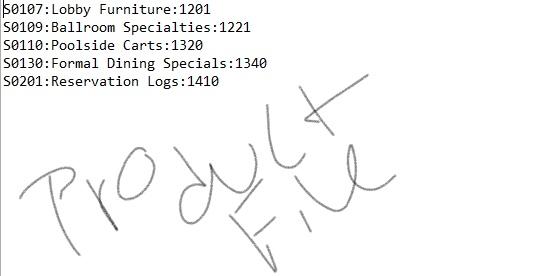
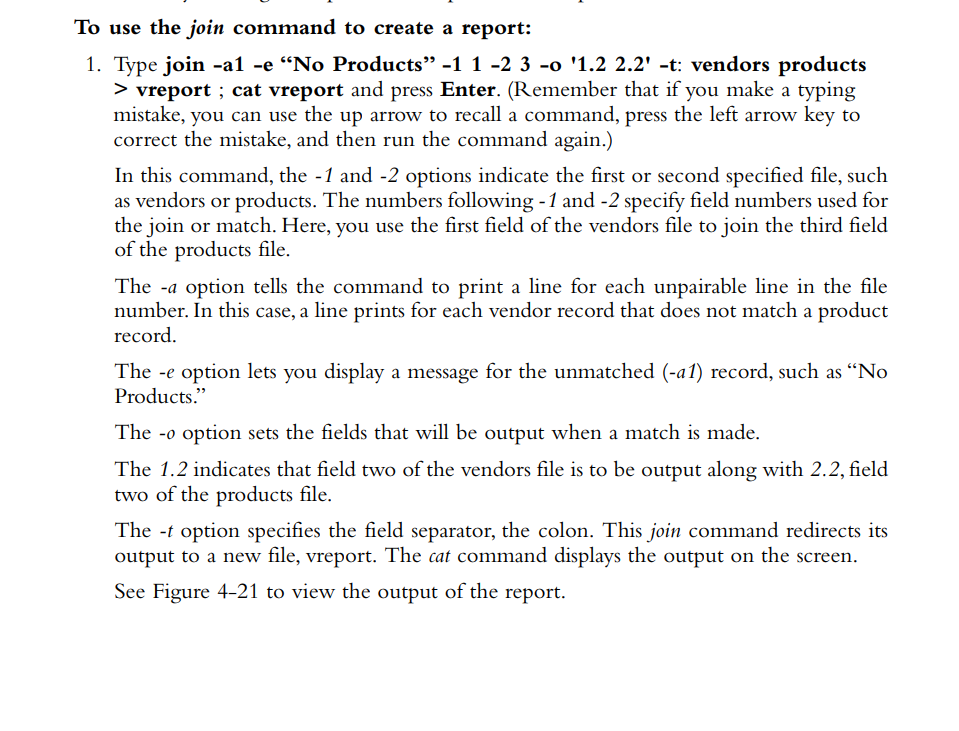
9. Join files products and vendors based on the vendors code outputting the products code and name followed by the vendor's name in this order) and append the result to file lab4.txt. Ensure that a line is produced for each unpairable line in file products and text No Vendor" is used to replace the empty fields for the unpairable lines. QUESTION 8: What command did you use (specify all the arguments)? : Encoding Color - X a 11201:Cromwell Interiors 1221: Design Extras Inc. 1320: Piedmont Plastics Inc. 1340: Morgan Catering Service Ltd. 1350: Pullman Elevators 1360: Johnson Office Products Vendors pl F File 107:Lobby Furniture:1201 S0109:Ballroom Specialties:1221 S0110:Poolside Carts:1320 50130: Formal Dining Specials: 1340 S0201:Reservation Log:1410 O File To use the join command to create a report: 1. Type join -al -e No Products -1 1-2 3 -o '1.2 2.2' -t: vendors products > vreport ; cat vreport and press Enter. (Remember that if you make a typing mistake, you can use the up arrow to recall a command, press the left arrow key to correct the mistake, and then run the command again.) In this command, the -1 and -2 options indicate the first or second specified file, such as vendors or products. The numbers following - 1 and -2 specify field numbers used for the join or match. Here, you use the first field of the vendors file to join the third field of the products file. The -a option tells the command to print a line for each unpairable line in the file number. In this case, a line prints for each vendor record that does not match a product record. The -e option lets you display a message for the unmatched (-a1) record, such as No Products." The -o option sets the fields that will be output when a match is made. The 1.2 indicates that field two of the vendors file is to be output along with 2.2, field two of the products file. The -t option specifies the field separator, the colon. This join command redirects its output to a new file, vreport. The cat command displays the output on the screen. See Figure 4-21 to view the output of the report. 9. Join files products and vendors based on the vendors code outputting the products code and name followed by the vendor's name in this order) and append the result to file lab4.txt. Ensure that a line is produced for each unpairable line in file products and text No Vendor" is used to replace the empty fields for the unpairable lines. QUESTION 8: What command did you use (specify all the arguments)? : Encoding Color - X a 11201:Cromwell Interiors 1221: Design Extras Inc. 1320: Piedmont Plastics Inc. 1340: Morgan Catering Service Ltd. 1350: Pullman Elevators 1360: Johnson Office Products Vendors pl F File 107:Lobby Furniture:1201 S0109:Ballroom Specialties:1221 S0110:Poolside Carts:1320 50130: Formal Dining Specials: 1340 S0201:Reservation Log:1410 O File To use the join command to create a report: 1. Type join -al -e No Products -1 1-2 3 -o '1.2 2.2' -t: vendors products > vreport ; cat vreport and press Enter. (Remember that if you make a typing mistake, you can use the up arrow to recall a command, press the left arrow key to correct the mistake, and then run the command again.) In this command, the -1 and -2 options indicate the first or second specified file, such as vendors or products. The numbers following - 1 and -2 specify field numbers used for the join or match. Here, you use the first field of the vendors file to join the third field of the products file. The -a option tells the command to print a line for each unpairable line in the file number. In this case, a line prints for each vendor record that does not match a product record. The -e option lets you display a message for the unmatched (-a1) record, such as No Products." The -o option sets the fields that will be output when a match is made. The 1.2 indicates that field two of the vendors file is to be output along with 2.2, field two of the products file. The -t option specifies the field separator, the colon. This join command redirects its output to a new file, vreport. The cat command displays the output on the screen. See Figure 4-21 to view the output of the report
Step by Step Solution
There are 3 Steps involved in it

Get step-by-step solutions from verified subject matter experts
 Study Help