







Question: using matlab 4. Write a local function showQuadrant (x, y). In the local function, use nested if-else statements to determine the quadrant of given coordinate
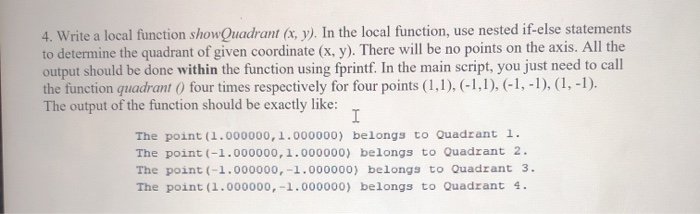
4. Write a local function showQuadrant (x, y). In the local function, use nested if-else statements to determine the quadrant of given coordinate (x, y). There will be no points on the axis. All the output should be done within the function using fprintf. In the main script, you just need to call the function quadrant ( four times respectively for four points (1,1),(-1,1),(-1,-1), (1, -1). The output of the function should be exactly like: The point (1.000000,1.000000) belongs to Quadrant 1. The point (-1.000000, 1.000000) belongs to Quadrant 2. The point (-1.000000,-1.000000) belongs to Quadrant 3. The point (1.000000,-1.000000) belongs to Quadrant 4
Step by Step Solution
There are 3 Steps involved in it

Get step-by-step solutions from verified subject matter experts
 Study Help