







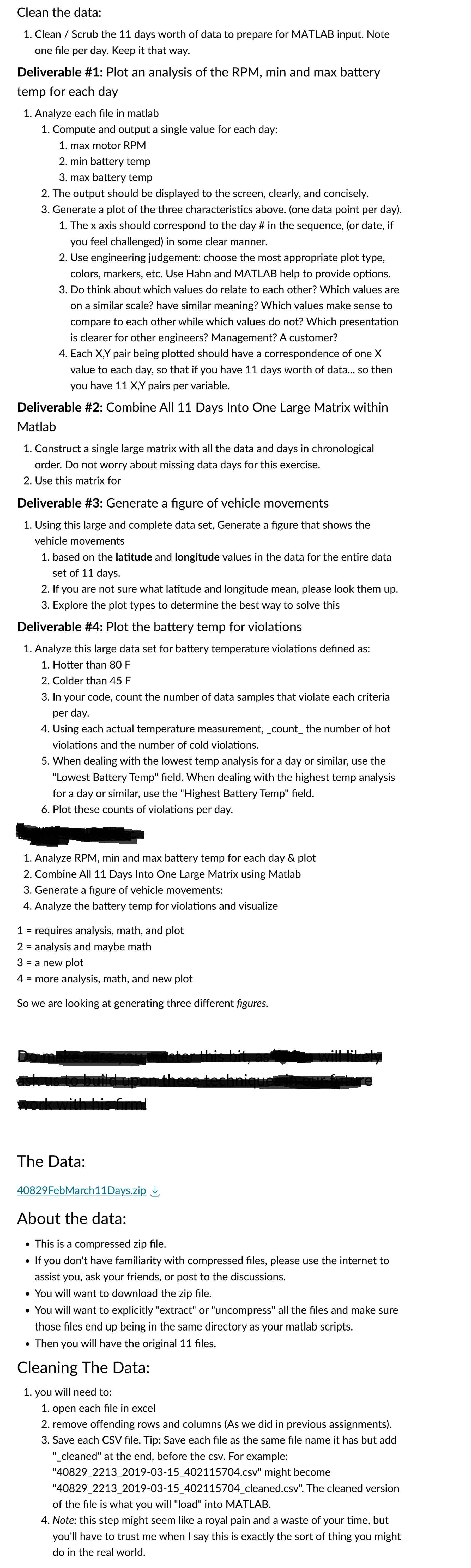
Question: Using Matlab, clean the data: 1 . Clean / Scrub the 1 1 days worth of data to prepare for MATLAB input. Note one file
Using Matlab, clean the data:
Clean Scrub the days worth of data to prepare for MATLAB input. Note one file per day. Keep it that way
Deliverable #: Plot an analysis of the RPM min and max battery temp for each day
Analyze each file in matlab
Compute and output a single value for each day:
max motor RPM
min battery temp
max battery temp
The output should be displayed to the screen, clearly, and concisely.
Generate a plot of the three characteristics above. one data point per day
The x axis should correspond to the day # in the sequence, or date, if you feel challenged in some clear manner.
Use engineering judgement: choose the most appropriate plot type, colors, markers, etc. Use Hahn and MATLAB help to provide options.
Do think about which values do relate to each other? Which values are on a similar scale? have similar meaning? Which values make sense to compare to each other while which values do not? Which presentation is clearer for other engineers? Management? A customer?
Each X Y pair being plotted should have a correspondence of one X value to each day, so that if you have days worth of data... so then you have X Y pairs per variable.
Deliverable #: Combine All Days Into One Large Matrix within Matlab
Construct a single large matrix with all the data and days in chronological order. Do not worry about missing data days for this exercise.
Use this matrix for
Deliverable #: Generate a figure of vehicle movements
Using this large and complete data set, Generate a figure that shows the vehicle movements
based on the latitude and longitude values in the data for the entire data set of days.
If you are not sure what latitude and longitude mean, please look them up
Explore the plot types to determine the best way to solve this
Deliverable #: Plot the battery temp for violations
Analyze this large data set for battery temperature violations defined as:
Hotter than F
Colder than F
In your code, count the number of data samples that violate each criteria per day.
Using each actual temperature measurement, count the number of hot violations and the number of cold violations
When dealing with the lowest temp analysis for a day or similar, use the "Lowest Battery Temp" field. When dealing with the highest temp analysis for a day or similar, use the "Highest Battery Temp" field.
Plot these counts of violations per day.
Analyze RPM min and max battery temp for each day & plot
Combine All Days Into One Large Matrix using Matlab
Generate a figure of vehicle movements:
Analyze the battery temp for violations and visualize
requires analysis, math, and plot
analysis and maybe math
a new plot
more analysis, math, and new plot
So we are looking at generating three different figures.
The Data:
FebMarchDays.zip downarrow
About the data:
This is a compressed zip file.
If you don't have familiarity with compressed files, please use the internet to assist you, ask your friends, or post to the discussions.
You will want to download the zip file.
You will want to explicitly "extract" or "uncompress" all the files and make sure those files end up being in the same directory as your matlab scripts.
Then you will have the original files.
Cleaning The Data:
you will need to
open each file in excel
remove offending rows and columns As we did in previous assignments
Save each CSV file. Tip: Save each file as the same file name it has but add cleaned" at the end, before the csv For example:
csv might become
cleaned.csv The cleaned version of the file is what you will "load" into MATLAB.
Note: this step might seem like a royal pain and a waste of your time, but you'll have to trust me when I say this is exactly the sort of thing you might do in the real world.
Ive posted excel image. There are of similar files.
Step by Step Solution
There are 3 Steps involved in it
1 Expert Approved Answer
Step: 1 Unlock

Question Has Been Solved by an Expert!
Get step-by-step solutions from verified subject matter experts
Step: 2 Unlock
Step: 3 Unlock
 Study Help