





Question: Using MATLAB do the following: Example:the following function sorts the elements of a vector in ascending order function v - gsort(v) while pos 2 %

Using MATLAB do the following:
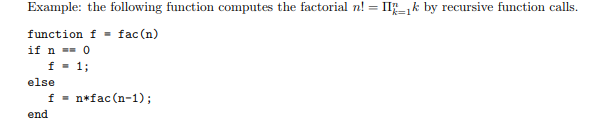
Using MATLAB do the following: Example:the following function sorts the elements of

Example:the following function sorts the elements of a vector in ascending order
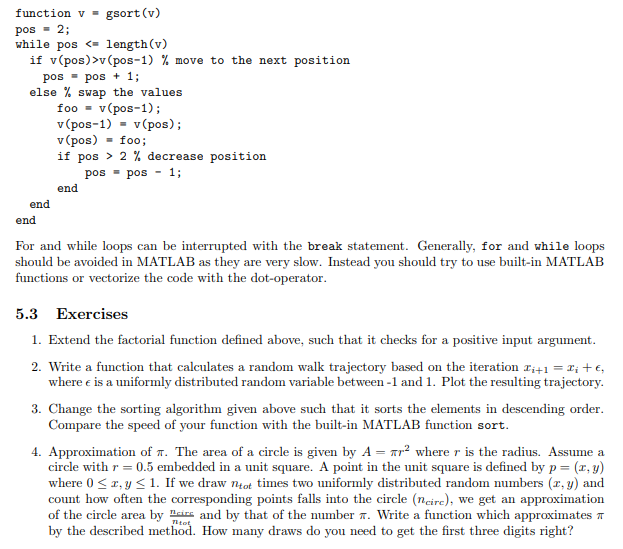
a vector in ascending order function v - gsort(v) while pos 2

function v - gsort(v) while pos 2 % decrease position pos pos 1; end end end For and while loops can be interrupted with the break statement. Generally, for and while loops should be avoided in MATLAB as they are very slow. Instead you should try to use built-in MATLAB functions or vectorize the code with the dot-operator 5.3 Exercises 1. Extend the factorial function defined above, such that it checks for a positive input argument 2. Write a function that calculates a random walk trajectory based on the iteration x-rite, where e is a uniformly distributed random variable between -1 and 1. Plot the resulting trajectory. 3. Change the sorting algorithm given above such that it sorts the elements in descending order Compare the speed of your function with the built-in MATLAB function sort 4. Approximation of T. The area of a circle is given by A-tr2 where r is the radius. Assume a circle with r 0.5 embedded in a unit square. A point in the unit square is defined by p-(x,y) where 0-2, y

Step by Step Solution

There are 3 Steps involved in it

1 Expert Approved Answer
Step: 1 Unlock blur-text-image
Question Has Been Solved by an Expert!

Get step-by-step solutions from verified subject matter experts

Step: 2 Unlock
Step: 3 Unlock

Students Have Also Explored These Related Databases Questions!