







Question: Using MATLAB, Modify the function mysort() below to sort this vector in ascending order based on the quiz average. vec quiz 2 id no 7.5
Using MATLAB, Modify the function mysort() below to sort this vector in ascending order based on the quiz average.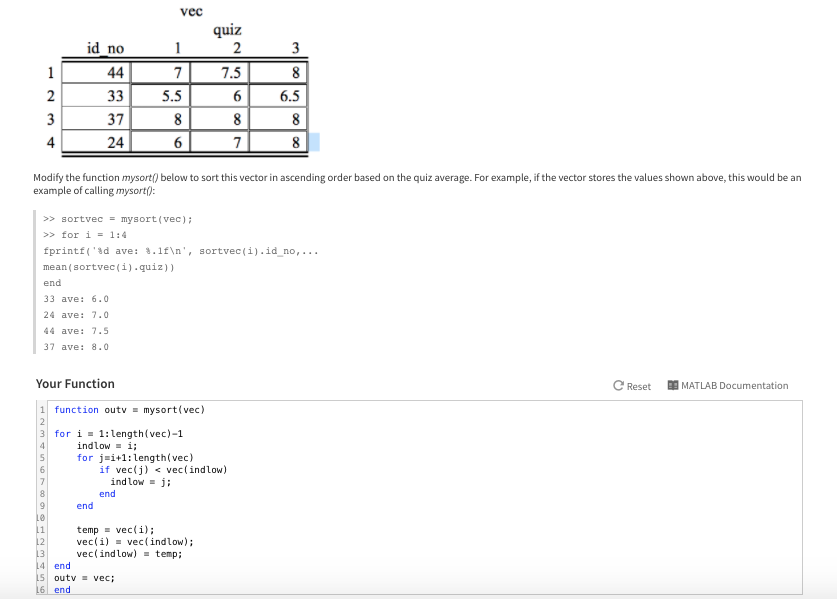
vec quiz 2 id no 7.5 5.5 6.5 37 24 4 Modify the function mysort() below to sort this vector in ascending order based on the quiz average. For example, if the vector stores the values shown above, this would be an example of calling mysort: >> sortvec = mysort (vec); >> for i = 1:4 fprintt('ad ave: %.1f ', mean sortveE( 1 ) . quiz ) ) sortvec(1). id-no, 3 ave: 6.0 24 ave: 7.0 ave: 7.5 7 ave:8.0 Your Function 1 function outvmysort(vec) 3 for i1:length(vec)-1 CReset MATLAB Documentation indlow i; for j-i+1: length(vec) if vecj)
Step by Step Solution
There are 3 Steps involved in it
1 Expert Approved Answer
Step: 1 Unlock

Question Has Been Solved by an Expert!
Get step-by-step solutions from verified subject matter experts
Step: 2 Unlock
Step: 3 Unlock
 Study Help