







Question: Using MATLAB, numerically solve the following set of differential equations. A MATLAB command to solve a set of differential equations is ode45. Plot your results
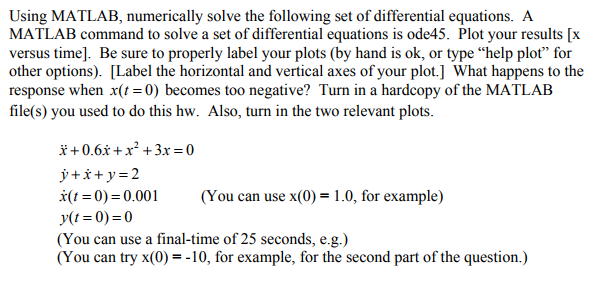
Using MATLAB, numerically solve the following set of differential equations. A MATLAB command to solve a set of differential equations is ode45. Plot your results [x versus time]. Be sure to properly label your plots (by hand is ok, or type help plot for other options). [Label the horizontal and vertical axes of your plot.] What happens to the response when x t( 0) = becomes too negative? Turn in a hardcopy of the MATLAB file(s) you used to do this hw. Also, turn in the two relevant plots
Using MATLAB, numerically solve the following set of differential equations. A MATLAB command to solve a set of differential equations is ode45. Plot your results [x versus time]. Be sure to properly label your plots (by hand is ok, or type "help plot" for other options). [Label the horizontal and vertical axes of your plot.] What happens to the response when x(t -0) becomes too negative? Turn in a hardcopy of the MATLAB file(s) you used to do this hw. Also, turn in the two relevant plots I+0.6x + x2 + 3x=0 (1-0)=0.001 (You can use x(0) = 1.0, for example) y(t = 0)=0 (You can use a final-time of 25 seconds, e.g.) (You can try x(O)--10, for example, for the second part of the question.)
Step by Step Solution
There are 3 Steps involved in it

Get step-by-step solutions from verified subject matter experts
 Study Help