







Question: Using Matlab only, Complete PART B Save script file as LastName_Project_02_timer_sensor.m Save function file as LastName_sensor.m PROJEC E2W E2S W2E You are required to write
Using Matlab only, Complete PART B
Save script file as LastName_Project_02_timer_sensor.m
Save function file as LastName_sensor.m
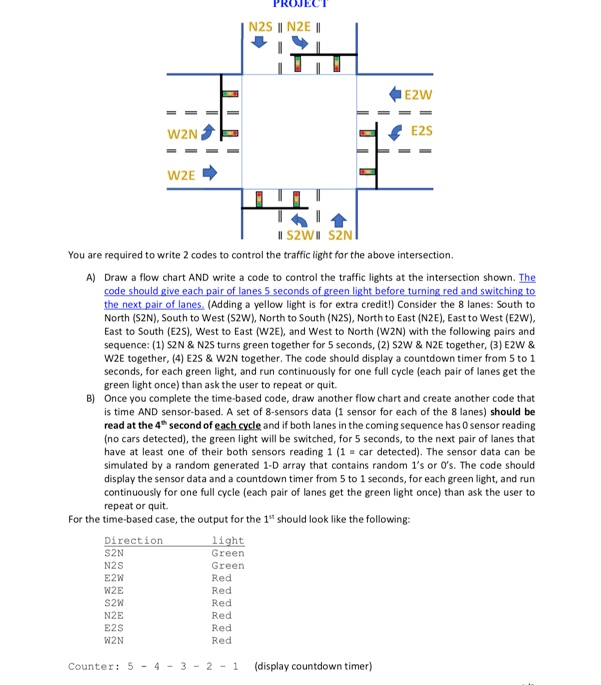
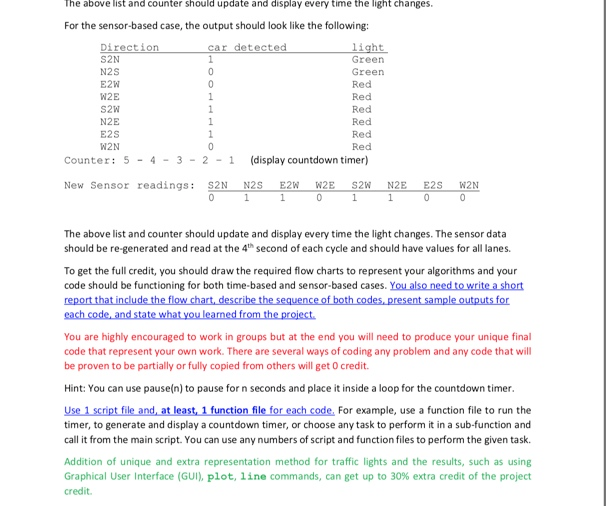
PROJEC E2W E2S W2E You are required to write 2 codes to control the traffic light for the above intersection. A) Draw a flow chart AND write a code to control the traffic lights at the intersection shown. The the next pair of lanes, (Adding a yellow light is for extra credit!) Consider the 8 lanes: South to North (S2N), South to West (S2W), North to South (N2S), North to East (N2E), East to West (E2W), East to South (E2S), West to East (W2E), and West to North (W2N) with the following pairs and sequence: (1) S2N & N2S turns green together for 5 seconds, (2) S2W & N2E together, (3) E2W & W2E together, (4) E2S & W2N together. The code should display a countdown timer from 5 to 1 seconds, for each green light, and run continuously for one full cycle (each pair of lanes get the green light once) than ask the user to repeat or quit. Once you complete the time-based code, draw another flow chart and create another code that is time AND sensor-based. A set of 8-sensors data (1 sensor for each of the 8 lanes) should be read at the 4 second of each cycle and if both lanes in the coming sequence has 0 sensor reading no cars detected), the green light will be switched, for 5 seconds, to the next pair of lanes that have at least one of their both sensors reading 1 (1-car detected). The sensor data can be simulated by a random generated 1-D array that contains random 1's or O's. The code should display the sensor data and a countdown timer from 5 to 1 seconds, for each green light, and run continuously for one full cycle (each pair of lanes get the green light once) than ask the user to repeat or quit. B) For the time-based case, the output for the 1st should look like the following: light Green Green Red Red Red Red Red Red Direction S2N N2S W2E S2W W2N Counter: 5-4 3-2-1 (display countdown timer) The above list and counter should update and display every time the light changes. For the sensor-based case, the output should look like the following: car detected S2N N2S E2W Green Green Red Red Red S2W N2E E2S W2N Red Red Counter: 5 43 2 display countdown timer) New Sensor readings: S2N N2S E2WW2E S2W N2E E2S W2N The above list and counter should update and display every time the light changes. The sensor data should be re-generated and read at the 4th second of each cycle and should have values for all lanes. To get the full credit, you should draw the required flow charts to represent your algorithms and your code should be functioning for both time-based and sensor-based cases. You are highly encouraged to work in groups but at the end you will need to produce your unique final code that represent your own work. There are several ways of coding any problem and any code that will be proven to be partially or fully copied from others will get 0 credit. Hint: You can use pause(n) to pause for n seconds and place it inside a loop for the countdown timer timer, to generate and display a countdown timer, or choose any task to perform it in a sub-function and call it from the main script. You can use any numbers of script and function files to perform the given task. Addition of unique and extra representation method for traffic lights and the results, such as using Graphical User Interface (GUI), plot, line commands, can get up to 30% extra credit of the project credit PROJEC E2W E2S W2E You are required to write 2 codes to control the traffic light for the above intersection. A) Draw a flow chart AND write a code to control the traffic lights at the intersection shown. The the next pair of lanes, (Adding a yellow light is for extra credit!) Consider the 8 lanes: South to North (S2N), South to West (S2W), North to South (N2S), North to East (N2E), East to West (E2W), East to South (E2S), West to East (W2E), and West to North (W2N) with the following pairs and sequence: (1) S2N & N2S turns green together for 5 seconds, (2) S2W & N2E together, (3) E2W & W2E together, (4) E2S & W2N together. The code should display a countdown timer from 5 to 1 seconds, for each green light, and run continuously for one full cycle (each pair of lanes get the green light once) than ask the user to repeat or quit. Once you complete the time-based code, draw another flow chart and create another code that is time AND sensor-based. A set of 8-sensors data (1 sensor for each of the 8 lanes) should be read at the 4 second of each cycle and if both lanes in the coming sequence has 0 sensor reading no cars detected), the green light will be switched, for 5 seconds, to the next pair of lanes that have at least one of their both sensors reading 1 (1-car detected). The sensor data can be simulated by a random generated 1-D array that contains random 1's or O's. The code should display the sensor data and a countdown timer from 5 to 1 seconds, for each green light, and run continuously for one full cycle (each pair of lanes get the green light once) than ask the user to repeat or quit. B) For the time-based case, the output for the 1st should look like the following: light Green Green Red Red Red Red Red Red Direction S2N N2S W2E S2W W2N Counter: 5-4 3-2-1 (display countdown timer) The above list and counter should update and display every time the light changes. For the sensor-based case, the output should look like the following: car detected S2N N2S E2W Green Green Red Red Red S2W N2E E2S W2N Red Red Counter: 5 43 2 display countdown timer) New Sensor readings: S2N N2S E2WW2E S2W N2E E2S W2N The above list and counter should update and display every time the light changes. The sensor data should be re-generated and read at the 4th second of each cycle and should have values for all lanes. To get the full credit, you should draw the required flow charts to represent your algorithms and your code should be functioning for both time-based and sensor-based cases. You are highly encouraged to work in groups but at the end you will need to produce your unique final code that represent your own work. There are several ways of coding any problem and any code that will be proven to be partially or fully copied from others will get 0 credit. Hint: You can use pause(n) to pause for n seconds and place it inside a loop for the countdown timer timer, to generate and display a countdown timer, or choose any task to perform it in a sub-function and call it from the main script. You can use any numbers of script and function files to perform the given task. Addition of unique and extra representation method for traffic lights and the results, such as using Graphical User Interface (GUI), plot, line commands, can get up to 30% extra credit of the project credit
Step by Step Solution
There are 3 Steps involved in it

Get step-by-step solutions from verified subject matter experts
 Study Help