







Question: Using MATLAB. Please run your code before posting the solution to make sure it runs properly. I have some code and want to compare it
 Using MATLAB. Please run your code before posting the solution to make sure it runs properly. I have some code and want to compare it to a running set. Thanks.
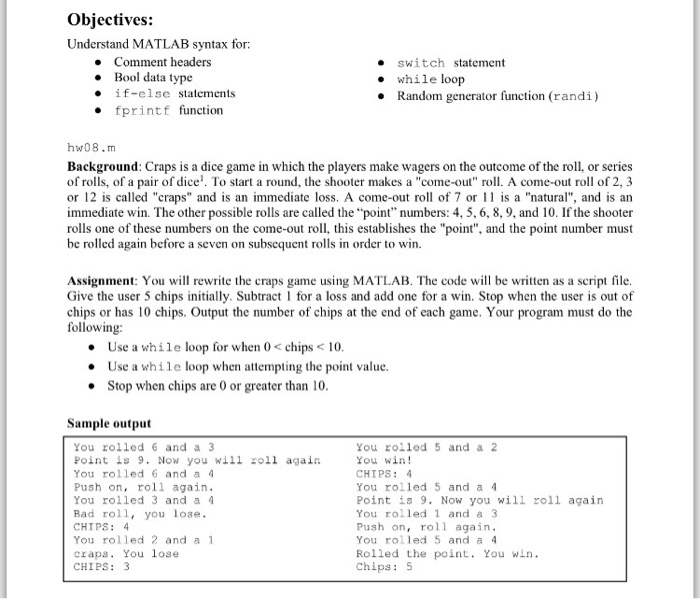
 Objectives: Understand MATLAB syntax for: Comment headers switch statement Bool data type while loop if-else statements Random generator function (randi) printf function hw08. Background Craps is a dice game in which the players make wagers on the outcome of the roll, or series of rolls, of a pair of dice'. To start a round, the shooter makes a "come-out" roll. A come-out roll of 2, 3 or 12 is called "craps" and is an immediate loss. A come-out roll of 7 or 11 is a "natural", and is an immediate win. The other possible rolls are called the "point" numbers: 4, 5, 6, 8, 9, and 10. If the shooter rolls one of these numbers on the come-out roll, this establishes the "point", and the point number must be rolled again before a seven on subsequent rolls in order to win. Assignment: You will rewrite the craps game using MATLAB. The code will be written as a script file. Give the user 5 chips initially. Subtract 1 for a loss and add one for a win. Stop when the user is out of chips or has 10 chips. Output the number of chips at the end of each game. Your program must do the following Use a while loop for when 0 chips 10. Use a while loop when attempting the point value Stop when chips are 0 or greater than 10. Sample output You rolled 6 and a 3 You rolled 5 and a 2 Point is 9. Now you will roll again You win! You rolled 6 and a 4 CHIPS Push on roll again. You rolled 5 and a 4 You rolled 3 and a 4 Point is 9. Now you will roll again Bad roll you lose You rolled 1 and a 3 Push on roll again. CHIPS 4 You rolled 2 and a 1 You rolled 5 and a 4 craps. You lose Rolled the point. You win. CHIPS 3 Chips 5
Step by Step Solution
There are 3 Steps involved in it

Get step-by-step solutions from verified subject matter experts
 Study Help