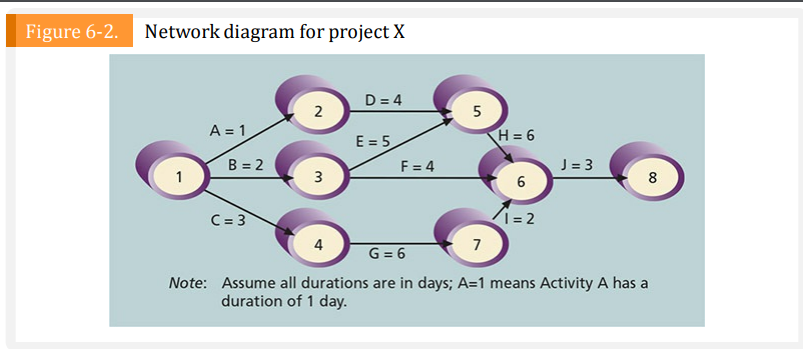
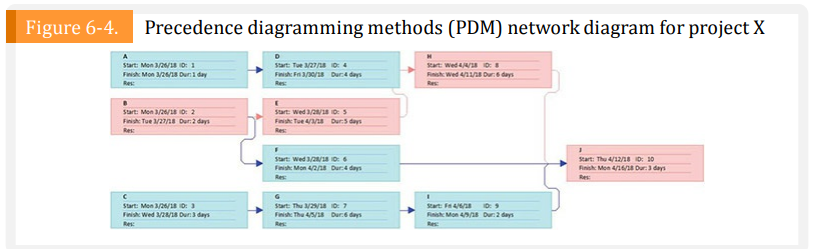
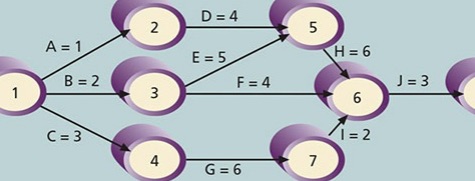
Question: Using Microsoft Project. using Figure 6-2. enter the activities, their durations (in days), and their relationship in project 2016. Use a project start date on

Using Microsoft Project. using Figure 6-2. enter the activities, their durations (in days), and their relationship in project 2016. Use a project start date on March 26, 2018 if you want the dates to match exactly. View the network diagram. Does it look like figure 6-4? Print the network diagram on one page. Return to the Gantt chart view. To re-create Table 6-1, right-click the select all button to the left of the task mode column heading and select schedule. Alternatively, you can click the View tab and click the tables button under the data group and then select Schedule. You may need to move the split bar to the right to reveal all the table columns. (see apendix A-Available on the Companion Website for this text-for detailed information on using project 2016) Write a few paragraphs explaining what the network diagram and schedule table show about project X's schedule.
Using Microsoft Project. using Figure 6-2. enterUsing Microsoft Project. using Figure 6-2. enterUsing Microsoft Project. using Figure 6-2. enterUsing Microsoft Project. using Figure 6-2. enter
D = 4 2 5 A = 1 E = 5 H = 6 B = 2 F = 4 J = 3 3 6 C=3 1 = 2 4 7 G = 6Figure 6-1. Project schedule management overview Project Schedule Management Overview 6.1 Plan Schedule Management 6.2 Define Activities 5.3 Sequence Activities .1 Inputs 1 Inputs 1 Inputs .1 Project charter .1 Project management plan .1 Project management plan 2 Project management plan 2 Enterprise environmental 2 Project documents 3 Enterprise environmental Lacion 3 Enterprise environmental factors 3 Organizational process factors 4 Organizational process " Organizational process 2 Tools & Technique 2 Took & Techniques .1 Expert judgment 2 Took & Techniques .1 Expert judgment 2 Decompoution 1 Precedence diagramming 2 Data analysis 3 Rolling wave planning method .3 Meetings A Meeting Dependency determination 3 Outputs 3 Output and integration .1 schedule management plan 1 Activity List 3 Leads and Lags 2 Activity Sunbath Project management 3 Milestone Int information potom .4 Change requests 3 Outputs 6.4 Estimate Activity 5 Project manager -1 Project schedule network Durations update diagrams 2 Project documents updates .1 Inputs .1 Project management plan 2 Project documents 6.5 Develop Schedule 3 Enterprise environmental 6.6 Control Schedule factors 4 Organizational process 1 Inputs .1 Project management plan .1 Inputs 2 Project documents 2 Took & Techniques 1 Project management plan 3 Agreements 1 Expert judgment 2 Project documents 4 Enterprise ervironmental 2 Analogous citimating 3 Work performance data .3 Parametric citimating factors 4 Organizational process 5 Organizational process .4 Three-point estimating 5 Bottom-up citimating 2 Tool & Techniques 6 Data analyst 2 Took & Techniques 1 Data analysis 7 Dechion making 1 Schedule network analyst 2 Critical path method # Meeting 2 Critical path method 3 Project management 3 Resource optimization 3 Output information palem 4 Data analysis 1 Duration estimates 4 Resource optimization 5 Leads and Lift .2 Banks of estimates 5 Leads and Lags .3 Project documents updates 6 Schedule compaction 6 Schedule compression 7 Project management information system 3 Outputs # Agile release planning i Work performance information 3 Output 2 Schedule forecast .1 Schedule burling 3 Change requests 2 Project schedule 4 Project management plan 3 Schedule dots updates 4 Project calendars $ Project documents updates 5 Change request 1 management plan updates .7 Project documents updates Source: PMBOK@ Guide - Sixth Edition. Project Management Institute, Inc. (2017). Copyright and all rights reserved Material from this publication has been reproduced with permission of PMI.Figure 6-2. Network diagram for project X D = 4 2 5 A = 1 E = 5 H = 6 B = 2 F = 4 J = 3 1 3 6 8 C=3 1 =2 G = 6 7 Note: Assume all durations are in days; A=1 means Activity A has a duration of 1 day.Figure 6-4. Precedence diagramming methods (PDM) network diagram for project X A Hart Men NOWLE 0: 1 Frick Mon WOWIS Daniday SurE: Mon WOWIE ID: 2 Finiche Tue 1/am/8 Duradan Heart: The 4/13/18 10: 10 C Sure: Men ModLE ID: 1

Step by Step Solution

There are 3 Steps involved in it

1 Expert Approved Answer
Step: 1 Unlock blur-text-image
Question Has Been Solved by an Expert!

Get step-by-step solutions from verified subject matter experts

Step: 2 Unlock
Step: 3 Unlock

Students Have Also Explored These Related General Management Questions!