







Question: Using MS Excel, Develop an accompanying Data Dictionary (You can use the DATA DICTIONARY TEMPLATE HOMEWORK 2 excel file attached to this homework assignment to
Using MS Excel, Develop an accompanying Data Dictionary (You can use the DATA DICTIONARY TEMPLATE HOMEWORK 2 excel file attached to this homework assignment to complete your data dictionary. Add new worksheets to the file in order to describe additional entities).
The Data dictionary should include the Data Name of each of your Data Objects (i.e. ENTITY and ATTRIBUTE ) as well as a comprehensive description of each of your Data Objects. The attributes MUST be arranged by the entity to which they belong.
Note: Data names refer to the names of entities, their attributes, and their relationships, which are the data objects. These names should be meaningful to the business interests and operations. In a sense, data names should be self-documenting, which means they should obviously capture the essence of the data object.
a) (10 points) For each entity:
State what the Entity is (i.e. provide a clear definition of the entity) and possibly why it is important (i.e. why you included it in the ERD)
Identify the entity type (whether it is a strong or weak entity)
Clearly indicate its identifier (key) attribute
b) (30 points) For each attribute:
State what the attribute is (i.e. provide a clear definition of the attribute) and possibly why it is important
Make it clear what is and is not included in the attributes value
Include aliases in documentation
State source of values
State whether attribute value can change once set
Specify required vs. optional State min and max number of occurrences allowed
| Entity Name | ||||||||
| Entity Type | ||||||||
| Entity Description | ||||||||
| Entity Identifier | ||||||||
| Attributes of the Entity | Name of Attribute | Definition of the Attribute (and why it is important) | Constraining Parameters (What is included and not included in attribute) | Alias (Other labels for atttribute) | Source of Values | Can Values change once set?(Y/N) | Is Attribute required? (Y/N) | Minimum & Maximum Occurences |
| 1 | ||||||||
| 2 | ||||||||
| 3 | ||||||||
| 4 | ||||||||
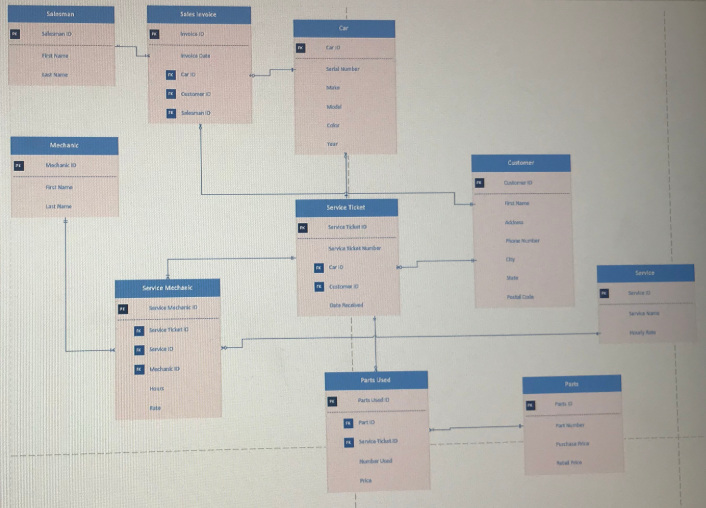
Sales levoke Mechasc Car 0 Service Mechaeic Sales levoke Mechasc Car 0 Service Mechaeic
Step by Step Solution
There are 3 Steps involved in it

Get step-by-step solutions from verified subject matter experts
 Study Help