







Question: using mulitsim with screen shots Let's allow for a more complex circuit without it getting cluttered. Construct a circuit as shown in Figure 3. Note
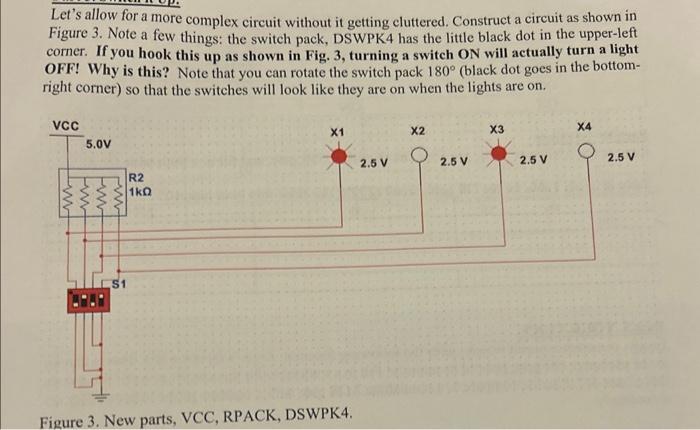
Let's allow for a more complex circuit without it getting cluttered. Construct a circuit as shown in Figure 3. Note a few things: the switch pack, DSWPK4 has the little black dot in the upper-left corner. If you hook this up as shown in Fig. 3, turning a switch ON will actually turn a light OFF! Why is this? Note that you can rotate the switch pack 180 (black dot goes in the bottomright corner) so that the switches will look like they are on when the lights are on. Figure 3. New parts, VCC, RPACK, USwrN4. Let's allow for a more complex circuit without it getting cluttered. Construct a circuit as shown in Figure 3. Note a few things: the switch pack, DSWPK4 has the little black dot in the upper-left corner. If you hook this up as shown in Fig. 3, turning a switch ON will actually turn a light OFF! Why is this? Note that you can rotate the switch pack 180 (black dot goes in the bottomright corner) so that the switches will look like they are on when the lights are on. Figure 3. New parts, VCC, RPACK, USwrN4
Step by Step Solution
There are 3 Steps involved in it

Get step-by-step solutions from verified subject matter experts
 Study Help