







Question: 1. Using MySQL Workbench, create a new database names Sales (ensure that the database does not already exist and remember to refresh your SCHEMA).
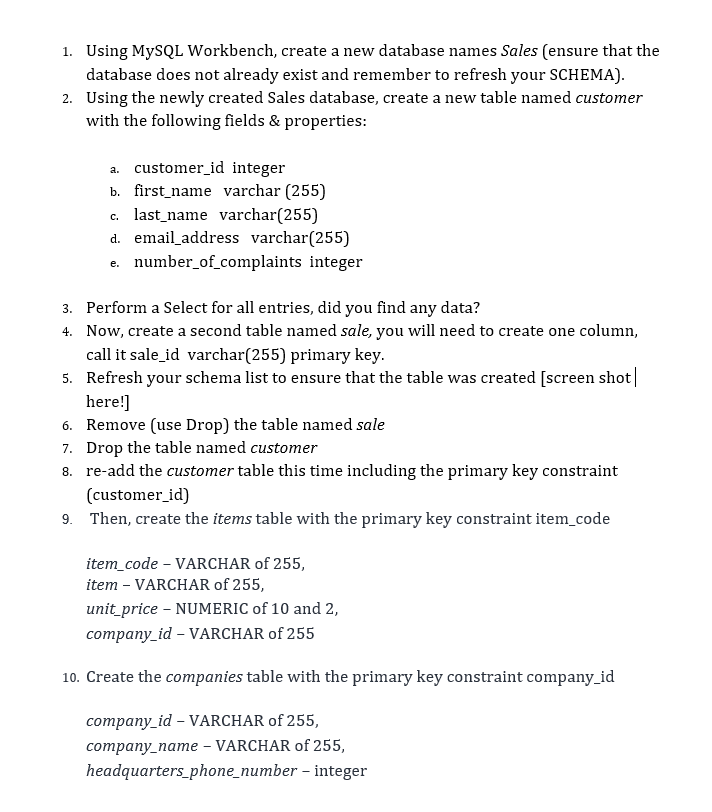
1. Using MySQL Workbench, create a new database names Sales (ensure that the database does not already exist and remember to refresh your SCHEMA). 2. Using the newly created Sales database, create a new table named customer with the following fields & properties: a. customer_id integer b. first name varchar (255) c. last_name varchar(255) d. email_address varchar(255) number_of_complaints integer e. 3. Perform a Select for all entries, did you find any data? 4. Now, create a second table named sale, you will need to create one column, call it sale_id varchar(255) primary key. 5. Refresh your schema list to ensure that the table was created [screen shot| here!] 6. Remove (use Drop) the table named sale 7. Drop the table named customer 8. re-add the customer table this time including the primary key constraint (customer_id) 9. Then, create the items table with the primary key constraint item_code item_code - VARCHAR of 255, item - VARCHAR of 255, unit_price-NUMERIC of 10 and 2, company_id - VARCHAR of 255 10. Create the companies table with the primary key constraint company_id company_id - VARCHAR of 255, company_name - VARCHAR of 255, headquarters_phone_number - integer
Step by Step Solution
3.48 Rating (151 Votes )
There are 3 Steps involved in it
Solution 1 To create a new database use the CREATE DATABASE statement CREATE DATABASE IF NOT EXISTS Sales To avoid an error in case you accidentally c... View full answer

Get step-by-step solutions from verified subject matter experts
 Study Help