







Question: Using NetBeans, Make a Java project named StudentList. Set the project location to your folder. Import Scanner, Map, and HashMap from the java.util package.
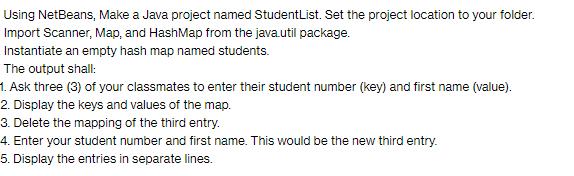
Using NetBeans, Make a Java project named StudentList. Set the project location to your folder. Import Scanner, Map, and HashMap from the java.util package. Instantiate an empty hash map named students. The output shall: 1. Ask three (3) of your classmates to enter their student number (key) and first name (value). 2. Display the keys and values of the map. 3. Delete the mapping of the third entry. 4. Enter your student number and first name. This would be the new third entry. 5. Display the entries in separate lines.
Step by Step Solution
There are 3 Steps involved in it
1 Expert Approved Answer
Step: 1 Unlock

Question Has Been Solved by an Expert!
Get step-by-step solutions from verified subject matter experts
Step: 2 Unlock
Step: 3 Unlock
 Study Help