







Question: Using OpenGL in C/C++ or Java, you have already created an interactive robot arm as shown. claw open / dose wrist rotation ebow angle angle
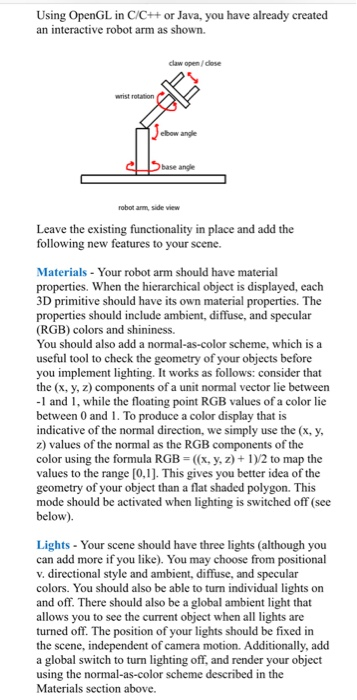
Using OpenGL in C/C++ or Java, you have already created an interactive robot arm as shown. claw open / dose wrist rotation ebow angle angle arm, side Leave the existing functionality in place and add the following new features to your scene. Materials Your robot arm should have material properties. When the hierarchical object is displayed, each 3D primitive should have its own material properties. The properties should include ambient, diffuse, and specular (RGB) colors and shininess. You should also add a normal-as-color scheme, which is a useful tool to check the geometry of your objects before you implement lighting. It works as follows: consider that the (x, y, z) components of a unit normal vector lie between -1 and 1, while the floating point RGB values of a color lie between 0 and 1. To produce a color display that is indicative of the normal direction, we simply use the (x, y z) values of the normal as the RGB components of the color using the formula RGB-(x, y, z+1)/2 to map the values to the range [0,1]. This gives you better idea of the geometry of your object than a flat shaded polygon. This mode should be activated when lighting is switched off (see below) Lights- Your scene should have three lights (although you can add more if you like). You may choose from positional v. directional style and ambient, diffuse, and specular colors. You should also be able to turn individual lights on and off. There should also be a global ambient light that allows you to see t turned off. The position of your lights should be fixed in the scene, independent of camera motion. Additionally, add a global switch to turn lighting off, and render your object using the normal-as-color scheme described in the Using OpenGL in C/C++ or Java, you have already created an interactive robot arm as shown. claw open / dose wrist rotation ebow angle angle arm, side Leave the existing functionality in place and add the following new features to your scene. Materials Your robot arm should have material properties. When the hierarchical object is displayed, each 3D primitive should have its own material properties. The properties should include ambient, diffuse, and specular (RGB) colors and shininess. You should also add a normal-as-color scheme, which is a useful tool to check the geometry of your objects before you implement lighting. It works as follows: consider that the (x, y, z) components of a unit normal vector lie between -1 and 1, while the floating point RGB values of a color lie between 0 and 1. To produce a color display that is indicative of the normal direction, we simply use the (x, y z) values of the normal as the RGB components of the color using the formula RGB-(x, y, z+1)/2 to map the values to the range [0,1]. This gives you better idea of the geometry of your object than a flat shaded polygon. This mode should be activated when lighting is switched off (see below) Lights- Your scene should have three lights (although you can add more if you like). You may choose from positional v. directional style and ambient, diffuse, and specular colors. You should also be able to turn individual lights on and off. There should also be a global ambient light that allows you to see t turned off. The position of your lights should be fixed in the scene, independent of camera motion. Additionally, add a global switch to turn lighting off, and render your object using the normal-as-color scheme described in the
Step by Step Solution
There are 3 Steps involved in it

Get step-by-step solutions from verified subject matter experts
 Study Help