







Question: Using Processing and Python code. For this Gestion you will need to start using your programe program that consists of a white ciclo on a
Using Processing and Python code.
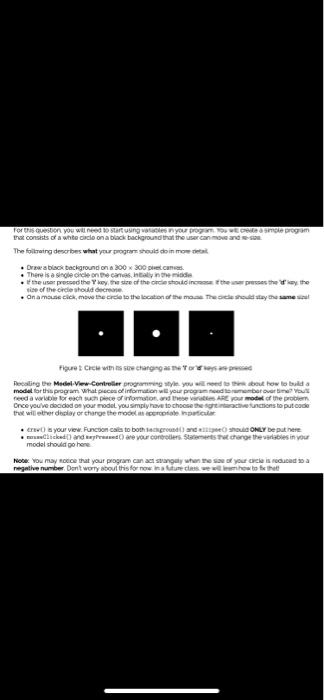
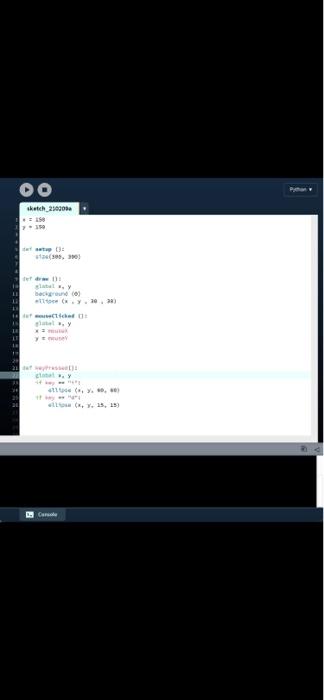
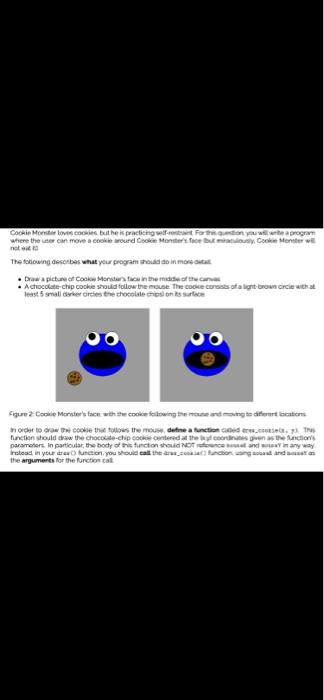
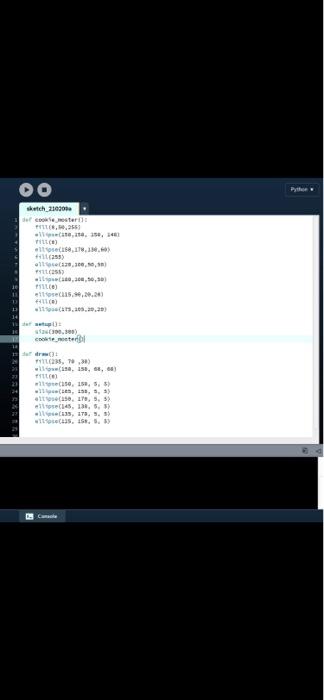
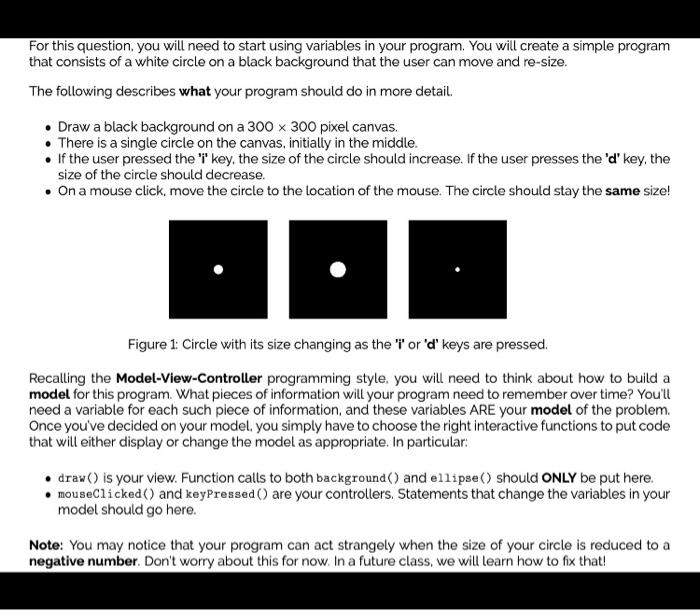
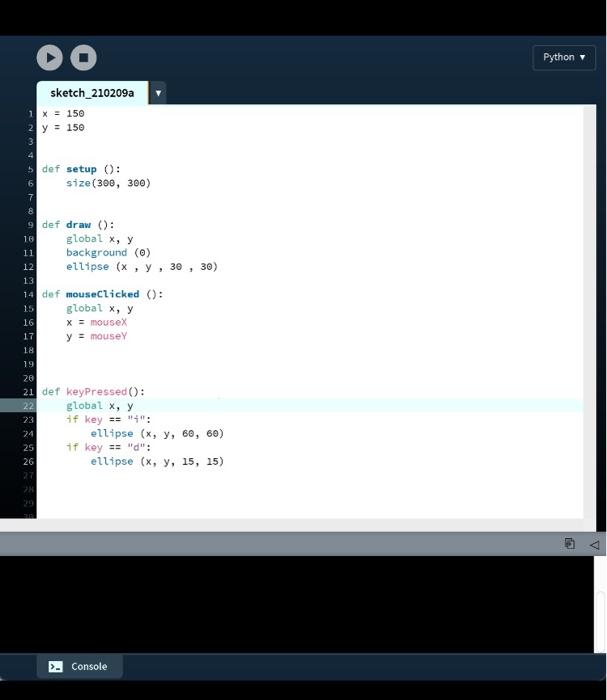
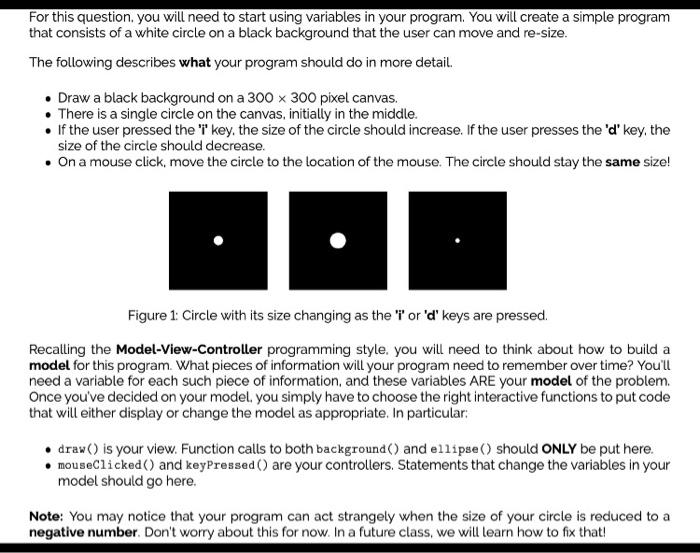
For this Gestion you will need to start using your programe program that consists of a white ciclo on a black background that the user can move and so The follarg decres what your page should do in mod Drabisctackground on 300 300 petans. There is a single cicle on the castly the middle the user pressed the hyre size of the artiestood in the press the the Ona mausteio, move the code to the location of the mose These so stay the same Figure Cicle with its changing as the Top Recalling the Midel-ViewController programu yeyou woed te bout how to build a model for the program what pieces of information will your programetrumber over time you! need a worech piece of Watoto wa ARE model of the pro Once you've decided on your model you simply have to choose the food ections to putcode the will the delay or change the most certo put erva your view. Fucson cats to both ground and should ONLY be put here wecked and are your controllers. She change the waisinvou model should go here Note: You may be that your program can atangay when your cicle is a regethe number Dont worry about this for more in the sketch 2008 150 w : (303, . back helt (... Do Game Cookie Monster lovescore buthe practicing elit Fortion you want a program where the user can move a cookies around Cookie Monsters for Busy Cookie Monster The following describes what your program modo in more . Draw a picture of Cooku Monsters from the made of the can Achocolate chip cookie should follow the mouse. The codice consists of light brown criwth test 5 small orker orcies the chocolate contrace Figure 2. Cookie Monster's face with the coolelowing the momente diferent cations order to draw the cookie testows the more detine auction code function should do the chocolate-chip collected at the coordinates gens the funcions parameters. In particular, the body of this function should NOT and in any way Instead in your area function, you should call the aw_faces and the arguments for the functional sketch_210201 de cookie poster ..253 1110, s. 34 15.11.11 441155) all 10,100, ( to 209.50.30 elfoseis.20.20 a) 00.300) cooter + 235,70 wils. 1, s. 68 50, 150, S. ) 1, 250, ,9) also. 19, 5, 5) (145. 128. 5. 5) 3, 73, S. For this question, you will need to start using variables in your program. You will create a simple program that consists of a white circle on a black background that the user can move and re-size. The following describes what your program should do in more detail. Draw a black background on a 300 x 300 pixel canvas. There is a single circle on the canvas, initially in the middle. If the user pressed the 'l' key, the size of the circle should increase. If the user presses the 'd' key, the size of the circle should decrease. On a mouse click, move the circle to the location of the mouse. The circle should stay the same size! Figure 1: Circle with its size changing as the 'i' or 'd' keys are pressed. Recalling the Model-View-Controller programming style, you will need to think about how to build a model for this program. What pieces of information will your program need to remember over time? You'll need a variable for each such piece of information, and these variables ARE your model of the problem. Once you've decided on your model , you simply have to choose the right interactive functions to put code that will either display or change the model as appropriate. In particular . draw() is your view. Function calls to both background() and ellipse() should ONLY be put here. mouseClicked() and keyPressed() are your controllers. Statements that change the variables in your model should go here. Note: You may notice that your program can act strangely when the size of your circle is reduced to a negative number. Don't worry about this for now. In a future class, we will learn how to fix that! DO Python sketch_210209a 1 x = 150 2 y = 150 6 30) 5 def setup(): size(300, 300) 7 8 9 def draw(): 18 global x, y 11 background (0) 12 ellipse (x, y, 30 13 14 def mouseClicked (): 15 global x, y 16 X = mousex 17 y = mouse 18 19 26 21 def keyPressed(): 22 global x, y 23 if key == "4": 24 ellipse (x, y, 60, 60) 25 if key == "d": 26 ellipse (x, y, 15, 15) Console For this question, you will need to start using variables in your program. You will create a simple program that consists of a white circle on a black background that the user can move and re-size. The following describes what your program should do in more detail. Draw a black background on a 300 x 300 pixel canvas. There is a single circle on the canvas, initially in the middle. If the user pressed the 'l' key, the size of the circle should increase. If the user presses the 'd' key, the size of the circle should decrease. On a mouse click, move the circle to the location of the mouse. The circle should stay the same size! Figure 1: Circle with its size changing as the 'i' or 'd' keys are pressed. Recalling the Model-View-Controller programming style, you will need to think about how to build a model for this program. What pieces of information will your program need to remember over time? You'll need a variable for each such piece of information, and these variables ARE your model of the problem. Once you've decided on your model , you simply have to choose the right interactive functions to put code that will either display or change the model as appropriate. In particular: draw() is your view. Function calls to both background() and ellipse() should ONLY be put here. . mouseClicked() and keyPressed() are your controllers. Statements that change the variables in your model should go here. Note: You may notice that your program can act strangely when the size of your circle is reduced to a negative number. Don't worry about this for now. In a future class, we will learn how to fix that! For this Gestion you will need to start using your programe program that consists of a white ciclo on a black background that the user can move and so The follarg decres what your page should do in mod Drabisctackground on 300 300 petans. There is a single cicle on the castly the middle the user pressed the hyre size of the artiestood in the press the the Ona mausteio, move the code to the location of the mose These so stay the same Figure Cicle with its changing as the Top Recalling the Midel-ViewController programu yeyou woed te bout how to build a model for the program what pieces of information will your programetrumber over time you! need a worech piece of Watoto wa ARE model of the pro Once you've decided on your model you simply have to choose the food ections to putcode the will the delay or change the most certo put erva your view. Fucson cats to both ground and should ONLY be put here wecked and are your controllers. She change the waisinvou model should go here Note: You may be that your program can atangay when your cicle is a regethe number Dont worry about this for more in the sketch 2008 150 w : (303, . back helt (... Do Game Cookie Monster lovescore buthe practicing elit Fortion you want a program where the user can move a cookies around Cookie Monsters for Busy Cookie Monster The following describes what your program modo in more . Draw a picture of Cooku Monsters from the made of the can Achocolate chip cookie should follow the mouse. The codice consists of light brown criwth test 5 small orker orcies the chocolate contrace Figure 2. Cookie Monster's face with the coolelowing the momente diferent cations order to draw the cookie testows the more detine auction code function should do the chocolate-chip collected at the coordinates gens the funcions parameters. In particular, the body of this function should NOT and in any way Instead in your area function, you should call the aw_faces and the arguments for the functional sketch_210201 de cookie poster ..253 1110, s. 34 15.11.11 441155) all 10,100, ( to 209.50.30 elfoseis.20.20 a) 00.300) cooter + 235,70 wils. 1, s. 68 50, 150, S. ) 1, 250, ,9) also. 19, 5, 5) (145. 128. 5. 5) 3, 73, S. For this question, you will need to start using variables in your program. You will create a simple program that consists of a white circle on a black background that the user can move and re-size. The following describes what your program should do in more detail. Draw a black background on a 300 x 300 pixel canvas. There is a single circle on the canvas, initially in the middle. If the user pressed the 'l' key, the size of the circle should increase. If the user presses the 'd' key, the size of the circle should decrease. On a mouse click, move the circle to the location of the mouse. The circle should stay the same size! Figure 1: Circle with its size changing as the 'i' or 'd' keys are pressed. Recalling the Model-View-Controller programming style, you will need to think about how to build a model for this program. What pieces of information will your program need to remember over time? You'll need a variable for each such piece of information, and these variables ARE your model of the problem. Once you've decided on your model , you simply have to choose the right interactive functions to put code that will either display or change the model as appropriate. In particular . draw() is your view. Function calls to both background() and ellipse() should ONLY be put here. mouseClicked() and keyPressed() are your controllers. Statements that change the variables in your model should go here. Note: You may notice that your program can act strangely when the size of your circle is reduced to a negative number. Don't worry about this for now. In a future class, we will learn how to fix that! DO Python sketch_210209a 1 x = 150 2 y = 150 6 30) 5 def setup(): size(300, 300) 7 8 9 def draw(): 18 global x, y 11 background (0) 12 ellipse (x, y, 30 13 14 def mouseClicked (): 15 global x, y 16 X = mousex 17 y = mouse 18 19 26 21 def keyPressed(): 22 global x, y 23 if key == "4": 24 ellipse (x, y, 60, 60) 25 if key == "d": 26 ellipse (x, y, 15, 15) Console For this question, you will need to start using variables in your program. You will create a simple program that consists of a white circle on a black background that the user can move and re-size. The following describes what your program should do in more detail. Draw a black background on a 300 x 300 pixel canvas. There is a single circle on the canvas, initially in the middle. If the user pressed the 'l' key, the size of the circle should increase. If the user presses the 'd' key, the size of the circle should decrease. On a mouse click, move the circle to the location of the mouse. The circle should stay the same size! Figure 1: Circle with its size changing as the 'i' or 'd' keys are pressed. Recalling the Model-View-Controller programming style, you will need to think about how to build a model for this program. What pieces of information will your program need to remember over time? You'll need a variable for each such piece of information, and these variables ARE your model of the problem. Once you've decided on your model , you simply have to choose the right interactive functions to put code that will either display or change the model as appropriate. In particular: draw() is your view. Function calls to both background() and ellipse() should ONLY be put here. . mouseClicked() and keyPressed() are your controllers. Statements that change the variables in your model should go here. Note: You may notice that your program can act strangely when the size of your circle is reduced to a negative number. Don't worry about this for now. In a future class, we will learn how to fix that
Step by Step Solution
There are 3 Steps involved in it

Get step-by-step solutions from verified subject matter experts
 Study Help