







Question: Using Processing and Python Code: For this question, you will write a program that allows the user to move and re-size a single circle. The
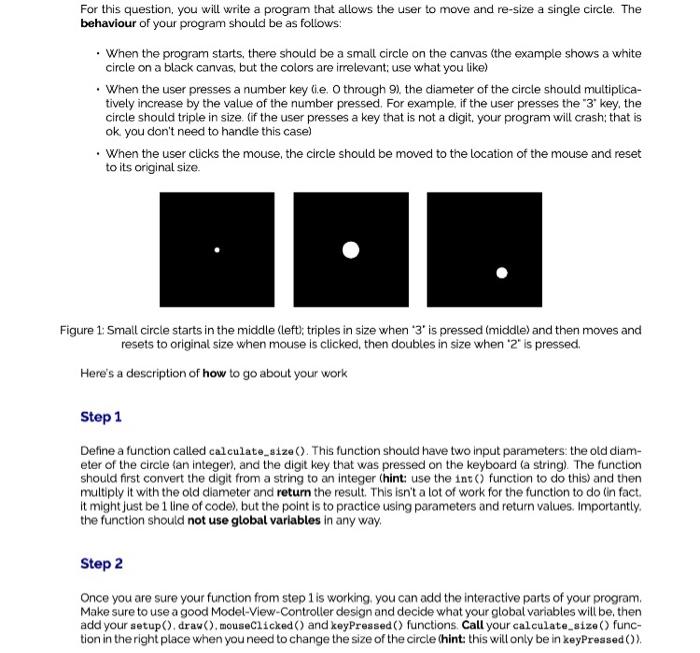
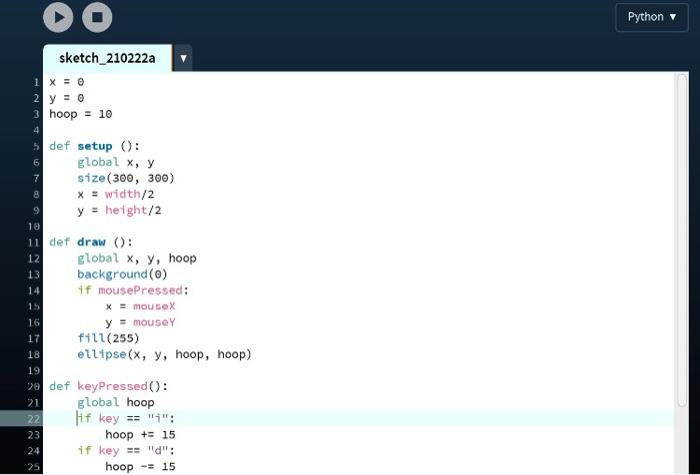
For this question, you will write a program that allows the user to move and re-size a single circle. The behaviour of your program should be as follows: When the program starts, there should be a small circle on the canvas (the example shows a white circle on a black canvas, but the colors are irrelevant use what you like) When the user presses a number key lie O through 9), the diameter of the circle should multiplica- tively increase by the value of the number pressed. For example, if the user presses the "3" key, the circle should triple in size. (if the user presses a key that is not a digit. your program will crash: that is ok you don't need to handle this case) . When the user clicks the mouse, the circle should be moved to the location of the mouse and reset to its original size Figure 1: Small circle starts in the middle (left); triples in size when *3' is pressed (middle) and then moves and resets to original size when mouse is clicked, then doubles in size when "2" is pressed Here's a description of how to go about your work Step 1 Define a function called calculate_size(): This function should have two input parameters: the old diam- eter of the circle an integer), and the digit key that was pressed on the keyboard (a string). The function should first convert the digit from a string to an integer Chint: use the int(function to do this) and then multiply it with the old diameter and return the result. This isn't a lot of work for the function to do in fact, It might just be 1 line of code), but the point is to practice using parameters and return values. Importantly, the function should not use global variables in any way. Step 2 Once you are sure your function from step 1 is working you can add the interactive parts of your program Make sure to use a good Model-View-Controller design and decide what your global variables will be then add your setup().draw() mouseClicked() and keyPressed() functions Call your calculate_size() func- tion in the right place when you need to change the size of the circle (hint this will only be in keyPressed()). DO Python sketch_210222a 1 x = 0 2 y = 0 3 hoop = 10 4 5 def setup(): 6 global x, y 7 size (300, 300) 8 x = width/2 9 y = height/2 10 11 def draw (): 12 global x, y, hoop 13 background() 14 if mousePressed: 15 x = mousex 16 y = mouse 17 fill(255) 18 ellipse(x, y, hoop, hoop) 19 e def keyPressed(): 21 global hoop 22 lif key == "4": 23 hoop += 15 24 if key == "d": 25 hoop -= 15
Step by Step Solution
There are 3 Steps involved in it

Get step-by-step solutions from verified subject matter experts
 Study Help