







Question: Using python 3 Create a simple python program that uses a socket to interact with a server. Note that your program MUST USE THE PYTHON
Using python 3
Create a simple python program that uses a socket to interact with a server. Note that your program MUST USE THE PYTHON SOCKET API. Yes, it is possible to do this in one line of code with Python Requests or some other library. But that wouldnt be any fun, would it?
Your program shall make a socket connection to the host: gaia.cs.umass.edu and send the GET request for the URI: /wireshark-labs/INTRO-wireshark-file1.html. To do this, you will send the following HTTP-compliant GET request to the server exactly as shown:
"GET /wireshark-labs/INTRO-wireshark-file1.html HTTP/1.1 Host:gaia.cs.umass.edu
Run your program and receive a response from the server. It should look like this:
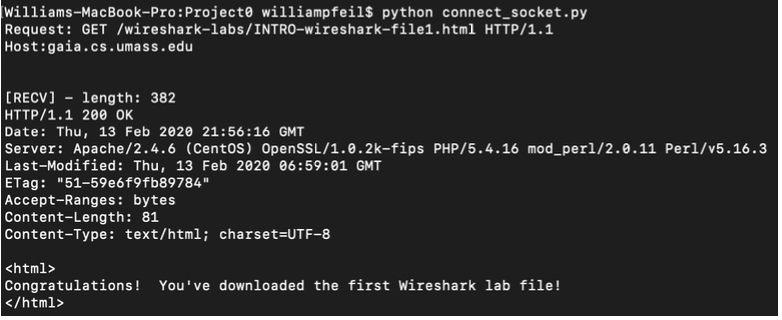
Williams-MacBook-Pro:Projecto williampfeil$ python connect_socket.py Request: GET /wireshark-labs/INTRO-wireshark-file1.html HTTP/1.1 Host:gaia.cs.umass.edu [RECV] - length: 382 HTTP/1.1 200 OK Date: Thu, 13 Feb 2020 21:56:16 GMT Server: Apache/2.4.6 (Centos) OpenSSL/1.0.2k-fips PHP/5.4.16 mod_perl/2.0.11 Perl/v5.16.3 Last-Modified: Thu, 13 Feb 2020 06:59:01 GMT ETag: "51-59e6f9fb89784" Accept-Ranges: bytes Content-Length: 81 Content-Type: text/html; charset=UTF-8 Congratulations! You've downloaded the first Wireshark lab file! Williams-MacBook-Pro:Projecto williampfeil$ python connect_socket.py Request: GET /wireshark-labs/INTRO-wireshark-file1.html HTTP/1.1 Host:gaia.cs.umass.edu [RECV] - length: 382 HTTP/1.1 200 OK Date: Thu, 13 Feb 2020 21:56:16 GMT Server: Apache/2.4.6 (Centos) OpenSSL/1.0.2k-fips PHP/5.4.16 mod_perl/2.0.11 Perl/v5.16.3 Last-Modified: Thu, 13 Feb 2020 06:59:01 GMT ETag: "51-59e6f9fb89784" Accept-Ranges: bytes Content-Length: 81 Content-Type: text/html; charset=UTF-8 Congratulations! You've downloaded the first Wireshark lab file!
Step by Step Solution
There are 3 Steps involved in it

Get step-by-step solutions from verified subject matter experts
 Study Help