







Question: Using python creating the following functions specifying all the instructions and the provided script: assume 2 directories exists called, fake_data_files_1 and fake_data_files_2 appropreatly wherein you
Using python creating the following functions specifying all the instructions and the provided script:
assume 2 directories exists called, fake_data_files_1 and fake_data_files_2 appropreatly wherein you will import you assigned files to depending on question.
1). Create a function called make_all_fake_data_files that creates a series of fake data files in
- the specified folder (target_folder parameter). Each fake data file should have a name like these:
- numbering starting at 1 (i.e., participant_1, participant_2, etc.)
"fakedata_participant_1.csv"
"fakedata_participant_2.csv"
"fakedata_participant_3.csv"
etc.
The content of each file must be created using the csv module! You cannot use the pandas module for this function.
- The header should be SID,TRIAL,STIMULUS,RT,CORRECT
each row of data should contain the following:
- SID: This is the same p-number used in the filename...it will be the same for each row of a datafile.
- TRIAL: Each file should have the specified rows of data and each row should
be numbered consecutively starting at 1 (i.e., 1, 2, 3..etc.)
- STIMULUS: This will be a randomly chosen title cased color from the set red, green, blue, and yellow.
- RT: This will be a randomly chosen integer between 350 and 850
- CORRECT: randomly choose either the word "yes" or "no".
There should be a 1/4 chance of this being the word "no", and a 3/4 chance of this being "yes".
The number of rows to generate is determined by the max_trials parameter.
If everything is ok, return the number of files you have created.
# NOTE: Implement these last! Focus on the primary goal of the function and add these checks at the end.
- If target_folder is not a valid directory (aka folder), return 0
- if either max_files or max_trials can't be successfully cast as integers, return 0
- if either max_files or max_trials are less than 1, return 0
E.g.:
result = make_fake_data_files_with_csv(target_folder=Path('fake_data_files'), max_files=4, max_trials=4)
fakedata_participant_1.csv might contain
SID,TRIAL,STIMULUS,RT,CORRECT
1,1,Green,665,no
1,2,Red,774,yes
1,3,Red,564,yes
1,4,Yellow,611,yes
fakedata_participant_2.csv might contain
SID,TRIAL,STIMULUS,RT,CORRECT
2,1,Blue,525,no
2,2,Yellow,512,no
2,3,Blue,542,yes
2,4,Blue,472,no
2).Create a function called make_fake_data_files_with_pandas() that creates the same result and is
identical to the previous function, with ONE exception:
- The content of each file must be created using the pandas module! You cannot use the csv module for this function.
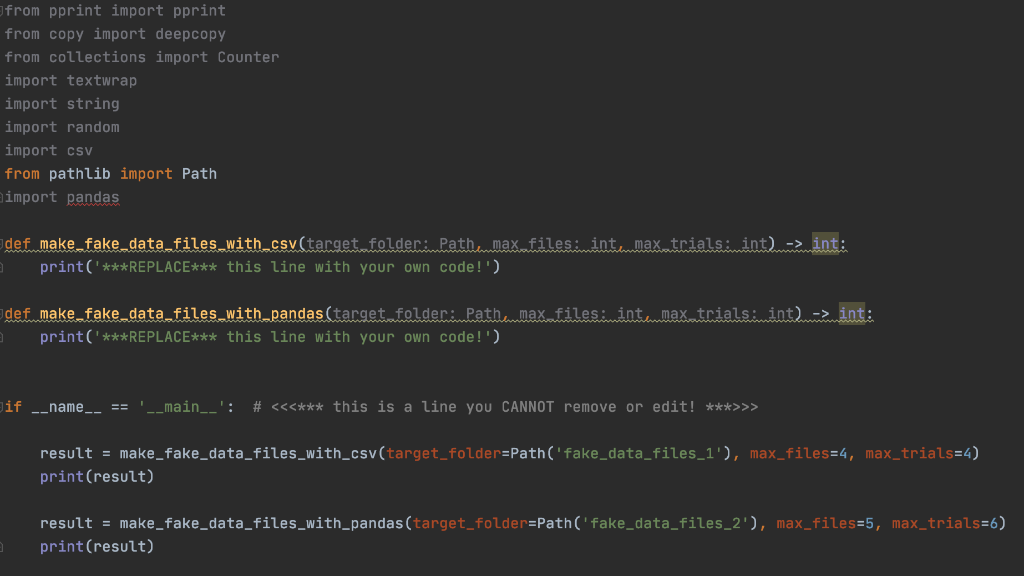
from pprint import pprint from copy import deepcopy from collections import Counter import textwrap import string import random import csv from pathlib import Path import pandas def make_fake_data_files_with_csv(target folder: Pathmax.files. int..max trials: int). -> int: print('***REPLACE*** this line with your own code!') def make_fake_data_files with pandas (target folder:Pathemax.files: intamax trialsimint. --> int: 1 print('***REPLACE*** this line with your own code!') Jif _name__ == '__main__': # >> result = make_fake_data_files_with_csv(target_folder=Path('fake_data_files_1'), max_files=4, max_trials=4) print(result) result = make_fake_data_files_with_pandas (target_folder=Path('fake_data_files_2'), max_files=5, max_trials=6) print(result) from pprint import pprint from copy import deepcopy from collections import Counter import textwrap import string import random import csv from pathlib import Path import pandas def make_fake_data_files_with_csv(target folder: Pathmax.files. int..max trials: int). -> int: print('***REPLACE*** this line with your own code!') def make_fake_data_files with pandas (target folder:Pathemax.files: intamax trialsimint. --> int: 1 print('***REPLACE*** this line with your own code!') Jif _name__ == '__main__': # >> result = make_fake_data_files_with_csv(target_folder=Path('fake_data_files_1'), max_files=4, max_trials=4) print(result) result = make_fake_data_files_with_pandas (target_folder=Path('fake_data_files_2'), max_files=5, max_trials=6) print(result)
Step by Step Solution
There are 3 Steps involved in it

Get step-by-step solutions from verified subject matter experts
 Study Help