







Question: Using Python What am I doing wrong? ___________________________________________________________________________________________________ This is what I'm supposed to do This is what I'm getting Problem 3: Processing File Input
Using Python
What am I doing wrong?
___________________________________________________________________________________________________
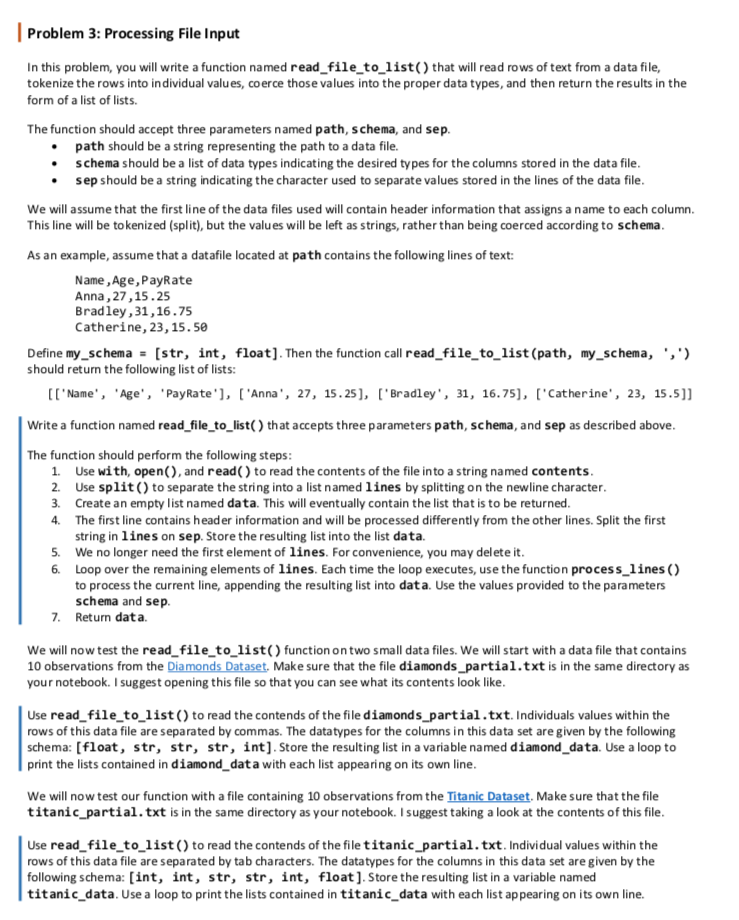
This is what I'm supposed to do
This is what I'm getting
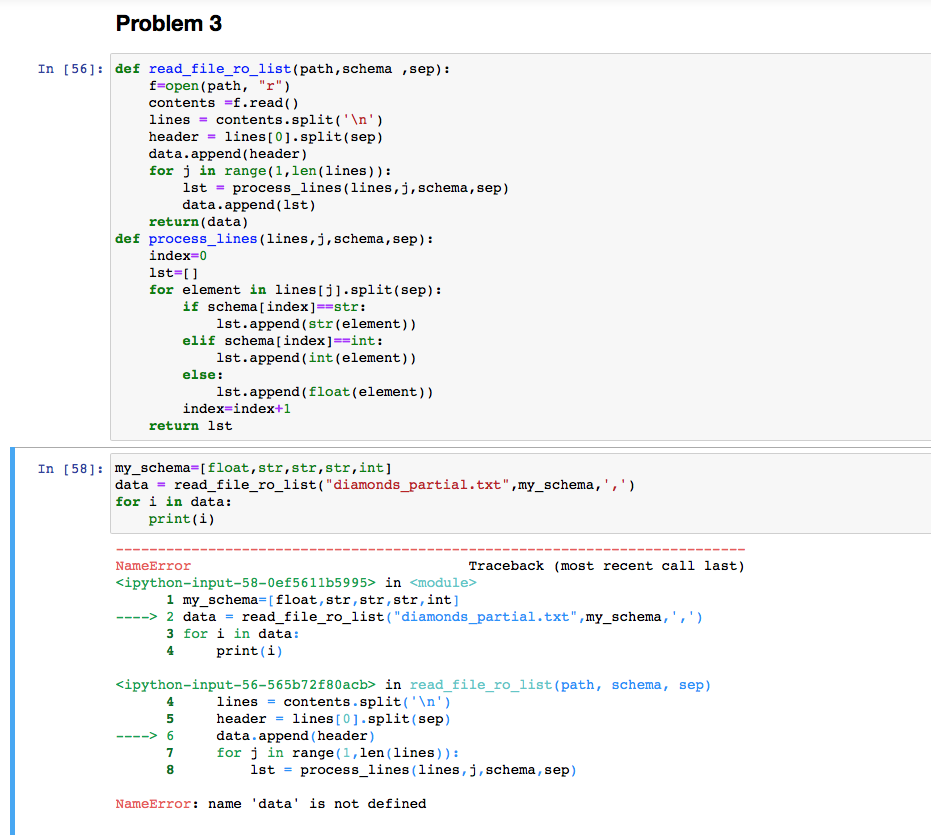
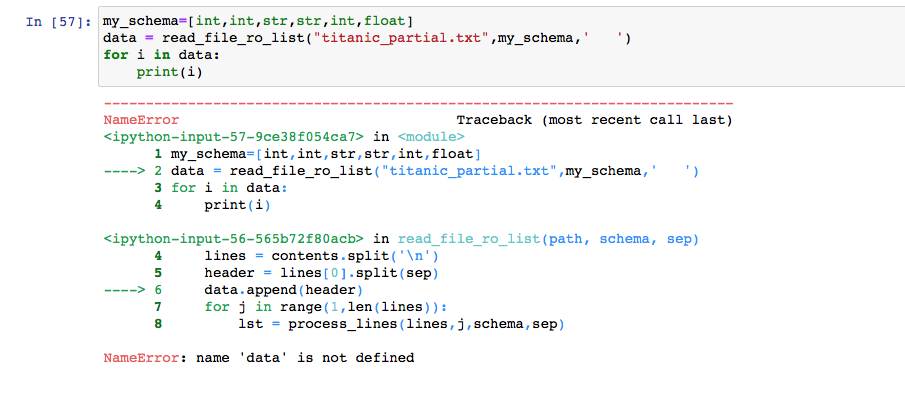
Problem 3: Processing File Input In this problem, you will write a function named read_file_to_list() that will read rows of text from a data file, tokenize the rows into individual values, coerce those values into the proper data types, and then return the results in the form of a list of lists. The function should accept three parameters named path, schema, and sep. path should be a string representing the path to a data file. schema should be a list of data types indicating the desired types for the columns stored in the data file. sep should be a string indicating the character used to separate values stored in the lines of the data file. We will assume that the first line of the data files used will contain header information that assigns a name to each column. This line will be tokenized (split), but the values will be left as strings, rather than being coerced according to schema. As an example, assume that a datafile located at path contains the following lines of text: Name, Age, PayRate Anna, 27,15.25 Bradley, 31,16.75 Catherine, 23, 15.50 Define my_schema = (str, int, float). Then the function call read_file_to_list(path, my_schema, ',') should return the following list of lists: [['Name', 'Age', 'Pay Rate'], ['Anna', 27, 15.25), ('Bradley', 31, 16.75], ['Catherine', 23, 15.5]] Write a function named read_file_to_list() that accepts three parameters path, schema, and sep as described above. The function should perform the following steps: 1. Use with, open(), and read() to read the contents of the file into a string named contents. 2. Use split() to separate the string into a list named lines by splitting on the newline character. 3. Create an empty list named data. This will eventually contain the list that is to be returned. 4. The first line contains header information and will be processed differently from the other lines. Split the first string in lines on sep. Store the resulting list into the list data. 5. We no longer need the first element of lines. For convenience, you may delete it. 6. Loop over the remaining elements of lines. Each time the loop executes, use the function process_lines() to process the current line, appending the resulting list into data. Use the values provided to the parameters schema and sep. 7. Return data We will now test the read_file_to_list() function on two small data files. We will start with a data file that contains 10 observations from the Diamonds Dataset. Make sure that the file diamonds_partial.txt is in the same directory as your notebook. I suggest opening this file so that you can see what its contents look like. Use read_file_to_list() to read the contends of the file diamonds_partial.txt. Individuals values within the rows of this data file are separated by commas. The datatypes for the columns in this data set are given by the following schema: [float, str, str, str, int]. Store the resulting list in a variable named diamond_data. Use a loop to print the lists contained in diamond_data with each list appearing on its own line. We will now test our function with a file containing 10 observations from the Titanic Dataset. Make sure that the file titanic_partial.txt is in the same directory as your notebook. I suggest taking a look at the contents of this file. Use read_file_to_list() to read the contends of the file titanic_partial.txt. Individual values within the rows of this data file are separated by tab characters. The datatypes for the columns in this data set are given by the following schema: [int, int, str, str, int, float]. Store the resulting list in a variable named titanic_data. Use a loop to print the lists contained in titanic_data with each list appearing on its own line. Problem 3 In [56]: def read_file_ro_list(path, schema , sep): f=open (path, "r") contents =f.read() lines = contents.split(' ') header lines[0].split(sep) data.append(header) for j in range(1, len(lines)): 1st = process_lines(lines, j, schema, sep) data.append(1st) return(data) def process_lines(lines, j, schema, sep): index=0 1st=1 for element in lines[j].split(sep): if schema[index]==str: 1st.append(str(element)) elif schema[index]=rint: 1st.append(int(element)) else: 1st.append(float(element)) index=index+1 return ist In [58]: my_schema=[float,str,str,str, int] data = read_file_ro_list("diamonds_partial.txt", my_schema,',') for i in data: print(i) NameError Traceback (most recent call last)
Step by Step Solution
There are 3 Steps involved in it

Get step-by-step solutions from verified subject matter experts
 Study Help