







Question: Using python , write a program that creates a list of customers and a list of sales associate with them. The program shall run until
Using python, write a program that creates a list of customers and a list of sales associate with them.
The program shall run until the user presses enter at the customer name input. Once completed, display the top customer.
For this program, use two separate lists to keep the name of the customer and the associated purchase amount.
Prompt to the user shall be
"What is the name of the customer?"
"What is the purchase amount (numbers only)?"
If the entry is not a number, then just ask again.
Important : If the customer already exits, then add the amount of new purchase to the prior total purchase amounts !!!
Sample output --> assuming Jim was the top customer spending 50 total is
"Jim spent 50"
For simplicity, have the purchase amounts be integer values only.
How do I change this code on the bottom so if the entry is not a number it asks again, if the customer already exists, then add the amount of new purchase to the prior total purchase amounts, and have it display the customer with the highest amount.
TEST WITH
Bob
5
Jeff
10
Bob
20
Output should be "Bob spent 25"
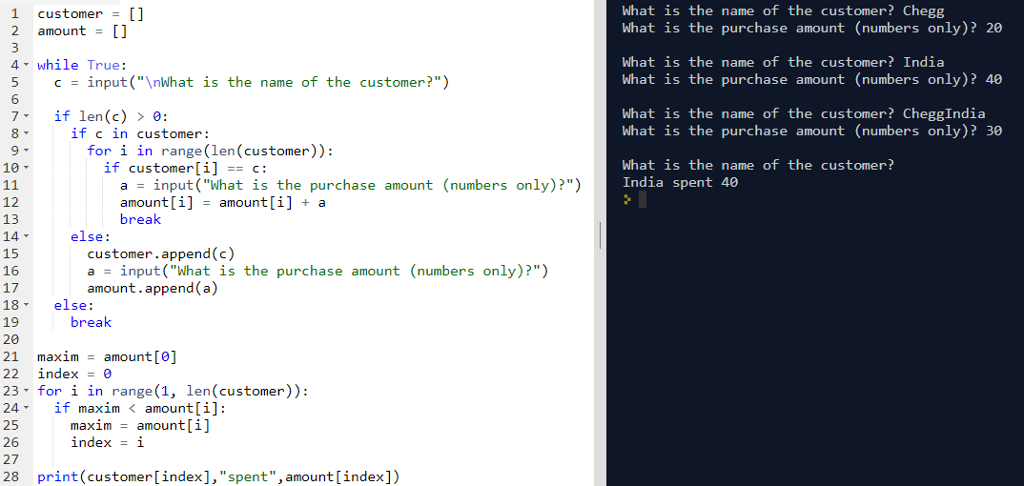
1 customer [l What is the name of the customer? Chegg What is the purchase amount (numbers only)? 20 2 amount 4 while True 6 What is the name of the customer?India What is the purchase amount (numbers only)? 40 5 c input(" What is the name of the customer?") What is the name of the customer? CheggIndia What is the purchase amount (numbers only)? 30 7 if len(c) > 0: 1T C in customer for i in range(len (customer)): What is the name of the customer? India spent 40 10 if customer[i]C 12 13 a input("What is the purchase amount (numbers only)?") amount[i] -amount[i] a break else: 15 16 17 18 else: 19 20 21 maximamount[] 22 index=0 23 - for i in range (1 len (customer) 24 if maxim
Step by Step Solution
There are 3 Steps involved in it

Get step-by-step solutions from verified subject matter experts
 Study Help