







Question: Using RSLogix, Enter the Ladder Logic: - An END rung automatically appears as the only rung in the LAD 2 ladder logic window. - Add
Using RSLogix,
Enter the Ladder Logic:
An END rung automatically appears as the only rung in the LAD ladder logic window.
Add a new rung by selecting the appropriate icon from the User instructions toolbar or by rightclicking on the END rung ID and selecting Insert Rung
Instructions XIC XIO, OTE, OTL, and OTU can be inserted within the rung by selecting the appropriate icon from the User or Bit instructions toolbar or by rightclicking on the rung and selecting Insert and choosing the instruction from the list.
The instruction address is entered by typing it in place of the question mark that appears on top of the instruction ie I: for terminal of the input module
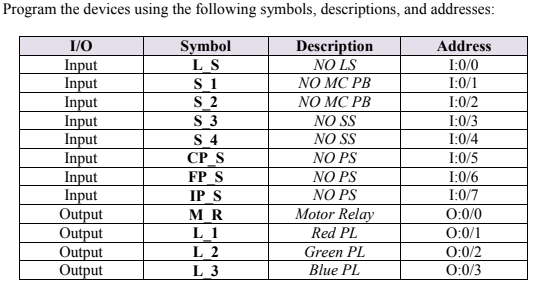
Enter a Description for the device the instruction is addressed to ie input devices: NO LS NO MC PB NO SS NO PS Output devices: Motor Relay, Red PL Green PL Blue PL
Enter a Symbol for the device the instruction is addressed to ie input devices: LS S S S S CPS FPS IPS Output devices: MR L L L
Using symbols will allow to refer to the device later by its symbol rather than by its address. In this lab you will be automating the operation of the conveyor system using timing instructions. The program is required to operate as follows:
The conveyor must run MR ON and remain running when pushbutton S is pressed and stop MR OFF and remain stopped when pushbutton S is pressed.
The conveyor must temporarily stop MR OFF when the limit switch LS is activated.
The green pilot light L is to flash ON and OFF in periods of
milliseconds when the proximity sensor CPS detects a part. The light is to remain flashing until the limit switch LS is activated or pushbutton S is pressed.
The blue pilot light L is to flash ON and OFF in periods of
milliseconds when the proximity sensor FPS detects a part. The light is to remain flashing until the limit switch LS is activated or pushbutton S is pressed.
When the proximity sensor IPS is activated, a second period must follow to ensure that the part clears the sensor followed by a temporary stop of the conveyor MR OFF for a period of seconds during which the red pilot light L is to be energized. Both the green and the blue pilot lights L and L must temporarily stop flashing during this second period. The process must resume automatically after the second period elapses.
Step by Step Solution
There are 3 Steps involved in it
1 Expert Approved Answer
Step: 1 Unlock

Question Has Been Solved by an Expert!
Get step-by-step solutions from verified subject matter experts
Step: 2 Unlock
Step: 3 Unlock
 Study Help