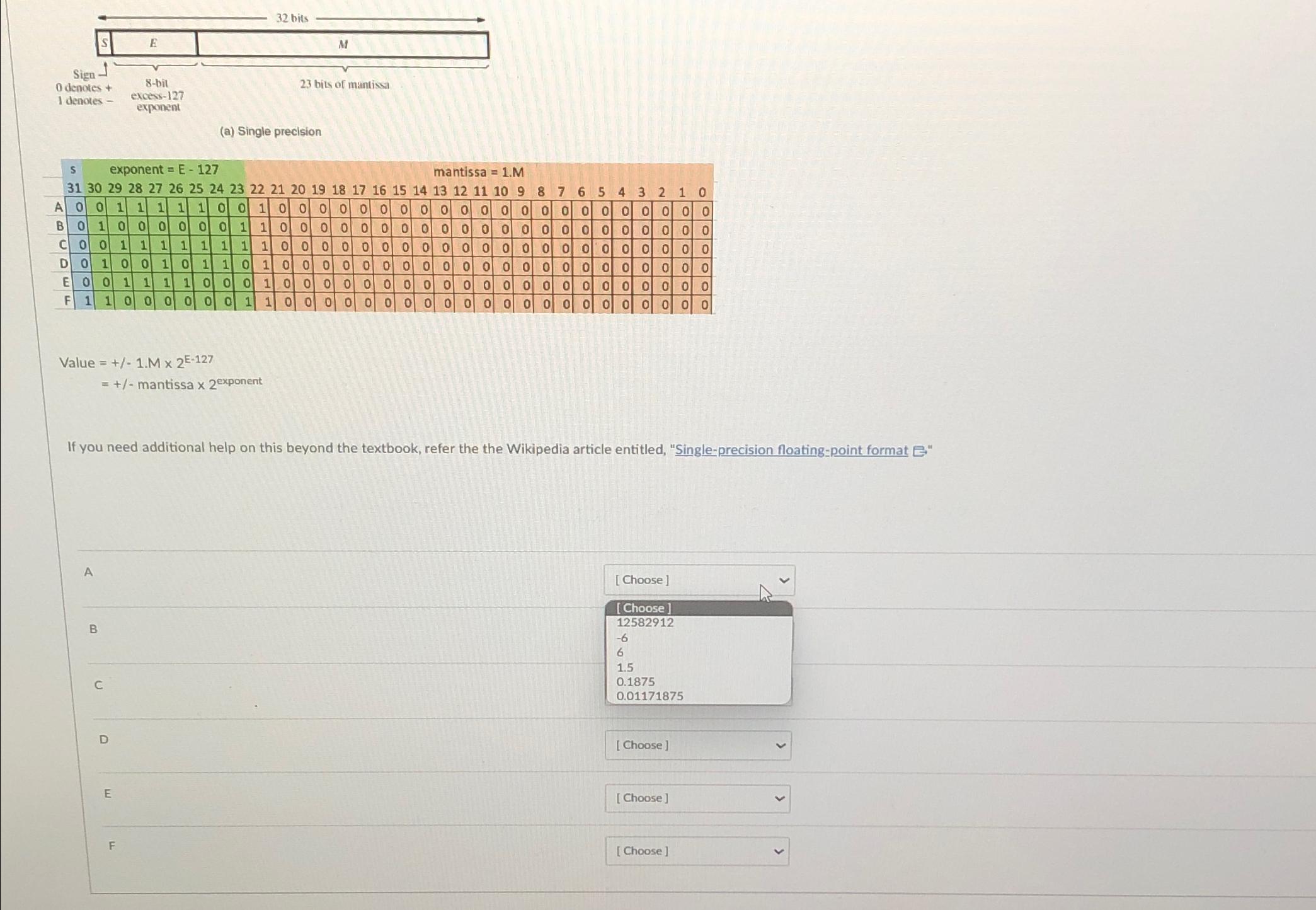
Question: Using Single - Precision Floating - Point Format, match the rows labeled A - F with their decimal value: table [ [ 0 denotes

Using Single-Precision Floating-Point Format, match the rows labeled A-F with their decimal value:
\table[[0 denotes +,8-bit],[1 denotes -,\table[[excess-127],[exponent]]]]
(a) Single precision
\table[[,s,,exp,pone,ent,=E,-12,,,,,,,,,,,,ma,is,ssa,=,,,,,,,,,,],[,31,30,29,28,27,26,25,24,23,22,21,20,19,18,17,16,15,14,13,12,11,10,9,8,7,6,5,4,3,2,1,0],[A,0,0,1,1,1,1,1,0,0,1,0,0,0,0,0,0,0,0,0,0,0,0,0,0,0,0,0,0,0,0,0,0],[B,0,1,0,0,0,0,0,0,1,1,0,0,0,0,0,0,0,0,0,0,0,0,0,0,0,0,0,0,0,0,0,0],[C,0,0,1,1,1,1,1,1,1,1,0,0,0,0,0,0,0,0,0,0,0,0,0,0,0,0,0,0,0,0,0,0],[D,0,1,0,0,1,0,1,1,0,1,0,0,0,0,0,0,0,0,0,0,0,0,0,0,0,0,0,0,0,0,0,0],[E,0,0,1,1,1,1,0,0,0,1,0,0,0,0,0,0,0,0,0,0,0,0,0,0,0,0,0,0,0,0,0,0],[F,1,1,0,0,0,0,0,0,1,1,0,0,0,0,0,0,,0,0,0,0,0,0,,0,0,0,0,0,0,0,]]
Value =+-1.M2E-127
=+- mantissa 2exponent
If you need additional help on this beyond the textbook, refer the the Wikipedia article entitled, "Singleprecision floating-point format G"
A
B
C
\table[[ Choose ]],[12582912],[-6],[6],[1.5],[0.1875],[0.01171875]]
D
E
F
\table[[s,,,,ne,,E,-12,,,,,,,,,,,,,5,sa,=1,,,,,,,,,,],[,,,,8,,26,,,23,22,,,19,18,17,16,,14,,12,,10,9,8,7,6,5,4,3,2,1,0],[A,0,0,1,1,1,1,1,0,0,1,0,0,0,0,0,0,0,0,0,0,0,0,0,0,0,0,0,0,0,0,0,0],[B,0,1,0,0,0,0,0,0,1,1,0,0,0,0,0,0,0,0,0,0,0,0,0,0,0,0,0,0,0,0,0,0],[C,0,0,1,1,1,1,1,1,1,1,0,0,0,0,0,0,0,0,0,0,0,0,0,0,0,0,0,0,0,0,0,0],[D,0,1,0,0,1,0,1,1,0,1,0,0,0,0,0,0,0,0,0,0,0,0,0,0,0,0,0,0,0,0,0,0],[E,0,0,1,1,1,1,0,0,0,1,0,0,0,0,0,0,0,0,0,0,0,0,0,0,0,0,,0,0,0,0,0],[F,1,1,,0,0,0,,0,1,1,0,0,0,0,0,0,0,0,0,0,0,0,0,0,0,0,0,0,0,0,0,0]]
Value =+-1.M2E-127
=+- mantissa 2exponent
If you need additional help on this beyond the textbook, refer the the Wikipedia article entitled, "Single-precision floating-point format e-
A
[Choose]
B
[Choose]
c
12582912
-6615
1.5
0.1875
D
E
F
 Using Single-Precision Floating-Point Format, match the rows labeled A-F with their

Step by Step Solution

There are 3 Steps involved in it

1 Expert Approved Answer
Step: 1 Unlock blur-text-image

Question Has Been Solved by an Expert!

Get step-by-step solutions from verified subject matter experts

Step: 2 Unlock
Step: 3 Unlock

Students Have Also Explored These Related Databases Questions!