







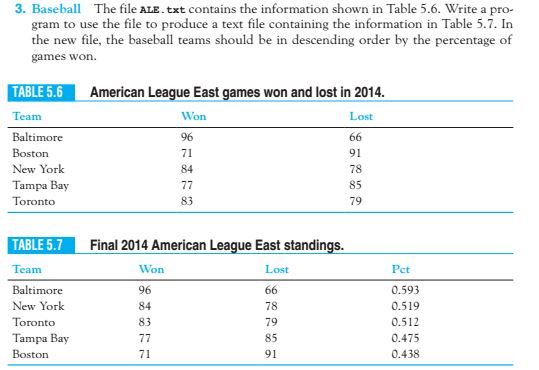
Question: Using the ALE.txt file, I'm trying to create a new output text file containing the information in descending order accordingly to the picture in Table
Using the ALE.txt file, I'm trying to create a new output text file containing the information in descending order accordingly to the picture in Table 5.7. But the output is blank on my part.
My code:
def main():
infile = open("ALE.txt", 'r')
scoreboard = [] # Keeps the tuples in an array
for line in infile:
# While storing the value, calculate win percentages
tok = line.rstrip(' ').split(',')
t = (tok[0], tok[1], tok[2], "{0:.3f}".format(float(tok[1])/(float(tok[1]) + float(tok[2]))))
scoreboard.append(t) # Adding to the list
# Sorting the tuples of the 3rd column in the table of the win percentage
scoreboard = sorted(scoreboard, key=lambda x: x[3], reverse=True)
# Open output file and writing to it
output = open('newALE.txt', 'w')
for tuple in array:
output.write(",".join(mytuple) + " ")
output.close()
main()
ALE.txt file data:
Baltimore,93,69
Boston,69,93
New York,95,67
Tampa Bay,90,72
Toronto,73,89
\f
Step by Step Solution
There are 3 Steps involved in it

Get step-by-step solutions from verified subject matter experts
 Study Help