







Question: Using the COBOL program shown above, analyze the program in detail. Consider the following items to discuss. Each division and what each part means and
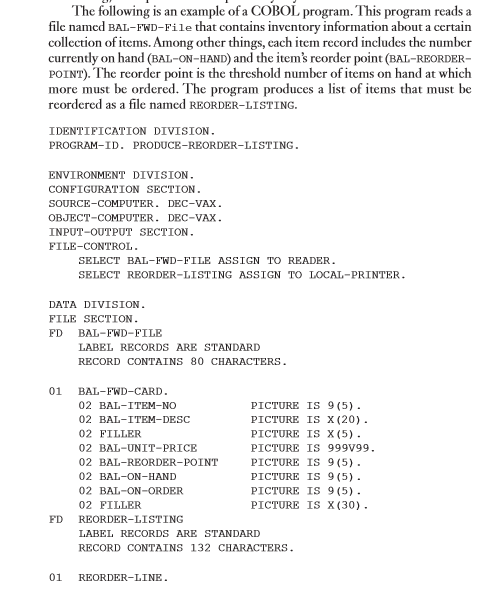
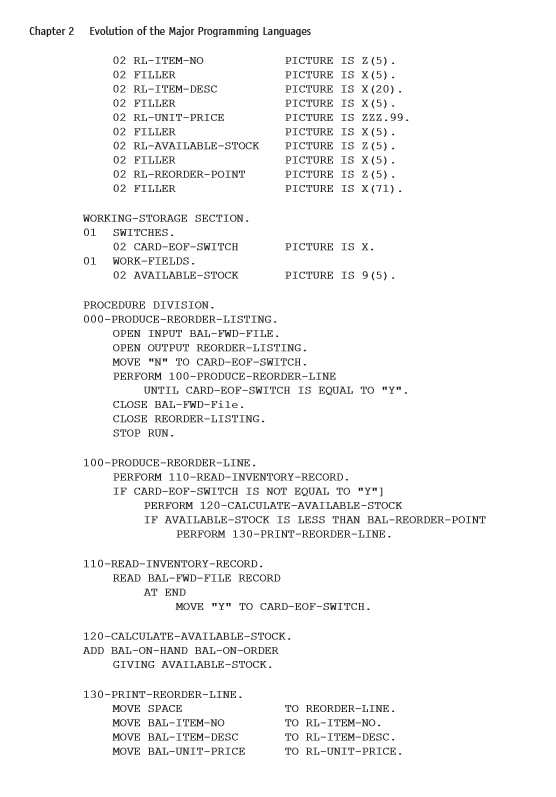
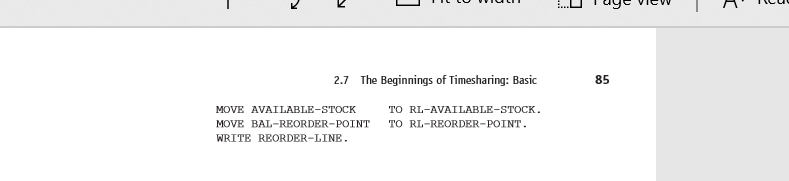
Using the COBOL program shown above, analyze the program in detail. Consider the following items to discuss.
Each division and what each part means and each line.
In the data division, define FD, each 01 part and break each item down and define each record part.
What is the working storage section used for?
In the procedure division, explain each procedure and what each statement is doing.
When does the program stop running?
The following is an example of a COBOL program. This program reads a file named BAL-FWD-File that contains inventory information about a certain collection of items. Among other things, each item record includes the number currently on hand (BAL-ON-HAND) and the item's reorder point (BAL-REORDER- POINT). The reorder point is the threshold number of items on hand at which more must be ordered. The program produces a list of items that must be reordered as a file named REORDER-LISTING. IDENTIFICATION DIVISION PROGRAM-ID. PRODUCE-REORDER-LISTING. ENVIRONMENT DIVISION. CONFIGURATION SECTION SOURCE-COMPUTER. DEC-VAX. OBJECT-COMPUTER. DEC-VAX. INPUT-OUTPUT SECTION FILE-CONTROL. SELECT BAL-FWD-FILE ASSIGN TO READER. SELECT REORDER-LISTING ASSIGN TO LOCAL-PRINTER. DATA DIVISION FILE SECTION. FD BAL-FWD-FILE LABEL RECORDS ARE STANDARD RECORD CONTAINS 80 CHARACTERS. BAL-FWD-CARD. 02 BAL-ITEM-NO PICTURE IS 9(5). 02 BAL-ITEM-DESC PICTURE IS X (20). 02 FILLER PICTURE IS X(5). 02 BAL-UNIT-PRICE PICTURE IS 999V99. 02 BAL-REORDER-POINT PICTURE IS 9 (5). 02 BAL-ON-HAND PICTURE IS 9(5). 02 BAL-ON-ORDER PICTURE IS 9(5). 02 PILLER PICTURE IS X(30). REORDER-LISTING LABEL RECORDS ARE STANDARD RECORD CONTAINS 132 CHARACTERS. FD 01 REORDER-LINE. Chapter 2 Evolution of the Major Programming Languages 02 RL-ITEM-NO 02 FILLER 02 RL-ITEM-DESC 02 FILLER 02 RL-UNIT-PRICE 02 FILLER 02 RL-AVAILABLE-STOCK 02 FILLER 02 RL-REORDER-POINT 02 FILLER PICTURE IS Z (5). PICTURE IS X(5). PICTURE IS X (20). PICTURE IS X (5). PICTURE IS Zzz.99. PICTURE IS X(5). PICTURE IS Z (5). PICTURE IS X(5). PICTURE IS 2 (5). PICTURE IS X (71). WORKING-STORAGE SECTION. 01 SWITCHES. 02 CARD-EOF-SWITCH 01 WORK-FIELDS. 02 AVAILABLE-STOCK PICTURE IS X. PICTURE IS 9(5). PROCEDURE DIVISION. 000-PRODUCE-REORDER-LISTING. OPEN INPUT BAL-FWD-FILE. OPEN OUTPUT REORDER-LISTING. MOVE "N" TO CARD-EOP-SWITCH. PERFORM 100-PRODUCE-REORDER-LINE UNTIL CARD-EOP-SWITCH IS EQUAL TO "Y". CLOSE BAL-FWD-File. CLOSE REORDER-LISTING. STOP RUN. 100-PRODUCE-REORDER-LINE. PERFORM 110-READ-INVENTORY-RECORD. IF CARD-EOF-SWITCH IS NOT EQUAL TO "Y"] PERFORM 120-CALCULATE-AVAILABLE-STOCK IF AVAILABLE-STOCK IS LESS THAN BAL-REORDER-POINT PERFORM 130-PRINT-REORDER-LINE. 110-READ-INVENTORY-RECORD. READ BAL-FWD-FILE RECORD AT END MOVE "Y" TO CARD-EOF-SWITCH. 120-CALCULATE-AVAILABLE-STOCK. ADD BAL-ON-HAND BAL-ON-ORDER GIVING AVAILABLE-STOCK. 130-PRINT-REORDER-LINE. MOVE SPACE MOVE BAL-ITEM-NO MOVE BAL-ITEM-DESC MOVE BAL-UNIT-PRICE TO REORDER-LINE. TO RL-ITEM-NO. TO RL-ITEM-DESC. TO RL-UNIT-PRICE. ...U Tuye View A' cu 2.7 The Beginnings of Timesharing: Basic MOVE AVAILABLE-STOCK TO RL-AVAILABLE-STOCK. MOVE BAL-REORDER-POINT TO RL-REORDER-POINT. WRITE REORDER-LINE
Step by Step Solution
There are 3 Steps involved in it

Get step-by-step solutions from verified subject matter experts
 Study Help