







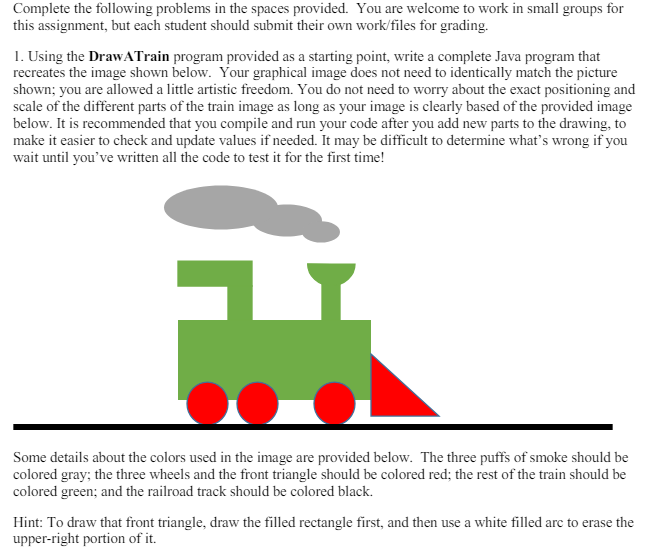
Question: using the code I provide and I need the answer excatly matches the picutre ( size doesn't matter ) . / / DrawATrain class /
using the code I provide and I need the answer excatly matches the picutresize doesn't matter DrawATrain class
for use with Homework
import java.awt.; Using AWT's Graphics and Color
import java.awt.event.; Using AWT event classes and listener interfaces
import javax.swing.; Using Swing's components and containers
Custom Drawing Code Template
A Swing application extends javax.swing.JFrame
public class DrawATrain extends JFrame
Define constants
public static final int CANVASWIDTH ;
public static final int CANVASHEIGHT ;
Declare an instance of the drawing canvas,
which is an inner class called DrawCanvas extending javax.swing.JPanel.
private DrawCanvas canvas;
Constructor to set up the GUI components and event handlers
public DrawATrain
canvas new DrawCanvas; Construct the drawing canvas
canvas.setPreferredSizenew DimensionCANVASWIDTH, CANVASHEIGHT;
Set the Drawing JPanel as the JFrame's contentpane
Container cp getContentPane;
cpaddcanvas;
or "setContentPanecanvas;
setDefaultCloseOperationEXITONCLOSE; Handle the CLOSE button
pack; Either pack the components; or setSize
setTitle; "super" JFrame sets the title
setVisibletrue; "super" JFrame show
Define inner class DrawCanvas, which is a JPanel used for custom drawing.
private class DrawCanvas extends JPanel
Override paintComponent to perform your own painting
@Override
public void paintComponentGraphics g
super.paintComponentg; paint parent's background
setBackgroundColorWHITE; set background color for this JPanel
Type your drawing code in here
Stop typing your drawing code in here
The entry main method
public static void mainString args
Run the GUI codes on the EventDispatching thread for thread safety
SwingUtilities.invokeLaternew Runnable
@Override
public void run
new DrawATrain; Let the constructor do the job
;
Step by Step Solution
There are 3 Steps involved in it
1 Expert Approved Answer
Step: 1 Unlock

Question Has Been Solved by an Expert!
Get step-by-step solutions from verified subject matter experts
Step: 2 Unlock
Step: 3 Unlock
 Study Help