







Question: Using the code snippets provided, design an interactive WebGL program to display Meshes as surfaces. I am very new to WebGL so I am really
Using the code snippets provided, design an interactive WebGL program to display Meshes as surfaces. I am very new to WebGL so I am really not sure how to actually use any of this, I did see this question asked elsewhere, but I could not figure out how to actually get the program to work or even display anything at all. I did attempt to ask my professor for help, twice even, and both times the only response I got was "There is quite a bit of information and code available via Google and YouTube".
In addition, as far as I am aware, the variables nRows, nColumns, and pointsArray are not defined anywhere in the entire textbook, nor does it mention defining them.
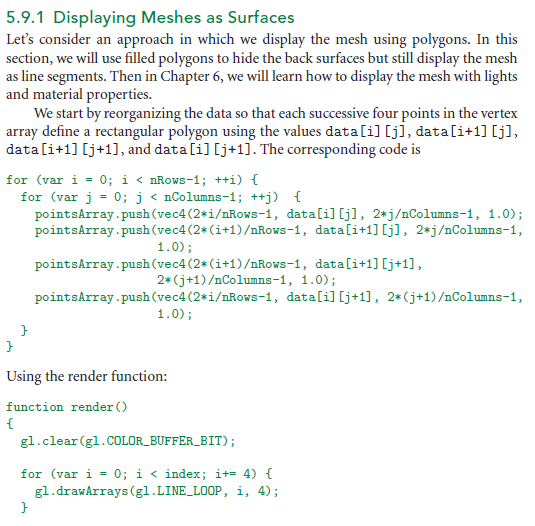
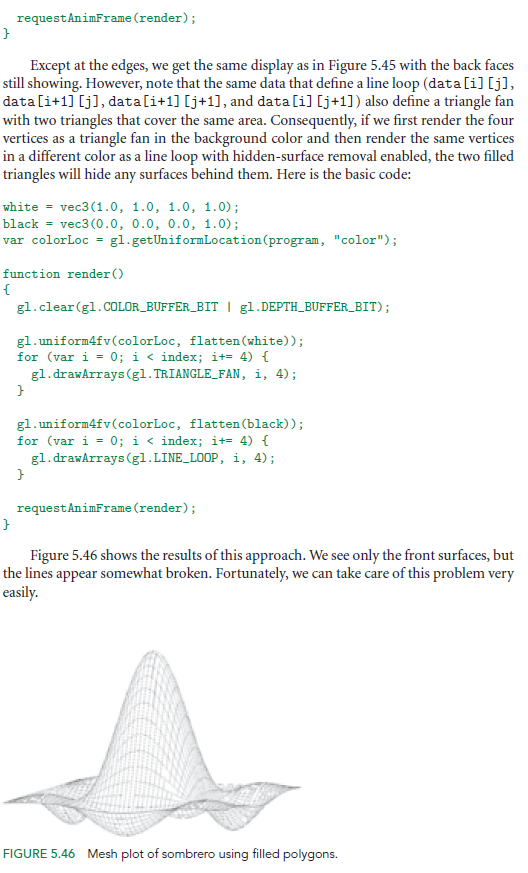
5.9.1 Displaying Meshes as Surfaces Let's consider an approach in which we display the mesh using polygons. In this section, we will use filled polygons to hide the back surfaces but still display the mesh as line segments. Then in Chapter 6, we will learn how to display the mesh with lights and material properties. We start by reorganizing the data so that each successive four points in the vertex array define a rectangular polygon using the values data[i][j], data[i+1] [j], data[i+1] [j+1], and data[i][j+1]. The corresponding code is for (var i = 0; i
Step by Step Solution
There are 3 Steps involved in it

Get step-by-step solutions from verified subject matter experts
 Study Help