







Question: Using the following database table description, create the following SQL queries WRITE THE FOLLOWING SQL QUERIES: Rater(UserlD, email, name, join-date, type, reputation,.) The join-date is
Using the following database table description, create the following SQL queries
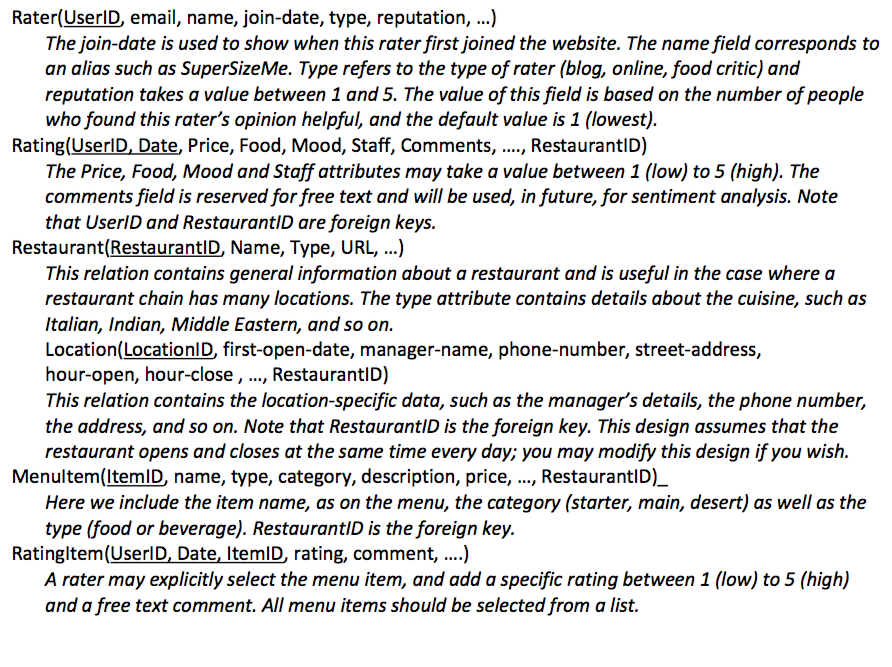
WRITE THE FOLLOWING SQL QUERIES:
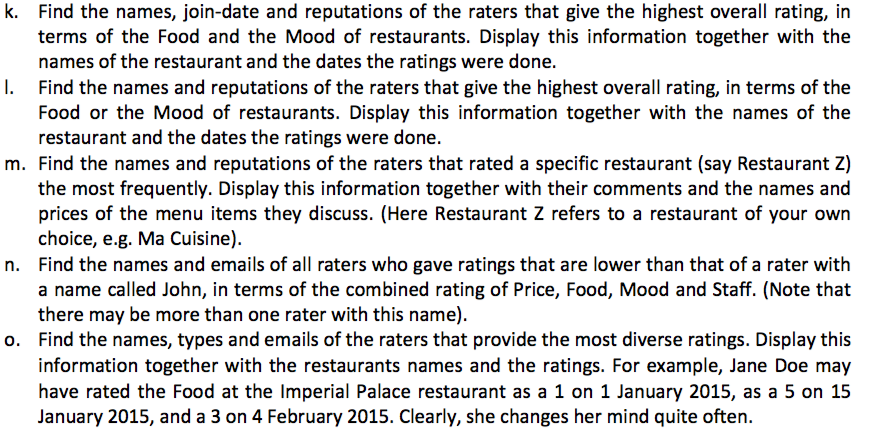
Rater(UserlD, email, name, join-date, type, reputation,.) The join-date is used to show when this rater first joined the website. The name field corresponds to an alias such as SuperSizeMe. Type refers to the type of rater (blog, online, food critic) and reputation takes a value between 1 and 5. The value of this field is based on the number of people who found this rater's opinion helpful, and the default value is 1 (lowest). Rating(UserlD Date, Price, Food, Mood, Staff, Comments, ..., RestaurantID) e Price, Food, Mood and Staff attributes may take a value between 1 (low) to 5 (high). comments field is reserved for free text and will be used, in future, for sentiment analysis. Note that UserlD and RestaurantID are foreign keys. Restaurant RestaurantID, Name, Type, URL, ...) This relation contains general information about a restaurant and is useful in the case where a restaurant chain has many locations. The type attribute contains details about the cuisine, such as Italian, Indian, Middle Eastern, and so on. Location(LocationlD, first-open-date, manager-name, phone-number, street-address, hour-open, hour-close , ..., RestaurantlD This relation contains the location-specific data, such as the manager's details, the phone number, the address, and so on. Note that RestaurantID is the foreign key. This design assumes that the restaurant opens and closes at the same time every day; you may modify this design if you wish. Menultem(ltemID, name, type, category, description, price, ..., RestaurantID)_ Here we include the item name, as on the menu, the category (starter, main, desert) as well as the type (food or beverage). RestaurantiD is the foreign key Ratingltem(UserlD, Date, ItemID, rating, comment, ....) A rater may explicitly select the menu item, and add a specific rating between 1 (low) to 5 (high) and a free text comment. All menu items should be selected from a list
Step by Step Solution
There are 3 Steps involved in it

Get step-by-step solutions from verified subject matter experts
 Study Help