







Question: Using the Microsoft Word software and the instructions below, prepare a 6-page horizontal paper prototype (Landspace A4 size), of a website of a university of
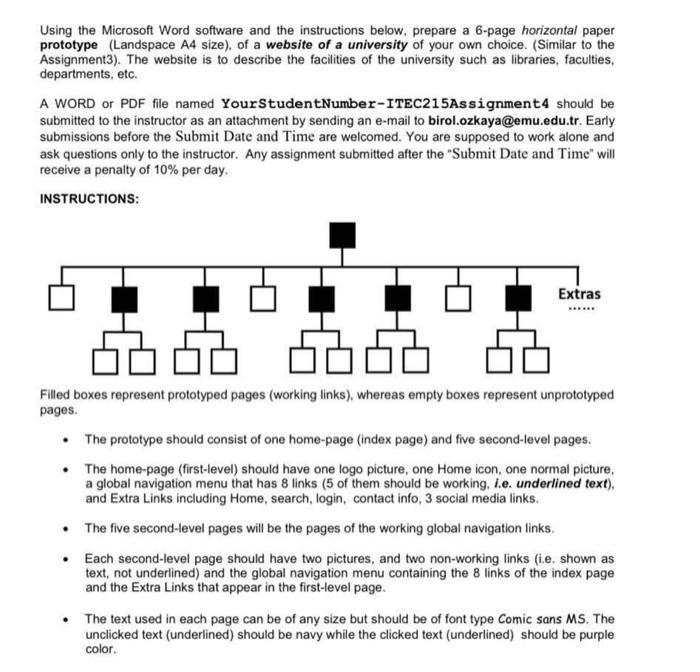
Using the Microsoft Word software and the instructions below, prepare a 6-page horizontal paper prototype (Landspace A4 size), of a website of a university of your own choice. (Similar to the Assignment3). The website is to describe the facilities of the university such as libraries, faculties, departments, etc. A WORD or PDF file named YourStudent Number-ITEC215Assignment4 should be submitted to the instructor as an attachment by sending an e-mail to birol.ozkaya@emu.edu.tr. Early submissions before the Submit Date and Time are welcomed. You are supposed to work alone and ask questions only to the instructor. Any assignment submitted after the "Submit Date and Time" will receive a penalty of 10% per day. INSTRUCTIONS: Extras - Filled boxes represent prototyped pages (working links), whereas empty boxes represent unprototyped pages. The prototype should consist of one home page (Index page) and five second-level pages. The home page (first-level) should have one logo picture, one Home icon, one normal picture, a global navigation menu that has 8 links (5 of them should be working, I.e. underlined text), and Extra Links including Home, search, login, contact info, 3 social media links. The five second-level pages will be the pages of the working global navigation links Each second-level page should have two pictures, and two non-working links (i.e. shown as text, not underlined) and the global navigation menu containing the 8 links of the index page and the Extra Links that appear in the first-level page. The text used in each page can be of any size but should be of font type Comic Sans MS. The unclicked text (underlined) should be navy while the clicked text (underlined) should be purple color
Step by Step Solution
There are 3 Steps involved in it

Get step-by-step solutions from verified subject matter experts
 Study Help