







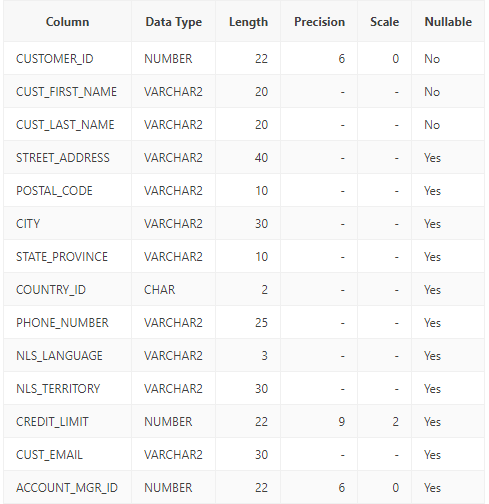
Question: Using the NVL() function Create a SQL query that shows the customer address1, customer address 2, customer city, customer state and customer postal code from
Using the NVL() function
Create a SQL query that shows the customer address1, customer address 2, customer city, customer state and customer postal code from the CUSTOMERS table. Use the NVL() function to turn all NULL values for customer street address 2 to say ?First Floor?.
Using the NVL2() function
Modify the previous SQL query and add the customer email address. Use the NVL2() to return the string ?on file? if someone has an email address already. If someone doesn?t have an email address use the same NVL2() function to return an email address in the format first name?.?last name?@email.com?. Use to concatenation operator ?||? to form the email address.
Using the NULLIF() function
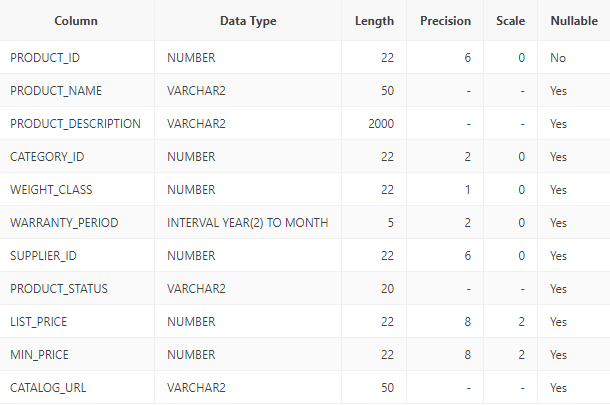
Create a SQL query that shows the product ID, product name and tags from the PRODUCTS_INFORMATION table. Use the NULLIF() function to turn the value returned to NULL if the tag ?Top seller? appears in the tags column.
Nesting NULL value functions
Modify the previous SQL query to nest the NULLIF() function inside of a regular NVL() function to show ?in stock? for the tags column if the value returned is NULL, which it should be since we used the NULLIF() function to turn all values for the column tags NULL.
Here are the two tables:
Customer Table
Product Table
Column CUSTOMER_ID CUST_FIRST_NAME CUST_LAST_NAME STREET_ADDRESS POSTAL CODE CITY STATE_PROVINCE COUNTRY_ID PHONE_NUMBER NLS_LANGUAGE NLS TERRITORY CREDIT_LIMIT CUST_EMAIL Data Type NUMBER VARCHAR2 VARCHAR2 VARCHAR2 VARCHAR2 VARCHAR2 VARCHAR2 CHAR VARCHAR2 VARCHAR2 VARCHAR2 NUMBER VARCHAR2 ACCOUNT_MGR_ID NUMBER Length Precision 22 20 20 40 10 30 10 2 25 3 30 22 30 22 6 9 6 Scale 0 2 0 Nullable No No No Yes Yes Yes Yes Yes Yes Yes Yes Yes Yes Yes
Step by Step Solution
3.61 Rating (158 Votes )
There are 3 Steps involved in it
1 SQL query using NVL function to replace NULL values in customer address 2 sql SELECT customeraddre... View full answer

Get step-by-step solutions from verified subject matter experts
 Study Help