







Question: USING THE PROGRAMMING LANGUAGE DART main.txt (the thing to manipulate) import 'package:flutter/material.dart'; void main() { runApp(const MyApp()); } class MyApp extends StatelessWidget { const MyApp({Key?
USING THE PROGRAMMING LANGUAGE "DART"
main.txt (the thing to manipulate)
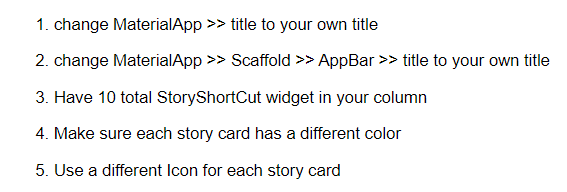
import 'package:flutter/material.dart'; void main() { runApp(const MyApp()); } class MyApp extends StatelessWidget { const MyApp({Key? key}) : super(key: key); @override Widget build(BuildContext context) { return MaterialApp( theme: ThemeData( brightness: Brightness.dark, ), title: 'Welcome to Flutter', home: Scaffold( appBar: AppBar( title: const Text('App Bar'), backgroundColor: Colors.red, centerTitle: true, ), body: Center( child: SingleChildScrollView( child: Column( mainAxisAlignment: MainAxisAlignment.spaceEvenly, children: const [ StoryShortCut( title: "title 1", topMargin: 30, backGroundColor: Colors.orange, icon: Icon(Icons.access_alarm), ), StoryShortCut( title: "title 2", topMargin: 30, backGroundColor: Colors.orange, icon: Icon(Icons.access_alarm), ), StoryShortCut( title: "title 3", topMargin: 30, backGroundColor: Colors.orange, icon: Icon(Icons.access_alarm), ) ], ), ), ), ), debugShowCheckedModeBanner: false, ); } } class StoryShortCut extends StatelessWidget { const StoryShortCut( { this.title = "", this.topMargin = 10.0, this.backGroundColor = Colors.orange, this.icon, Key? key } ) : super(key: key); final String title; final double topMargin; final Color backGroundColor; final Icon? icon; @override Widget build(BuildContext context) { return Container( margin: EdgeInsets.only(top: topMargin), // EdgeInsets.all(16.0), child: ClipRRect( borderRadius: BorderRadius.circular(25), child: Container( padding: const EdgeInsets.all(10.0), height: 300, width: 300, color: backGroundColor, child: Column( children: [ Container( child: Text(title), alignment: Alignment.topCenter, ), Container( child: icon, alignment: Alignment.center, ), ], ), ), ), ); } }1. change MaterialApp title to your own title 2. change MaterialApp Scaffold AppBar title to your own title 3. Have 10 total StoryShortCut widget in your column 4. Make sure each story card has a different color 5. Use a different Icon for each story card
Step by Step Solution
There are 3 Steps involved in it
1 Expert Approved Answer
Step: 1 Unlock

Question Has Been Solved by an Expert!
Get step-by-step solutions from verified subject matter experts
Step: 2 Unlock
Step: 3 Unlock
 Study Help