







Question: Using the stack diagram found in the above file, hand trace the code given in our Lab 4 ( main . c , main.s ,
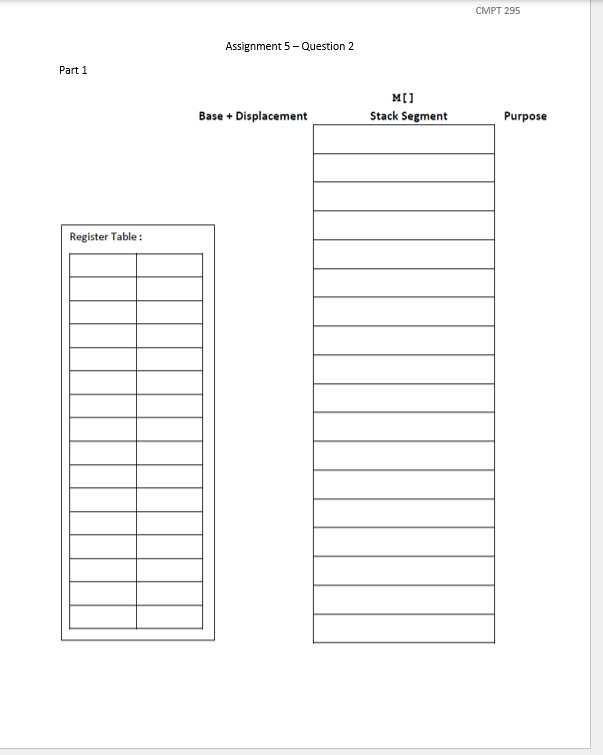
Using the stack diagram found in the above file, hand trace the code given in our Lab mainc main.s pc ps pc and ps using the test case, ie x y buf and reflect the result of your hand tracing on this stack diagram.
Note: Hand trace the entire program until you reach but have not yet executed the ret instruction of the main function.
The use of the Register Table is optional: use it only if you find it useful. You do not have to include it as part of your answer to this question.
As you are hand tracing and updating the stack diagram, make sure you attend to the following details:
Indicate the movement of rsp along the lefthand side of the stack diagram under the column named Base Displacement by crossing its old location and rewriting rsp to indicate its new location as we have done in our lectures and in Lab
Strikethrough the content of the stack that has been popped andor dealt with.
When updating the content of a stack location, strikethrough its old value and write the new value in the same stack location.
Include the content of buf ie the actual value stored in buf in your stack diagram. Do not simply write buf over this section of the stack as we did in Lab This will help you answering the question in Part Remember that each character is a byte.
Draw a line just below each stack frame to clearly indicate where each of them ends. Also, under the column named Purpose on the righthand side, label each stack frame using the name of its associated function.
When drawing your stack diagram, you do not have to show the effect on the stack of the five call instructions at Line Line Line and Line in main.s and at Line in ps These are calls to printf puts and sprintf In other words, you do not have to add the return addresses associated with these five calls onto the stack.
Part
In this second part, we shall investigate what happens to the canary value when we change the size of the array called buf
Modify the code in main.c by reducing the size of buf from down to as you did in Lab Compile and execute this modified program. What happens?
On the second page of the file you downloaded in Part the file containing the stack diagram answer the question: What happens to the canary value when you reduce the size of buf from down to and x y
To figure out what happens, you can hand trace the assembly code of this modified program creating a second drawing of the stack diagram. If you follow the instructions in Part and attend to details as you are drawing this second stack diagram, it should reveal what is happening to the canary value. Note that you do not have to include this second stack diagram to your answer for this question.
Filename: main.c
Description: Test driver for our Lab
Auhtor:
Modification date: Feb.
#include
void procchar int int ;
void main
char buf;
int x ;
int y ;
printfOriginal values are: xd yd
x y;
procbuf &x &y;
printfFinal values are: xd yd
x y;
putsbuf;
return;
Filename: pc
Description: pc for our Lab
Auhtor:
Modification date: Feb.
#include
int procint int;
void procchar s int a int b
int v;
int t;
t a;
v procab;
sprintfs "The result of procdd is dab v;
a b ;
b t;
return;
Filename: pc
Description: pc for our Lab
Auhtor:
Modification date: Feb.
int procint m int n
int res;
res mn ;
return res;
Step by Step Solution
There are 3 Steps involved in it
1 Expert Approved Answer
Step: 1 Unlock

Question Has Been Solved by an Expert!
Get step-by-step solutions from verified subject matter experts
Step: 2 Unlock
Step: 3 Unlock
 Study Help