







Question: Using the terminal apply the correct bash seript syntax/commands. 1. Display the Hello World message on the screen Use the read command to input a
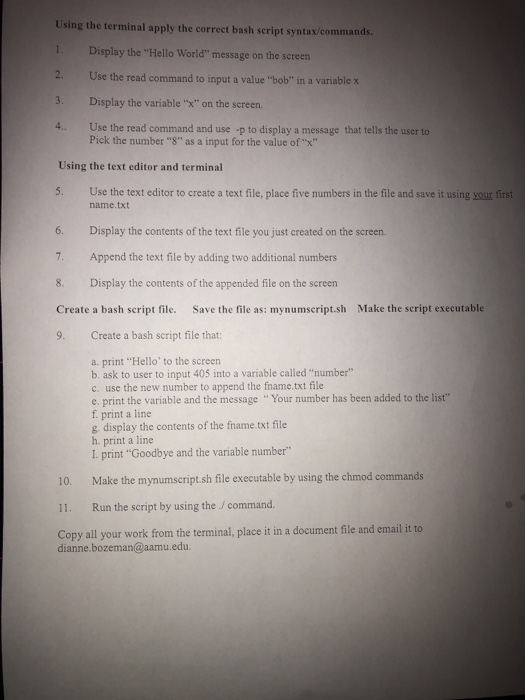
Using the terminal apply the correct bash seript syntax/commands. 1. Display the "Hello World" message on the screen Use the read command to input a value "bob" in a variable x 3. Display the variable "x" on the screen. 4. Use the read command and use -p to display a message that tells the user to Using the text editor and terminal 5. Use the text editor to create a text file, place five numbers in the file and save it using your first Pick the number "8" as a input for the value of "x" name.txt 6. Display the contents of the text file you just created on the screen. 7. Append the text file by adding two additional numbers 8. Display the contents of the appended file on the screern Create a bash script file. Save the file as: mynumscript.sh Make the script executable 9. Create a bash script file that a. print "Hello' to the screen b. ask to user to input 405 into a variable called "number" c. use the new number to append the fname.txt file e. print the variable and the message "Your number has been added to the list" f. print a line g. display the contents of the fname.txt file h. print a line I. print "Goodbye and the variable number 10. Make the mynumscript.sh file executable by using the chmod commands 11. Run the script by using the /command. Copy all your work from the terminal, place it in a document file and email it to dianne.bozeman@aamu.edu
Step by Step Solution
There are 3 Steps involved in it

Get step-by-step solutions from verified subject matter experts
 Study Help